
dpTreeSetIcons()
Sets any icons for a system, a datapoint type or a datapoint element in the datapoint tree view.
Synopsis
int dpTreeSetIcons(mapping icons);
Parameters
| Parameter | Meaning |
|---|---|
| icons |
Mapping of icons to be set. An individual icon can be set for:
|
Return Value
In the event of an error -1, otherwise 0
Errors
If an icon can not be found, the  is displayed instead of the actual icon.
If an empty mapping is passed, all settings will be deleted and the default icons are displayed.
Description
Sets any icons for a system, a datapoint type or a datapoint element in the data point tree view.
The icons must be located in the /pictures directory (first the /pictures project directory is browsed, then the /pictures installation directory).
The definition is global effective for the entire UI (i.e. all occurrences of the datapoint tree view).
The specification of the system is optional. Wildcards ("*", "?", etc.) are not supported.
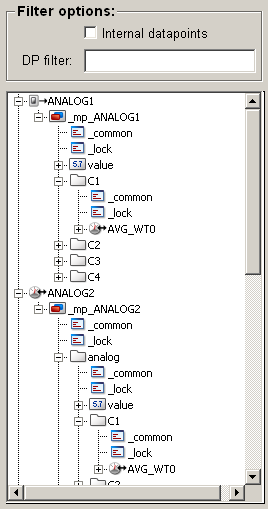
If an icon was set for a datapoint element and the corresponding datapoint type is embedded to another datapoint type, then the icon of the first datapoint type is not used automatically and needs to be specified explicitly (see example 2 below: ANALOG1 is embedded to ANALOG2 as .analog).
The icons are shown in their original size in the datapoint tree view.
 Example 1
It is assumed that the name of the local system is "dist_1" and the used icons are stored in the /pictures directory of the project.
Create the script icons.ctl with the following code:
main()
{
  mapping map;
  map["dist_1:"] = "dist_1.png";
  map["dist_1:[PUMP1]"] = "pump1.png";
  map["dist_1:[PUMP1].state.on"] = "on.png";
  map["dist_1:[PUMP1].state.on_2"] = "on_2.png";
  map["dist_1:[PUMP1].state.off"] = "off.png";
  map["dist_1:[PUMP1].state.mode.remote"] = "remote.png";
  map["dist_1:[PUMP1].state.mode.local"] = "local.png";
  map["dist_1:[PUMP1].state.mode.auto"] = "auto.png";
  map["dist_1:[PUMP1].state.mode.man"] = "man.png";
  map["dist_1:[PUMP1].state.mode.service"] = "service.png";
  dpTreeSetIcons(map);
}
Start the PARA and the script with the following command line options in the Console:
WCCOAui -m para -s icons.ctl
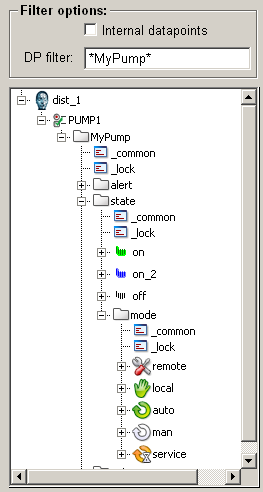
The following icons are displayed in the datapoint tree view at the datapoint type PUMP1:
Figure: DPT PUMP1 with individual icons
Example 2
It is assumed that the name of the local system is "System1" and the used icons are stored in the /pictures directory of the project.
Create the script icons.ctl with the following code:
main()
{
  mapping map;
  map["System1:[ANALOG1]"] = "analog1.png";
  map["System1:[ANALOG1].C1.AVG_WT0"] = "ava.png";
  map["[ANALOG2]"] = "analog2.png";
  map["[ANALOG2].analog.C1.AVG_WT0"] = "ava.png";
  dpTreeSetIcons(map);
}
Start the PARA and the script with the following command line options in the Console:
WCCOAui -m para -s icons.ctl
Figure: DPTs ANALOG1 and ANALOG2 with individual icons
Assignment
Graphics functions
Assignment
UI