
Server KPIs
The Server section of the System Dashboard provides all key operational and hardware information about the current server instance. This enables efficient monitoring, troubleshooting, and documentation.
Overview: Server Widget
The Server widget displays all fundamental metrics of the physical or virtual host running your WinCC OA project. All specifications are updated regularly, enabling a quick assessment of the system environment and the early detection of anomalies.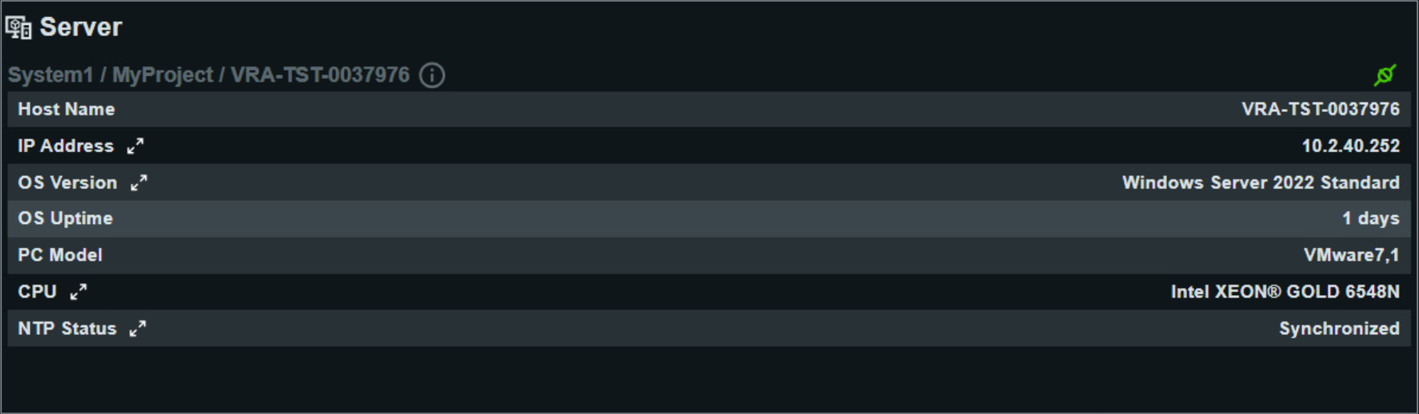
Detailed KPIs
- Host Name
- The Host Name identifies the server in the network, e.g., VRA-TST-0037976. Useful for identification, troubleshooting, and remote access.
- IP Address
- Shows the IP Address of the active network connection, e.g., 10.2.40.252.
- OS Version
- Displays the operating system of the server, e.g., Windows Server 2022 Standard.
- OS Uptime
- Shows how long the operating system has been running since the last restart, for example 1 day. Short uptime can indicate reboots or maintenance activity.
- PC Model
- Hardware model of the server, such as VMware7,1 for a virtual machine or a workstation name for physical hardware.
- CPU
- Type of CPU in use, for example Intel XEON® GOLD 6548N. Relevant for performance and compatibility assessment.
- NTP Status
- Displays the network time synchronization status:
- NTP Server: Used time server, e.g., atenteisetmdc03.etm-ag.com
- Enabled: Whether time sync is activated (Yes)
- Synchronized: Current sync status (Yes)
- NTP State: State description, e.g., synchronized
- Last Sync Time: Last successful synchronization, e.g., 22.10.2025 12:49
- Server Time: Actual local server time, e.g., 22.10.2025 13:04
Note:Viewing or updating NTP KPI information may require administrative rights. In some cases, a manual trigger of the windows time service usingnet start W32Timemight be necessary.