
Security KPIs
The Security section in the System Dashboard offers a central overview of all relevant aspects regarding user access, authentication, certificates, events, and vulnerability management within WinCC OA projects.
Overview: Security Widget
The Security widget provides at-a-glance insight into the project’s active users, security features, certificate health, recent security events, and exposure to known vulnerabilities. Indicators and counters make detection of risks, compliance gaps, or irregularities fast and reliable.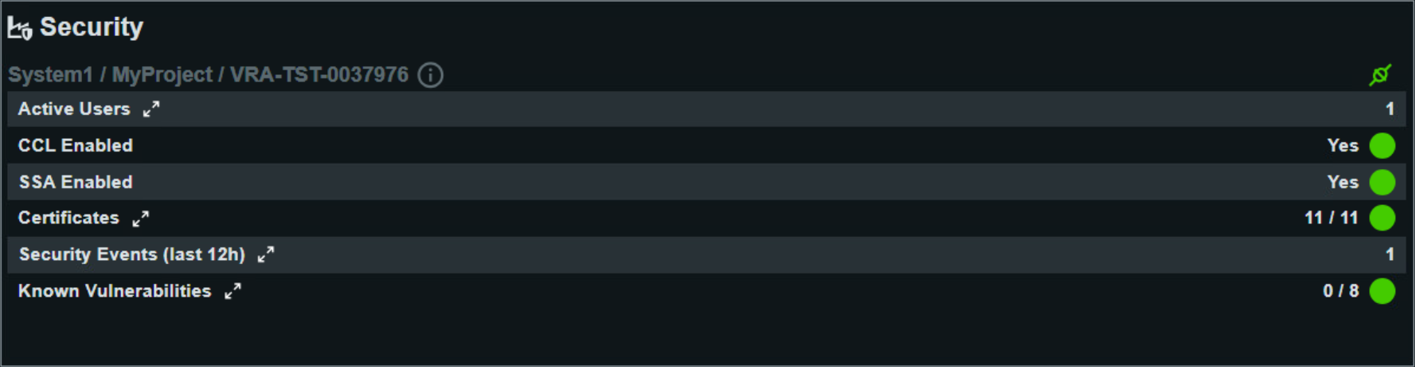
Detailed Security KPIs
- Active Users
- Lists all currently logged-in users. For each user, the dashboard shows the username, connected UI(s), and whether the user holds administrator privileges. This is important for access control monitoring and troubleshooting session issues.
- CCL Enabled
- Indicates whether the CCL is active. A value of “Yes” means enhanced, role-based access control and configuration is enforced.
- SSA Enabled
- Displays whether the SSA is enabled; “Yes” ensures that advanced security monitoring and recommendations are active for the project.
- Path Traversal Restricted
- Shows the current state of the pathTraversalRestricted config entry. The config is deactivated by default, which means that no path restriction is enforced and panels and scripts may be loaded from any path accessible to the operating system.
- Certificates
- Shows the total number of deployed certificates and how many are currently valid. You can drill down to view the list of certificates with details such as identifier, location, status, issuer, validity period, self-signature, and type. Invalid or soon-to-expire certificates are critical for maintaining secure communication.
- Security Events (last 12h)
- Summarizes all security-relevant log entries from the past 12 hours; for example, port openings, authentication events, or changes in security configuration. Each entry includes manager name/number, timestamp, type, priority and descriptive text. This supports incident detection and traceability.
- Known Vulnerabilities
- Lists known vulnerabilities relevant to the environment and their current status.