
Project KPIs
The Project section in the System Dashboard gives a comprehensive overview of all central project properties—including type, version, error state, managers, event information, and the underlying data model structure—allowing efficient system assessment and troubleshooting.
Overview: Project Widget
The Project widget summarizes all essential technical and organizational attributes of the current WinCC OA project. This includes the active project type, version information, overall error state, event start timestamp, emergency mode status, the number and status of project managers, and a link to the detailed data model.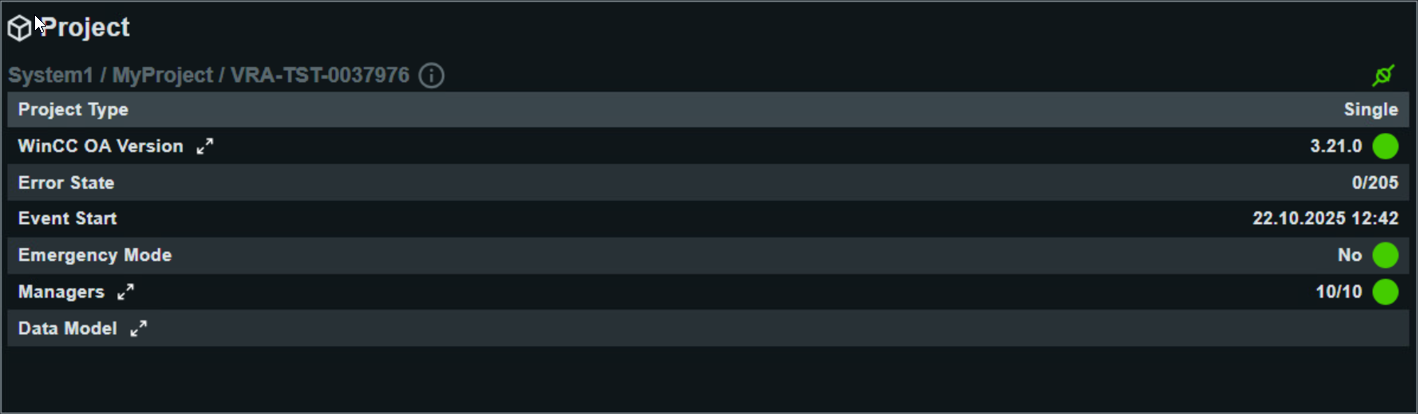
Detailed Project KPIs
- Project Type
- Specifies the configuration type of the project, such as “Single” or a distributed/multi-instance setup. This determines the architecture and integration options for the entire installation.
- WinCC OA-Version
- Indicates the exact software version of the WinCC OA project. The dashboard also flags whether the installation is fully up-to-date, and whether any upgrades or updates are available or recommended. This ensures system stability and compatibility with other modules.
- Error State
- Displays the number of active project errors or faults. A “0” indicates everything is operating smoothly; higher values should prompt immediate review and intervention.
- Event Start
- Shows the timestamp when the current project event or runtime session began. This helps in tracing operational intervals or analyzing event-based system changes.
- Emergency Mode
- Indicates whether the project is currently operating in emergency fallback mode. A value of “No” means standard operation; "Yes" signals that error recovery mechanisms are in effect and the system is working in a safety-restricted mode.
- Managers
- Displays the number of configured and actively running managerial components (like control managers, proxies, archivers, simulation drivers, etc.). In detail, the dashboard shows for each manager its type, running state, required status, start options, and the precise start time. A green state signals proper operation.
- Data Model
- Provides insight into the complexity and structure of the project’s data
model, listing:
- Number of Datapoint Types and Datapoints
- Datapoint Elements
- Number of Configs and Datapoint Functions (statistical and per datapoint)
- Total Alert Handlers, broken down by sum, multi-instance, discrete, and continuous
- Archive Configs for long-term data storage
- Address Configs and Project Languages
- Identification Size for object referencing