
License KPIs
The License section in the System Dashboard summarizes all relevant information regarding system license status, contract period, and license container details for WinCC OA projects.
Overview: License Widget
The License widget provides an at-a-glance view of your project's license type, validity, expiration date, central availability, and more. Status indicators help to quickly spot license or contract issues that could impact system operation.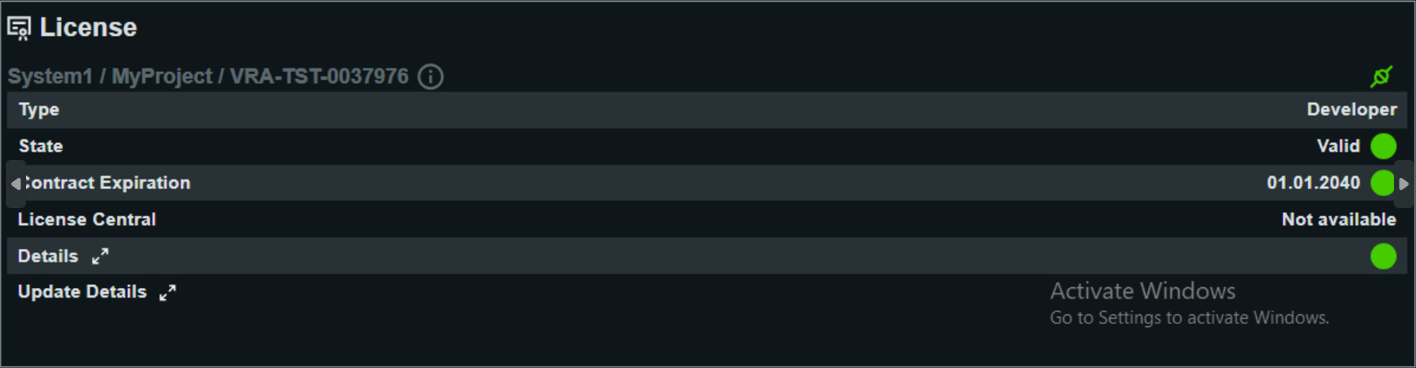
Detailed License KPIs
- Type
- Indicates the current license type used by the project, such as “Developer” or “Runtime”. Determines capabilities and permissible usage scenarios.
- State
- Shows whether the license is currently valid. A green state means the system operates fully licensed; any other status requires immediate action to avoid interruptions.
- Contract Expiration
- Displays the end date of the current maintenance or license contract. Expiry information is critical for proactive renewals and continued support.
- License Central
- Indicates if the central Siemens License Server is available/connected for this project. “Not available” suggests stand-alone operation or a connection issue.
- Details
- Provides specifics such as license expiration, hardware/software license container number, grace period, and demo period lengths. This information is important for understanding contingencies during license renewal.
- Update Details
- Shows info about the next scheduled license check and the result of the most recent update, including error messages if any issues occurred. Useful for troubleshooting auto-update problems and ensuring license continuity.