The Connections section in the System Dashboard provides a comprehensive overview of
the connectivity status to backends, field-side (“southbound”) systems, and the currently
active UIs within a WinCC OA project.
Overview: Connections Widget
The Connections widget offers an at-a-glance summary of all critical communication links
established by the system. It visualizes the status for backend connections (e.g.,
database), fieldbus or southbound integrations, and User Interfaces that are currently
connected to the project. Status indicators and counters help to quickly identify
healthy, degraded, or failed connections.
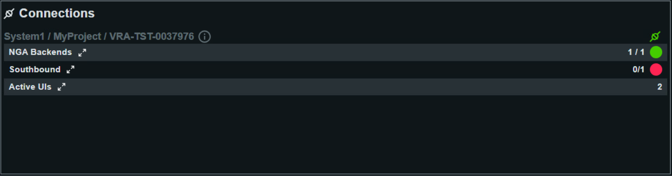
Detailed Connections KPIs
- NGA Backends
- Displays the status of all NGA backend connections, such as connections to
underlying databases (PostgreSQL®, etc.).
- Each backend lists whether it is:
- Active: The backend service is running and reachable.
- Connected to DB: Indicates if the backend is successfully
connected to the configured database.
- Buffer: Shows buffer utilization (e.g., Disk and Memory
buffers), helping diagnose latency or bottleneck issues. Buffer
sizes of zero are optimal in normal operation.
Green status highlights fully functional connections, while any other color
points to issues needing attention.
- Southbound
- Southbound connections cover all active field-side or driver-based links,
such as to PLCs, devices, or other automation hardware.
- For each connection, the following details are available:
- Connection name and type (e.g., “SIM” for simulation
drivers)
- Driver number
- State: Indicates if the connection is healthy or if there are
errors. A red/error status signals lost connection or
malfunction.
- Last Updated: The timestamp when the status was last
checked.
Immediate action is recommended for any connection in “Error” state to avoid
loss of process data or control integrity.
- Active UIs
- Summarizes the currently connected User Interfaces to the project.
- This includes:
- UI: Standard UI clients actively connected with their
current/maximum (e.g., “1 / unlimited”)
- UI Light: Lightweight or web-based UIs and their usage
- UI Fixed: Any statically configured UI connections
