
 "rulerTimeLabelVisibility"
The attribute "rulerTimeLabelVisibility" shows the time for a curve value of a trend ruler.
Synopsis
setValue(string shape, "rulerTimeLabelVisibility",int area, bool
                visible);
getValue(string shape, "rulerTimeLabelVisibility", int area, bool
                visible);
shape.rulerTimeLabelVisibility(int area, bool visible);
Parameter
| Parameter | Description |
|---|---|
| area | The trend area for which the times for the curve values are shown. |
| visible |
1 = The time for the curve value of a ruler is shown 0 = The time for the curve value of a ruler is not shown |
Description
The attribute "rulerTimeLabelVisibility" shows the time for a curve value of a trend (curve) ruler.
In order to use rulers, set the config entry "trendEnableCurveRulers" in the [ui] section of the config file. You can set rulers by clicking a curve. You can, however, also use the attribute "curveRulers".
Via the attribute "maxRulerCount" you can specify how many rulers can be used for a trend area.
Example
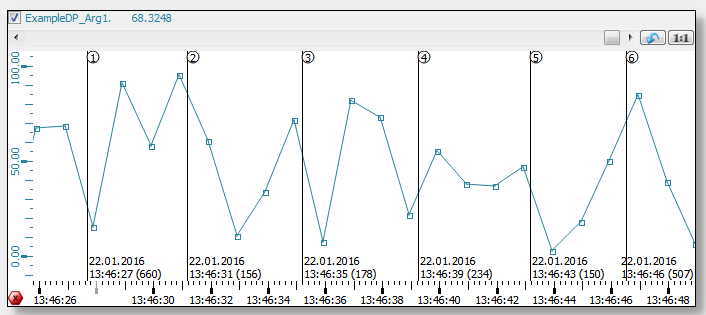
The following example shows the time for the curve value of the ruler. The time is shown for the first trend area (area 0).
main()
{
  TREND1.rulerTimeLabelVisibility(0,1);
}

Use the attribute "rulerValueLabelVisibility"to set the values.
Assignment
Trend