
 "curveLegendUnit", "curveLegendUnitX"
Defines the curve unit in legend. The function "curveLegendUnitX"; sets the unit in the legend for the XY trend curve of the X part.
Synopsis
setValue(string shape, "curveLegendUnit", string Name, string Unit);
getValue(string shape, "curveLegendUnit", string Name, string
                &Unit);
shape.curveLegendUnit (string Name, string Unit);
setValue(string shape, "curveLegendUnitX", string Name, string
            Unit);
getValue(string shape, "curveLegendUnitX", string Name, string
                &Unit);
shape.curveLegendUnitX(string Name, string Unit);
Parameters
| Parameter | Description |
|---|---|
| shape | Name of the object |
| Name | Name of a curve |
| Unit | Curve unit in a legend |
Description
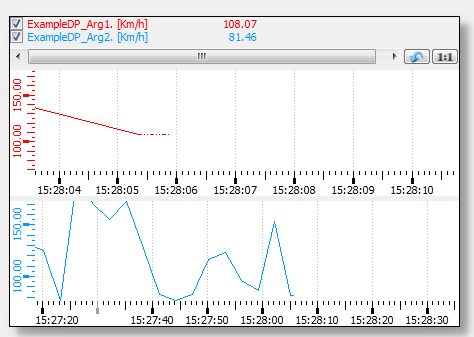
This attribute describes the unit label of the curve "Name" in the curve legend.
 Example
main()
{
  // Unit
  TREND1.curveLegendUnit("curve1", "Km/h");
}
When assigning legend properties ("curveLegendName", "curveLegendUnit", "curveLegendVisibility") in trends with several areas by means of a control script, you have to adhere to a fixed order. At first declare the properties for the curves of the first area, then declare the properties for the curves of the second area and so on.
Assignment
Trend