
Release Notes Version 3.21
Licensing
Licensing improvements - Manage your licenses with ease through streamlined processes, integrated updates and flexible options designed for global availability.

WinCC OA “One-Click” packages
- Medium, Large & Unlimited (Tags/UIs) variants
- Software update service already included (mandatory)
- Highly competitive pricing
- Subscription model available as well
- Available in all Siemens Regions which can handle maintenance options
Inhouse development license (IDL) enhanced
- BACnet and SmartSCADA development packages, previously sold separately, are now included in the standard IDL package
Improvements for subscription-based licenses
- When a subscription-based license is nearing expiration, the system promptly notifies you, helping you plan updates with ease
- Automatic renewal is possible, if access to the central license database is enabled
New License Portal
Empower your License Operations
Key benefits:
- Centralized Management: Manage all licenses in one portal and categorize them in groups for better overview
- Self-Service Activation: Activate, move, or deactivate licenses anytime; one place for all operations
- Flexibility: Support for on-prem, virtual, and cloud setups with robust user and role management
- Real-Time Deployment: Faster license rollouts for quicker project execution
- Transparency: Full visibility on license usage, status, and compliance
- Massive time savings and better resilience: One central access for all your licenses instead of ticket administration via emails
Security
Strengthen your system with advanced authentication methods and industry certified compliance standards for maximum security and reliability.
Authentication
- Support OpenID Connect for Authentication
- For single server, redundant and distributed systems
- Support the use of alternative OIDC-Providers (e.g., Azure Entity ID)
- Emergency login
- Single Sign On using SAML2 protocol
- Multi-factor authentication
- Multi-Domain-Support
- Active Directory connection via LDAP to replace deprecated NTLM interface
Certifications
- IEC 62443-4-2 – Fully SL2 certified
- IEC 61508 Re-certification

Compliance
- NIS 2: WinCC OA fully meets the the technical requirements for compliance with the NIS 2 directive. The directive targets operators of essential and important services as well as digital service providers.
- With WinCC OA, you gain the security and reliability needed to safeguard your network and information systems.
- Cyber Resilience Act: WinCC OA fully complies with IEC 62443-4-2 SL2, a key step towards mandatory EU CRA compliance for all digital products.
Cloud & Web Ready

Dashboarding
Build high-performance Dashboards with native Web Components and ensure uninterrupted availability through automatic failover.
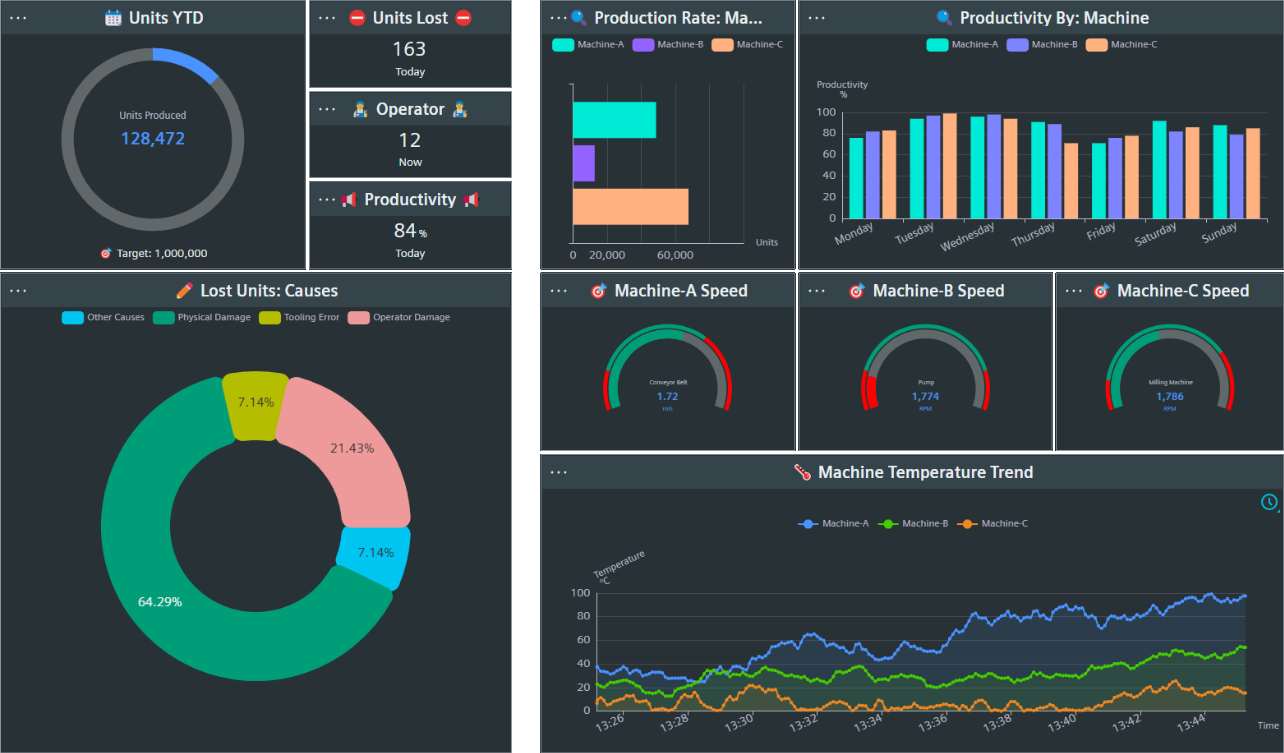
Advantages of Web Components:
- Natively supported by browsers
- Highly versatile and future-proof
- Commands to DPEs possible with new input widgets (e.g. Slider, Input field, etc)
- Improved reusability; use them across multiple projects or share as libraries
- Higher performance and better encapsulation
- Use of new Siemens Industrial Experience Design System (IX)
- Easier extendibility with own customized widgets in your dashboards
High Availability
- Enable automatic switch of web server in case of interruptions
Logging

PostgreSQL® as default database for NGA
Starting with WinCC OA V3.20, the Next Generation Archiver with PostgreSQL® is the new default archiving solution.
PostgreSQL® NGA Features: Latest Improvements
- Increased performance
- Support of Split Mode
- High availability configuration
- User Interface for backup & restore functionality
Enhanced WinCC OA Add-Ons Integration and Licensing
- AMS – Advanced Maintenance Suite now supported for PostgreSQL®
- APM – Advanced Playback Manager now supported for PostgreSQL®
- APM – Streamlined license package for APM
NGA High Availability Configuration (HAC)
The HAC provides a reliable failover solution which increases the consistency of the archived data in case of many network-, hardware-, or software problems.
- Based on well-established 3rd party software Patroni
- Allows to run 2 or more PostgreSQL® nodes in a clustered configuration
- Comparable to the Oracle Real Application Cluster (RAC)
Backup, Restore, and Archiving Interface for PostgreSQL®
With 3.21 we provide an easy-to-use user interface for full backup and restore operations for our managed single and redundant server PostgreSQL® managed databases.
- Status overview for completed/failed backup operations
- Execution of backups without command line operations
- Scheduler for automated database backups
- No operation interruption during backup process1
- Restoring backups with minimal downtime
- Visual status monitoring for proactive system maintenance
- Information for storage availability and backup sizes
1 Database Read/Write performance will be slightly decreased during backup operations.
Connectivity

Northbound Manager & Sparkplug B
As a foundation for future northbound protocols, a JavaScript/TypeScript based manager (“Northbound”) provides essential general basic functions for future protocol implementations.
Sparkplug B
- First protocol implementation based upon the Northbound Manager framework
- Sparkplug B offers a simple and excellent way to structure MQTT-based data
- Usage of WinCC OA's Plant Model as perfect Industry 4.0 approach for unified data modelling, like Unified Namespace (UNS)
- Datapoint groups to specify data from your WinCC OA data model
- MQTT driver and MQTT publisher functionalities are unchanged
- MQTT driver supports Sparkplug B connections
- MQTT Broker is not included in WinCC OA
OCPP Driver
OCPP (Open Charge Point Protocol) is an open-source communication protocol designed to standardize communication between EV (Electric Vehicle) charging stations (charge points) and central management systems (CMS or backend).
- WinCC OA acts as central management system and data hub for your charging stations
- Native WinCC OA driver
- Covered by the Standard Protocol license
- Full 1.6 protocol version support
- OCPP protocol versions 2.0 and 2.1 in evaluation
SECS/GEM Driver
SEMI Equipment Communications Standard/Generic Equipment Model communication support via a new driver allows for communication between semiconductor manufacturing equipment and WinCC OA.
- Seamless integration to monitor process tools, facilities and fab automation
- Reduced Total Cost of Ownership; no custom SECS/GEM interface development or third-party gateway servers are needed
- Centralized data logging for better traceability
DNP3 driver: Support of Sleep Mode
WinCC OA DNP3 driver supports the “TCP dual end point” functionality according to the DNP3 Standard (IEEE Std 1815-2012). This allows for RTU devices to connect to WinCC OA even when they come out of the “Sleep Mode”.
- Optimized for power-constrained devices like battery or solar powered devices
- Bandwidth savings due to reduced communication overhead
- Reduced operational costs
- Improved sustainability through reduced energy consumption enabled by TCP dual endpoint functionality
- Increased reliability in critical infrastructure, especially for remote RTU scenarios known from W&WW or Oil & Gas industry branches
Transaction-based Commands
Ensure reliable communication and data integrity with new transaction-based read and write functions for WinCC OA OPC UA Client, designed for mission critical environments.
- Verification that the PLC has acknowledged receiving the command
- Process image is updated when a positive response was received
- Rollback of data in case of missing/negative response from PLC
- Ensuring data consistency in PLC and process image
- Partial writes are avoided for multi block datasets in PLC
- Combination of dpGet() and single query function to the PLC
- Update of original value in the Event Manager if the PLC sends a positive result, answer message with current value is sent
- In case of a negative response an error code is sent
OPC UA Hot & Mirrored Redundancy
The new OPC UA redundancy mode release brings major improvements for the WinCC OA OPC UA client.
- Minimized downtime during maintenance
- Seamless client failover
- Improved system resilience
- Redundant network connections to redundant PLCs
- Compliance with critical infrastructure requirements
- Increased PLC performance (up to 30%) with Siemens S7-1500 hardware
- Ideal for secure SCADA and PLC environments: WinCC OA and S7-1500 are IEC 62443-4-1/2 certified
OPC UA GDS Pull
The new capability centralizes discovery and certificate management by leveraging a Global Discovery Server.
- Automated security management includes certificates and trust setup
- Continuous control and automatic update of configuration
- Reduced operational effort
- Increased scalability and security
Enhanced Driver Feature Range
TIA Portal versions support
WinCC OA now also fully supports TIA Portal versions 19 & 20.
Address diagnostic enhanced
OPC UA, S7, S7 Plus, Modbus, EIP, MQTT, SNMP and IEC104 drivers received additional dynamic validation routines to enhance the existing address diagnostic.
OPC UA: Re-certification
Or extensive OPC UA feature set, including Client/Server and OPC Classic connectivity has successfully renewed its certification, reaffirming our high product quality and compliance with international standards.
OPC UA Server enhancements
- Now supports OS Authentication
- A new config entry [opcuasrv] showDescriptions enables displaying descriptions for DPE structure elements
EIP: Rockwell 800 series PLCs
- The EIP driver now also supports the newest generation of the Rockwell Micro800 series
- Enables direct, high-performance integration without additional gateways, which reduces system complexity and protects existing investments
MQTT: Enhanced flexibility
A new config entry [mqttpub] publishSystemName for the MQTT Publisher allows to add or remove the system name from topics, making it even more versatile and compatible.
Performance

Performance
WinCC OA is still getting faster
Next Generation Archiver (NGA): PostgreSQL® got faster
Several enhancements leading to better performance, especially when reading data, for the managed PostgreSQL® database for NGA.
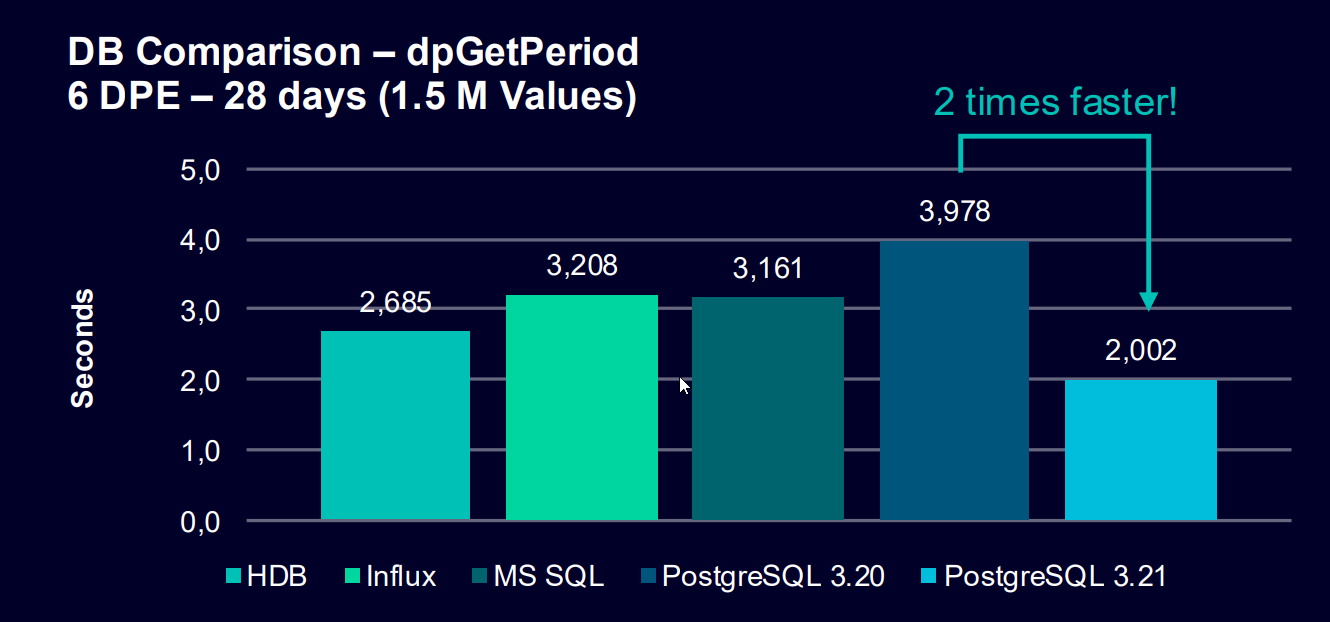
- Read performance increased by more than 2x
- Automated clustering of data after segmentation
- Improved user experience for data requests
- Significantly better performance than HDB/Value archives
- Performance may vary on dpGetPeriod()/dpQuery() function
System Dashboard
Built on future-proof Web Component technology, the new System Dashboard delivers a comprehensive WinCC OA overview through a wide range of Key Performance Indicators (KPIs).
- Instant system health overview on the dashboard main page:
- See immediately if the system is running smoothly, needs attention, or requires urgent action
- Examples: expiring SSL certificates, high memory usage, low disk space, or CPU load
- Detailed insights:
- Access detail pages for deeper analysis
- View historical trends of specific KPIs
- Customization options:
- Create your own dashboards
- Define custom KPIs using our comprehensive business logic framework
Engineering

Increased flexibility
Enhance engineering workflows that simplify data handling, improve responsiveness, and provide greater flexibility for project analysis.
Manager Service API (MSA)
With MSA, we're adding Remote Procedure Call functionality, giving managers a more direct, streamlined way to communicate. It's built on a Service-Oriented Architecture, which means you can reuse server-side logic across all managers and UI Clients.
- Direct communication between managers
- Better process load distribution
- Trigger/response functionality
- Implementation in V3.21 provides the “Report” flags information
- Can be utilized in own managers
Additional Improvements

Usability Enhancements
Demo mode/Trial period has been set to 120 minutes
The extension of the demo period from 30 to 120 minutes allows interested customers to try out and test WinCC OA even more easily.
Multiple alarm rows acknowledgement
A new config entry [ui] aesRowMultipleSelection allows to select and acknowledge multiple alarm rows at once, thus avoiding additional clicks and saving valuable operating time.
Improved Table Widget handling
A new property Edit on Key Navigation for the Table widget improves behavior when navigating
between editable and non-editable cells with keys (Tab/Arrow),
making navigating much easier and flexible and thus saving valuable
handling time.
Name substitution mapping for NGA Importer
In case datapoints were renamed during the project lifetime, this feature allows to add a mapping file to the NGA Importer functionality. This allows for automatic data adaption during the import, when switching from Value Archives to the NGA. Keep your historical data consistent while harvesting the benefits of next generation arching.
Script Editor
- The Save Button indicates actual changes in the file
- Files can be opened directly in the Script Editor
- The syntax error at status line remains visible and does no longer disappear within a few seconds
- Switching Tabs can now be performed via Alt+Left/Right Arrow keys
- On multiple edited script tabs, a new indicator was added to show unsaved changes
- In addition, the new option “Save all” has been added to the file menu
- Now the Script Editor also shows the “function list” dock window when opened from a panel script
- Doxygen-style comments for enums, classes and class methods can be shown as documentation inside a tooltip and in the argument hint popups
- The object list synchronizes when clicking into different functions in the script
Video Add-on
Axis Cameras
- Clear view (“Swipe”) functionality has been restored.
- The Clear view API makes it possible to activate functions that keeps your Axis camera lens and/or dome clean.
- This is useful in environments where water from rain and ice or dust particles are common issues.
Various enhancements
- SVG Overlay and Privacy Zone configuration can be copied from one stream to others
- Added selection for live/archive streams to be viewed in vimaccOA Workstation for each camera
- Improved handling of user-defined parameters/keys for camera configuration
- The latest Axis devices TU9001 (Joystick TU9002 and Keypad TU9003) are supported now
Supported Operating Systems, Platforms & Databases
Operating systems
- Windows Server 2022
- Windows Server 2025 (IoT)
- Windows 11 LTSC
- RHEL/Oracle Linux 10
- Industrial OS 4
- Debian 12
- VMware ESXi / VMware vSphere High Availability - 8.0.3e
- Proxmox Virtual Environment
- Runs on Azure and AWS
We recommend deactivating Hyper-threading when running a system with Windows 11 or Windows Server 2025 to ensure good and stable performance in your WinCC OA application.
The behavior of the Windows thread scheduler has changed in recent versions of Windows, which may have a negative impact on the achievable performance, especially on modern systems with performance- and efficiency core CPUs.
Databases
- PostgreSQL® V17
- InfluxDB 1.12.2 (RHEL10, OracleServer10) / 1.8.10 (Windows, Debian)
- MS SQL Server 2022
- SQLite 3.50.4 (included)
- Oracle 19c Server
- Oracle 19c Instant Client
Please note that all Windows OS types are Enterprise versions. All listed products are registered trademarks of the corresponding companies.
Please see the Software requirements chapter for currently supported (minor) versions.
Qt & Supported Mobile Systems and Browsers
Operating systems for mobile devices:
- iOS 15 or higher
- Android 8 or higher
Browsers
Current versions of Firefox, Chrome & MS Edge1
Qt
WinCC OA comes with the newest 6.8 LTS-Version of Qt
All listed products are registered trademarks of the corresponding companies.
1 Please see the Software requirements chapter for details.
Lifecycle

Discontinuations in V3.21
These features will no longer be included in WinCC OA 3.21
- Siemens Industrial Thin Client specific UI Client: Due to the older SSL
version available on this panel platform, we will discontinue the support of the
specific UI Client with V3.21.
Customers interested in using this hardware or who want to continue using it with the specific UI client, may do so on WinCC OA 3.19/3.20 or switch to web-based user interface clients like the Dashboard or ULC UX.
- PROFINET/PROFIsafe driver (+re-certification) Both drivers can unfortunately no longer be provided or re-certified as the CP1616 hardware card – which acts as a necessary base for them – will no longer be available for new customers due to being phased out. Additionally, the card is not supported on newer Windows versions.
- Angular Dashboard
- With the new Web Component Dashboard available in V3.21, we discontinue our support of the previous technical base
- It will be made available for download on the WinCC OA Portal
- It remains fully supported in V3.20
- Created dashboards will be automatically migrated to the new technology when upgrading the project. Except for self-created widgets, which need to be manually migrated
Deprecations in V3.21
These features remain fully available in WinCC OA V3.21, but migration is recommended due to potential future removal.
- InfluxDB support for the Next Generation Archiver: After careful evaluation, we have concluded that InfluxDB will not be a sustainable solution for future customer and internal use cases. For details, see the FAQ
- getCurrentOSUserLocal(): This function becomes obsolete as the NTLM protocol (used for Microsoft Active Directory Authentication) has been replaced.
- 32-bit version of Microsoft Excel for the Excel report: With the 64-bit version available and supported, we encourage our users to choose the more modern and future-proof variant of MS Office.
- OLE DB interface support: With numerous interface possibilities available, we recommend switching to more modern and secure variants.
- XML-RPC interface: We recommend to use the new JavaScript/TypeScript functionality (available since WinCC OA V3.20) instead.
- VMWare solutions: VMware Cluster (HA) ESXi and VMware Tools remain supported in V3.21 but are marked as deprecated after the Siemens Group will discontinue its business relations with VMWare/ Broadcom in this regard.
- NTLM Authentication: This protocol was previously used for the Active Directory Authentication. As it is also deprecated by Microsoft and in WinCC OA already fully replaced by LDAP it will be removed from V3.21.
Additional Changes
Here you will find all the awesome new features and improvements of WinCC OA Version 3.21!
WinCC OA Excel Report
WinCC OA Excel Report is part of the WinCC OA installation (WinCC OA server option - see chapter Advanced Component Selection) and runs with 64bit MS Office. The WinCC OA server option installation contains Excel Report together with MS ActiveX components.
New Attributes for the TextField
Two new attributes are available for the Text field:
New dpConnect Functions
There are four new CTRL functions:
Cryptography Next Generation (CNG) Certificates
Microsoft's Cryptography API: Next Generation (CNG) is a Windows framework for managing cryptographic tasks, including certificates and private keys. For more information, see chapter Cryptography Next Generation (CNG) Certificates.
Password Policy
The password policy has been updated to enhance security. The new policy increases the minimum password length, requires at least one lowercase letter and one digit, and allows a wider range of special characters. These changes help improve overall password quality. For more information, see chapter Users.
-CNSyes / -CNSno
The -CNSyes and -CNSno options now only apply to
CNS imports:
CNSyes: Updates existing CNS nodes.CNSno: Does not update existing CNS nodes and does not show error messages.
The -Typesyes and -Typesno options define whether
existing types are updated during the import:
Typesyes: Updates existing types.Typesno: Does not update existing types.
For more information, see chapter Command line options (input).
PARA - Tree Structure Editor for JSON/YAML of _original Config
A new tree structure editor is now available for entries of type string in the _original config. The editor opens automatically when the string content contains valid JSON or YAML. For more information, see chapter _original config.
HTTP Header Names
All HTTP header names are converted to lowercase to be compatible with HTTP/2 (RFC 7540).
New Datapoint Elements in Datapoint "_VarTrendSettings"
There are two new datapoint elements in the datapoint "_VarTrendSettings":
- OpenTimeIntervalSettings.Names (Stores the names of new user-defined time ranges)
- OpenTimeIntervalSettings.TimeRange (Stores the time intervals for new user-defined time ranges). For more details, see _VarTrendSettings.
Relocation of .wav Files to the “Example Application” Setup Option
The .wav files located in data/sounds have been removed from the standard installation option and moved to the Example Application setup option.
JavaScript demo panels moved to the Example Application setup option
The folder examples/js has been moved to the Example Application setup option. The JavaScript demo panels are installed in the WinCC OA installation directory, for example under <WinCC_OA_path>/Examples/.
The panels are only fully functional when the webclient_http.ctl
script is running.
compatLegacyPainting not set by default
In version 3.21, the config entry [ui] compatLegacyPainting is no longer set by default. To maintain previous behavior, it must be added manually in the configuration if needed.
Senseye - providing WinCC OA data
A project-based solution for providing WinCC OA data is available for Senseye (https://www.siemens.com/global/en/products/services/digital-enterprise-services/analytics-artificial-intelligence-services/predictive-services/senseye-predictive-maintenance.html). This solution is available upon request.
Dialog Framework moved to the Example Application setup option
The Generic Dialog Framework panels and scripts have been moved from the standard installation to the Example Application setup option. The Dialog Framework files are installed in the WinCC OA installation directory, for example under <WinCC_OA_path>/Examples/.