Alarm suppression by design
This topic explains how suppression by design prevents an alert handler configuration from generating alerts in WinCC OA.
What suppression by design means
Suppression by design is an engineering-level mechanism that prevents an alert handler configuration from generating alerts.
It is applied at the datapoint configuration level on the
alertHandling configuration attribute.
Typical use cases are planned maintenance windows, commissioning phases, or the deactivation of known faulty signal paths.
Unlike shelving, suppression by design stops alert generation completely instead of only hiding existing alerts from the display.
Suppression is not supported for datapoint elements that use multi-instance alerts; these elements are silently excluded. See Multi-instance alerts for details.
How suppression by design works
The AlertService modifies the alertHandling configuration attribute
of the target datapoint element.
While suppression is active, the alert handler does not generate new alerts.
When suppression is applied, all pending unacknowledged alerts on the target are acknowledged automatically.
Suppression by design does not use a timer. It remains active until an operator or engineer removes it explicitly.
Because it works at configuration level, it affects all future alert generation for the affected handler.
Workflow
- The operator or engineer selects a datapoint element in the system, for example by using a panel, the CNS tree, or an API.
- Suppression is then applied with an optional reason text.
- After that, the alert handler stops generating new alerts for the selected element.
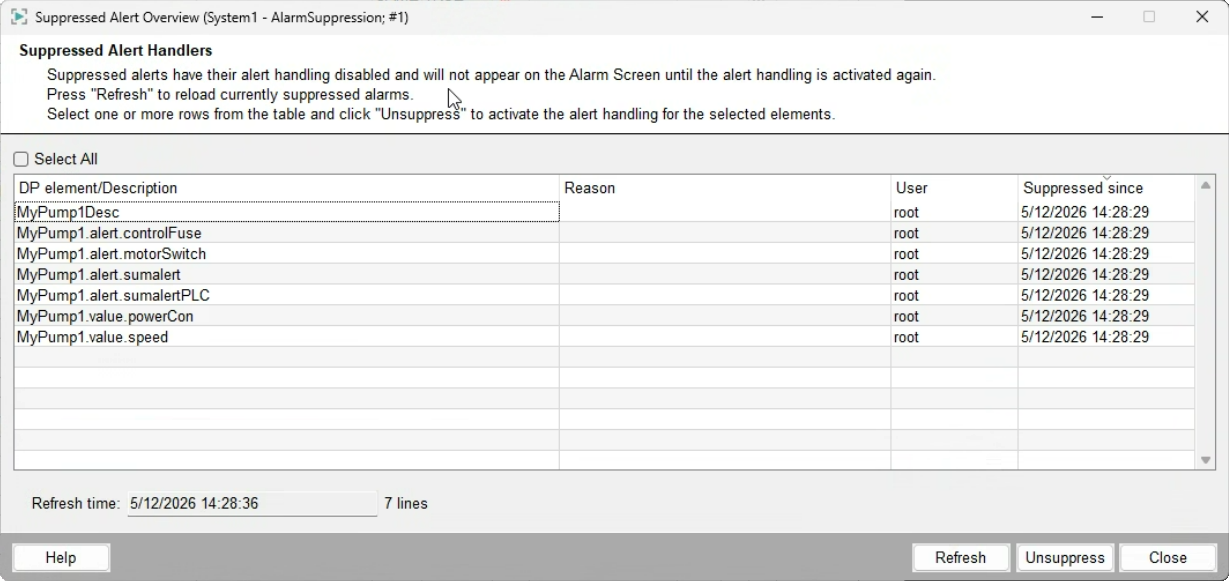
- The suppressed state is visible in the Suppressed Alert Handler overview panel.
- To restore normal alerting, remove the suppression explicitly.
Suppressed Alert Handler overview panel
The Suppressed Alert Handler overview panel shows all currently suppressed alert handler configurations.
It displays the suppression reason and the responsible operator.
The panel allows removing suppression from selected configurations.
It is accessible via a dedicated button in the Alert Event Screen.