Out-of-service mode
This topic explains how out-of-service mode swaps alert classes to maintenance classes in WinCC OA while keeping alert generation active.
What out-of-service mode means
Out-of-service mode places a datapoint element into maintenance mode by swapping its alert classes to dedicated maintenance alert classes.
Alerts continue to be generated, but they use maintenance classes that are visually distinct.
Alerts that use maintenance classes do not count toward operational KPIs.
This provides a clear visual indication that equipment is under maintenance while preserving alerting capability.
Maintenance alert classes
Out-of-service mode uses dedicated maintenance alert classes that are named "<Original Alert Class>-maint". These are created for all existing alert classes after the initial activation the Alert Service, see Set up alarm shelving and suppression. If a maintenance alert class does not exist when out-of-service mode is applied, e.g. has the alert class has been created after the initial Alert Service configuration, the AlertService creates it automatically by copying the original alert class configuration with the force parameter.
Maintenance alert classes can be used to create a distinct visual representation, such as colors or icons, so operators can distinguish them from operational alerts. By default the "short sign" OOS is added for the maintenance alert classes.
How out-of-service mode works
The AlertService swaps the alert class configuration on the target datapoint element.
It stores the original alert classes so that they can be restored when out-of-service mode is removed.
When out-of-service mode is set, all pending unacknowledged alerts on the target are acknowledged automatically.
Out-of-service mode has no automatic timer and remains active until it is removed explicitly.
Because it works at configuration level, it affects how future alerts on the element are classified.
An element can be in one of three states:
- In normal operation – all alert handlers use their original alert classes.
- Out of service – all alert handlers use maintenance alert classes.
- Partial out of service – some alert handlers on the element or CNS node use maintenance classes while others remain in normal operation. This can occur when a CNS node partly overlaps with out-of-service datapoints.
Workflow
- The operator or engineer selects a datapoint element, for example by using a panel, the CNS tree, or an API.
- Out-of-service mode is then applied with an optional reason text.
- The alert classes on the element are swapped to their maintenance counterparts.
- New alerts that are generated on the element use maintenance classes.
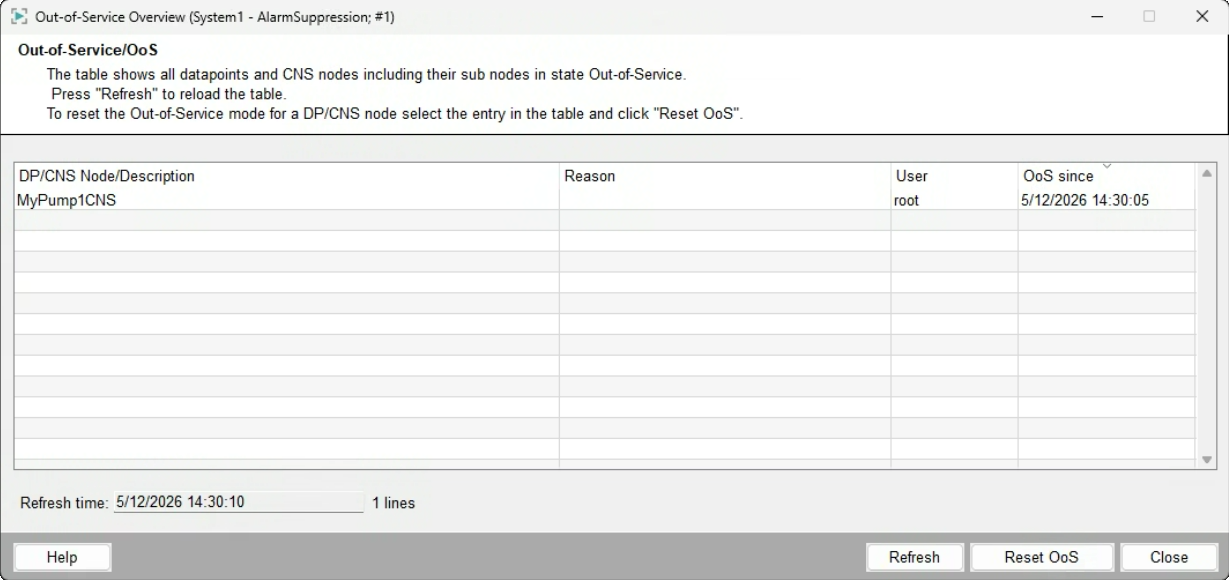
- The element remains visible in the Out-of-Service overview panel.
- To restore normal operation, remove the out-of-service state so that the original alert classes are restored.
Out-of-Service overview panel
The Out-of-Service overview panel shows all datapoints or CNS elements that are currently in maintenance mode.
It displays the out-of-service reason and the responsible operator.
The panel allows restoring selected elements to normal operation.
It is accessible via a dedicated button in the Alert Event Screen.