Create a datapoint type
Opening the DP-type Editor
Datapoint types are created with the DP-type Editor. With the editor you can define the structure of datapoints by creating nodes (type struct) and leaves and define the data types of the leaves.
Datapoint types determine the structure of WinCC OA datapoints.
The datapoint types contain the structure of system components to be represented in the form of datapoints in the process control system. Datapoint types have different levels of tree structures. A summary of available element types, plus detailed descriptions of data formats are given under Data Types as well as in the Reference Tables.
Open the DP-type Editor from the context menu of the PARA tree view. The context menu is opened by clicking with the right mouse button on a free space in the PARA-TreeView. Via the context menu you can create a new datapoint type. By clicking on an existing DPT with the right mouse button you can edit or delete it.
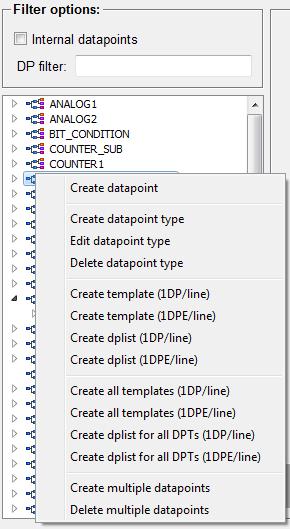
The DP-type editor is opened via the Creating datapoint type and a new DPT can be created. A summary of available element types, plus detailed descriptions of data formats are given under Data Types as well as in the Reference Tables. An existing DPT can be changed via the Edit datapoint type .(add node, change the datapoint of a leaf). The entry Delete datapoint type deletes the selected DPT from the system after security check. The further entries of this context menu are to be used in relation to mass configuration. For detailed information, read the chapter Mass configuration, basics.
Layout of the DP-type Editor
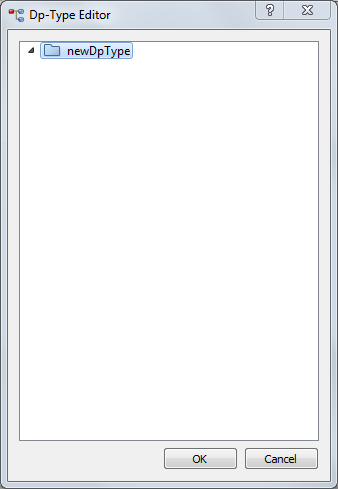
The figure below shows the DP type Editor.
All datapoint types are shown in the tree. You can enter a new name at the marked point (at "NewDpType") in order to add a new datapoint type.
The OK button saves the changes made in the DP-type Editor.
You can use Cancel to close the DP-type Editor without changing the datapoint types
Each datapoint type has its own symbol in the tree. The following list contains all symbols and meanings:
- 29 = int, dyn_int, int_array
- 5,7 = float, dyn_float, float_array
- 01 = bool, dyn_bool, bool_array
- 'c' = char, dyn_char, char_array,
- +6 = unsigned, dyn_uint, unsigned_array
- 64 = long, dyn_long, long_array
- +64 = ulong, dyn_ulong, ulong_array
- 1111 = bit64, dyn_bit64, bit64_array
- 111 = bit32, dyn_bit32, bit32_array
- AD = string, dyn_string, string array
- time symbol = time, dyn_time, time array
- DP = dyn_dpid, dpid array, dpid
- Flag symbol = langString dyn_langString, langString array
The datapoint type langString cannot be archived.
- Bubble symbol= blob, dyn_blob, blob array
- Directory symbol = struct
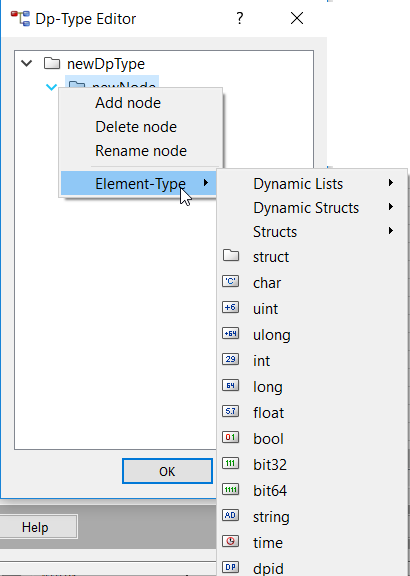
You can open the context menu of the Datapoint-type Editor by clicking the right mouse button. The context menu is shown in the figure below.
Editing a node
You can add nodes, rename or delete them. Please see Figure "The DP-type Editor - creating a new datapoint type".
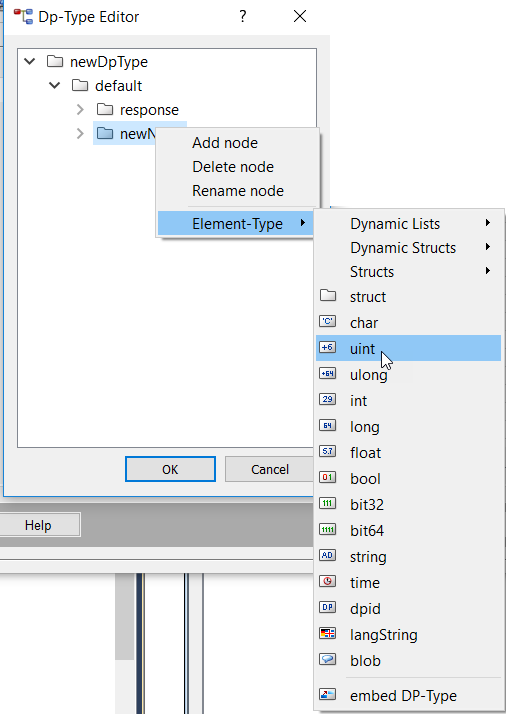
You can change the data type of a node using Element type. This menu option lets you assign other data formats to end nodes (leaves). See Figure above ("The context menu of the Datapoint type Editor").
You can also add sub nodes to the nodes. The sub nodes are also called datapoint elements. See the figure further below.
A summary of available element types, plus detailed descriptions of data formats are given under Data Types as well as in the Reference Tables.
Editing a DP type
You can save, copy and delete a DP type (= the structure).
The following figure shows a new datapoint type. The datapoint type consists of nodes "default", "newNode", "response" and "state" as well as of elements "position" and "malfunction".
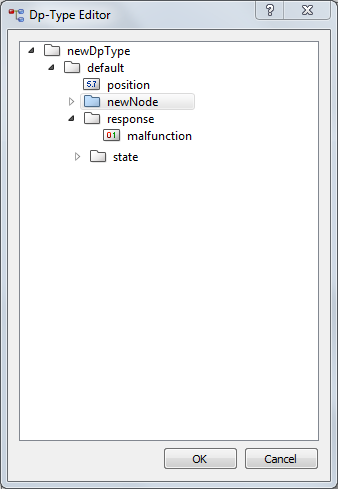
Figure DPT element formats: Changing the node - or element type