
Rename Datapoints
The Rename datapoint panel allows you to rename datapoints:
- Open the PARA module and select the datapoint that you want to rename. In the
context menu of the datapoint select the "Rename datapoint" option.
The option is not displayed when clicking a datapoint type (DPT) or a datapoint
element.
Note:In the figure below, the datapoint does not contain any sub elements. Thus, the datapoint element is the datapoint and you can rename the datapoint directly via the element.
Figure 1. Option "Rename datapoint" 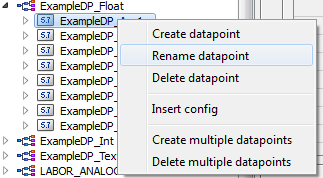 CAUTION:Refer to the parameter description of nameCheck() for not permitted characters.
 - Specify a new name and check the checkbox "ASCII Export". The ASCII export
option backs up the datapoint type and the datapoint under
Project_Path/dpList/<dpName>_<Number sequence>.dpl. The
cross-reference search searches for the datapoint name in the current project.
Click the "Search" button and you can find out where a manual change of the
datapoint name is necessary. Click the "Rename" button.
Figure 2. Rename datapoint Panel 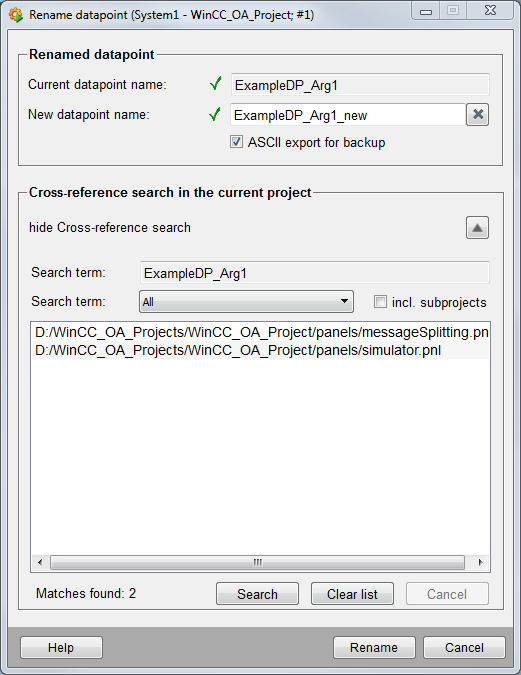
- The system checks if the entered name is valid and not already in use. If
necessary, an error message is shown and the datapoint name is not changed. When a
datapoint is renamed, the datapoint configurations, historical values as well as
DP access rights are adopted.
Figure 3. Renamed DP "ExampleDP_Arg1_new" 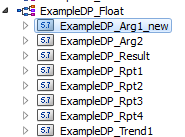
Note the following limitations when renaming datapoints:
-
If you rename a datapoint, adapt the new name in the whole application (e.g. in the references to DPs in panels, DPs in the alert screen, DPs in the trend configuration or if a DP is used in scripts or in sumalerts).
-
The functionality is only available for the DPs of the local system. DPs of a distributed system cannot be renamed.
-
Internal datapoints may not be renamed.
-
Master datapoints cannot be renamed.
-
ASCII backups may only be run on the server.
-
Datapoints can only be renamed when the DataBgManager is running the DataBgManager runs shortly after the project start – see the log messages in the log viewer).