
Permission Settings
The WinCC OA video framework is divided into separate functional groups, each with specific functions. A user with the Superuser (perm_1) authorization can assign a permission bit (1-32) to each group.
If a logged-in user wants to access a functional group, he must have the correct permission bit. These permission bits are assigned by the WinCC OA user control. For more details, refer to the chapter Permission.
Only the permission bits assigned through user groups are recognized (as per the WinCC OA CTRL function getUserPermission()).
Area permissions are not recognized by the video framework.
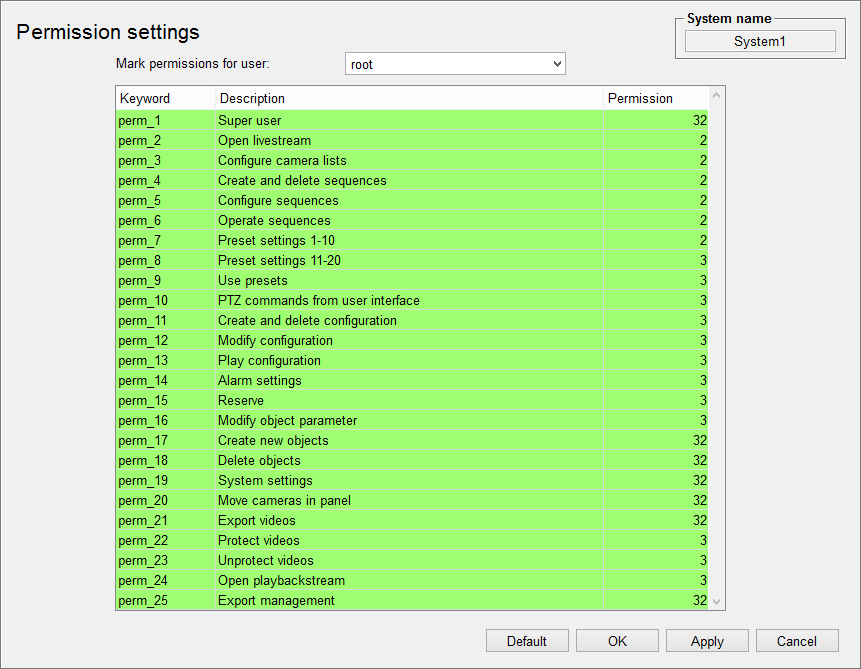
Mark Permissions for a User
You can select a user from the list to view their authorization level. All functional groups the user has access to will be highlighted.
- Keyword
-
This column shows the keywords for the functional groups. These keywords are used by the authorization management functions VIDEO_OA_getUserPermission() and VIDEO_OA_openNoPermission().
- Description
- This column provides descriptions of the functional groups.
- Permission
- This column displays the permission bits assigned to the functional groups.
- Default Button
- Resets the permission bits of the functional groups to their default values.
Setting Permissions
To edit permission settings, the user must have Superuser (perm_1) authorization. This function is preset with bit 4.
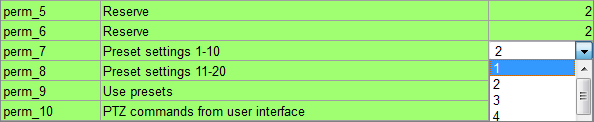
Users can change the permission bit by clicking on the permission column of the desired functional group.
Understanding Functional Groups
| Functional Group | Function | Default Bit | Description |
|---|---|---|---|
| perm_1 | Superuser | 4 |
This group includes:
|
| perm_2 | Open Livestream | 2 | Allows opening live streams via the user interface. |
| perm_3 | Configure Camera Lists | 2 |
This group includes:
|
| perm_4 | Create and Delete Sequences | 2 |
This group includes:
|
| perm_5 | Configure Sequences | 2 |
This group includes:
|
| perm_6 | Operate Sequences | 2 |
This group includes:
|
| perm_7 | Preset Settings 1-10 | 2 | Set and delete presets 1-10 in the video object explorer. |
| perm_8 | Preset Settings 11-20 | 3 | Set and delete presets 11-20 in the video object explorer. |
| perm_9 | Use Presets | 3 | Allows moving to presets via the user interface. |
| perm_10 | PTZ Commands from User Interface | 3 | Enables PTZ commands via the user interface. |
| perm_11 | Create and Delete Configuration | 2 |
This group includes:
|
| perm_12 | Modify Configuration | 3 | |
| perm_13 | Play Configuration | 3 | |
| perm_14 | Alarm Settings | 3 | Configure and activate WinCC OA video reaction processors. |
| perm_15 | Reserve | 3 | |
| perm_16 | Modify Object Parameter | 3 | Configure video objects in the video object explorer. |
| perm_17 | Create New Objects | 4 | Create new video objects in the video object explorer. |
| perm_18 | Delete Objects | 4 | Delete video objects in the video object explorer. |
| perm_19 | System Settings | 4 | Set users and debug flags. |
| perm_20 | Move Cameras in Panel | 4 | Adjust cameras in the user interface during runtime. |
| perm_21 | Export Videos | 4 |
This group includes:
|
| perm_22 | Protect Videos | 3 |
This group includes:
|
| perm_23 | Unprotect Videos | 3 |
This group includes:
|
| perm_24 | Open Playback Stream | 3 |
This group includes:
|
| perm_25 | Export Management | 4 |
This group includes:
|
| perm_26 | Reserve | 4 | |
| perm_27 | Reserve | 4 | |
| perm_28 | Reserve | 4 | |
| perm_29 | Reserve | 4 | |
| perm_30 | Reserve | 4 | |
| perm_31 | Reserve | 4 | |
| perm_32 | Reserve | 4 |