Camera lists
|
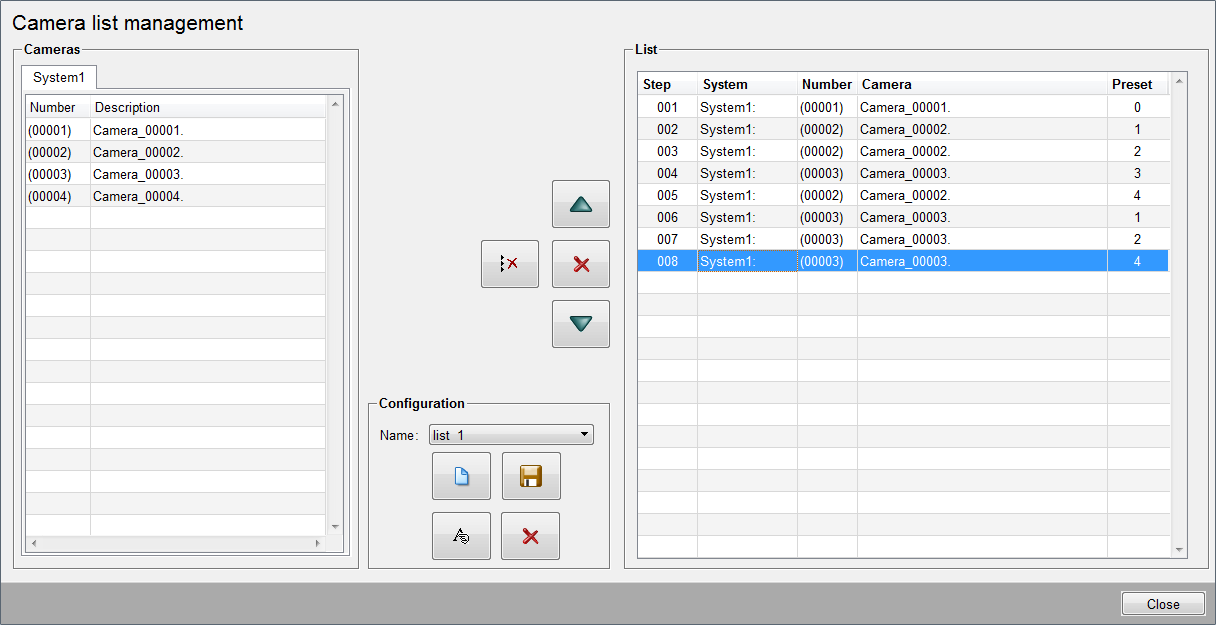
A camera list is necessary for a sequence. The following panel can be opened via the button camera lists in the system management.
All available cameras are shown in this table. The cameras can be passed to the list on the right side by using drag & drop. Each camera can occur several times in the list. ListShows the currently defined camera list. The column Preset shows which preset of the camera shall be shown in this step. If position 0 is set, no preset is used and the camera remains in the current position. Presets only can be defined for PTZ cameras. The following buttons are available for adjusting the step sequence.
The combo box allows to select an existing camera list. Moreover the following buttons are available:
|
 moves the
selected step upward
moves the
selected step upward deletes the
selected step
deletes the
selected step deletes all
steps
deletes all
steps moves the
selected step downward
moves the
selected step downward creates a new
camera list
creates a new
camera list saves the
current camera list
saves the
current camera list renames the
current camera list
renames the
current camera list deletes the
current camera list
deletes the
current camera list