
Zoom Navigator
With the zoom navigator widget you can zoom a module.
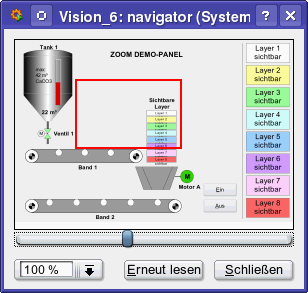
In order to zoom a module, set the mode to Zooming via setScaleStyle():
setScaleStyle(SCALE_ZOOM, myModuleName());How to create a zoom navigator
- Click on the zoom navigator symbol
 in the GEDI.
 - Click in the panel work area. Specify the size of the zoom navigator.
- Open the Property Sheet
- Enter the object name (Name).
- On the Extended tab define the navigator specific attributes of the zoom navigator such as "ModuleName".
Zoom Navigator – refreshTime
The refreshTime property defines the refresh interval of the zoom navigator in milliseconds. The default value 0 disables the refresh (previous behavior). Values greater than or equal to 100 enable automatic updates of value and color changes, smaller values are ignored.
Restriction:
Lines are not zoomed!