
Inserting a DPT PowerConfig
A PowerConfig covering a whole datapoint type is inserted at the root node of the master datapoint. As soon as the DPT PowerConfigs are defined, a master datapoint has to exist for the specific datapoint type (when starting PARA, a corresponding master data point is created if it does not exist). If the datapoint type does not exist, an error message (dpCreate() did not succeed) is displayed when starting the PARA module and ASCII Manager. Right-click on the master datapoint of a datapoint type and select the option Insert PowerConfig. The following panel opens containing the defined PowerConfigs:
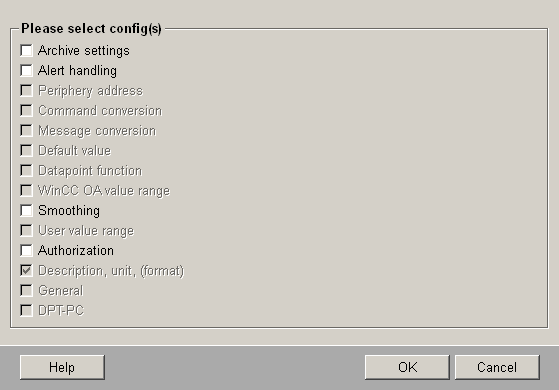
Selecting the check box DPT-PC and clicking on OK attaches the DPT PowerConfig to the master datapoint. The advantage of the DPT PowerConfig is that all the datapoint elements in the structure of the master datapoint can be provided with Configs and configured in one single step. Which parameters are set at which element depends on the programming in the script of the DPT PowerConfig. In the software version there is a predefined DPT PowerConfig for the datapoint type ANALOG2 (see Predefined PowerConfigs).
When you add a DPT-PC to a datapoint type that serves as a reference , for example, to ANALOG1 (and the configs added to the DPEs when adding this DPT-PC) no inheritance of DPT-PC takes place on DPTs (this means that different PowerConfigs are not added to single elements of the master datapoint) because these are using references (for example, "analog" part at ANALOG2). It is possible to add PowerConfigs at , for example, ANALOG2-DPT-PC also in the reference part of ANALOG1 (node "analog"). This is possible when the PowerConfigs are not already available there (inherited from ANALOG1).
This PowerConfig can be deleted at any time. Right-click on the root node (of the master datapoint), where a PowerConfig is located, and select the option Delete PowerConfig > DPT-PC. Editing is not possible, as there can only be one DPT PowerConfig for each datapoint type.
In order to add a DPT powerConfig, delete the master datapoint and recreate a master datapoint. Now you can check the check box Insert PowrConfig -> DPT PC.
Only one DPT-PC may exist for each datapoint type. An example of creating a DPT PowerConfig is given in the chapter Creating a new PowerConfig for a DPT. Generating a PowerConfig using the PowerConfig Editor should only be performed by experienced WinCC OA users.