
Deleting multiple datapoints
There are various options for deleting datapoints, just as there are for creating data points:
- In PARA using the panel Delete multiple datapoints.
- Using the ASCII Manager and a defined template (see Templates/DP lists, basics).
- Using Excel tools (see Excel tools, basics).
This page explains how to delete multiple datapoints using the dedicated panel in PARA. This panel is opened by right-clicking on a datapoint type/master datapoint/datapoint in the PARA module and then selecting the option Delete multiple datapoints in the context menu.
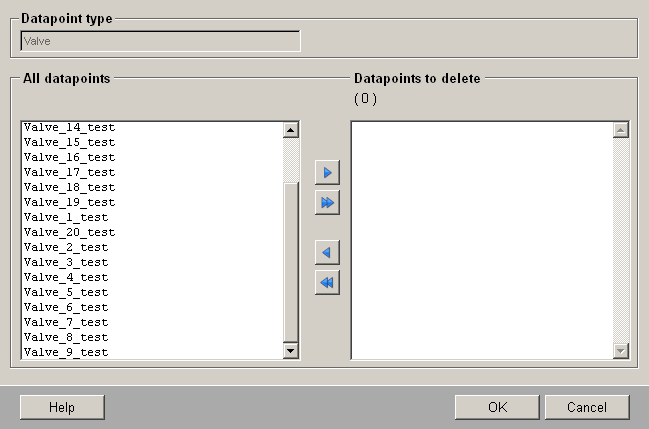
This panel has three sections:
- Top section: displays the datapoint type from which the datapoints are to be deleted (Datapoint type text field). This field is grayed out and cannot be changed.
- Left-hand section: all available datapoints are listed here in the selection list. Select one or more datapoints and click on the button displaying the single right-arrow to transfer the datapoints to the deletion list (right-hand section). The button displaying the double right-arrow selects all available datapoints in the list for deletion.
- Right-hand section: all datapoints selected for deletion are listed here. To restore datapoints that are destined for deletion to the list of all data points, follow exactly the same procedure as in the left-hand section (select datapoint in the right-hand list and click on the button displaying the left-arrow icon). Press OK after the confirmation prompt to delete the selected datapoints. The deletion process is displayed in a progress bar. Cancel closes the panel without deleting any datapoints; Help opens this page of the Online Help.
You can interrupt deletion of the datapoints at any time by clicking on the Close button in the progress bar window. The last action (deletion of the datapoint that was being processed when Close was clicked) continues until complete, before the whole process is terminated.
Example
The example involves deleting 10 datapoints of the datapoint type Valve with the names Valve_01_test to Valve_10_test, which you created earlier (see Creating multiple datapoints).
- Right-click on the datapoint type Valve and select the option Delete multiple datapoints.
-
Select the datapoints to the deleted and move these into the right-hand
selection list. (See also the figure below.)
Figure 2. Deleting 10 datapoints of type Valve 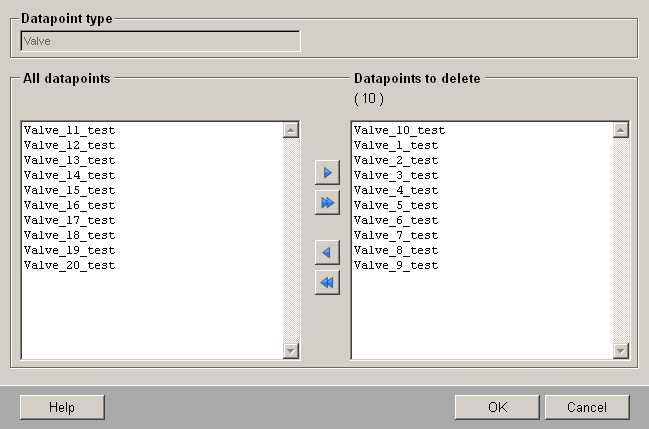
- Click on OK and confirm the prompt with Yes.
10 datapoints of type valve have been deleted. These datapoints are no longer displayed in the tree structure of the PARA module.