
Check group panel
The Check button opens a panel displaying all datapoints and datapoint elements in a group.
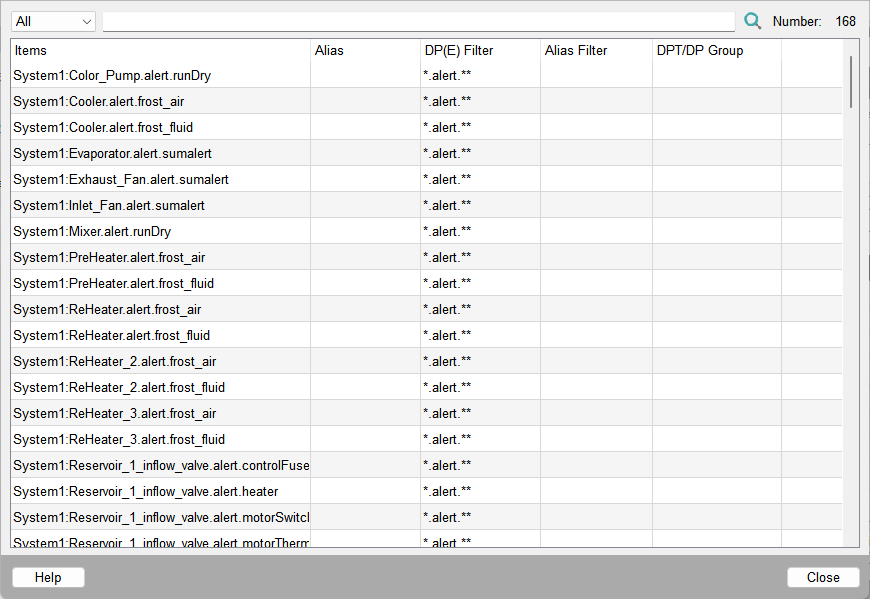
The table lists the following details:
- Occ
The number of occurrences of the datapoint elements in the group. Only displayed when you click Duplicates. Usually, a datapoint element should only occur once.
- Items
List of datapoints or datapoint elements selected by the filter options
- Alias
Alias names of the datapoint elements selected via filter options
- DP(E) filter
The search pattern (DP(E) filter) for datapoints or datapoint elements
- Alias filter
The alias filter (search pattern)
- DPT/DP group
Datapoint type of each element when a group is ungrouped, otherwise indication of type filtering options.
The number of items found is displayed in the upper right corner. In addition, you can use the combo box in the upper left corner to select the following modes:
- All
Displays the datapoint elements without regard for multiple occurrences
- Duplicates
Displays whether multiple instances of datapoint elements are found by the filter
- Alert
Choosing 'Alert' changes the display of the panel and shows what element in the system has a configured active or inactive alert handling. In the right upper corner of this panel you can see the number of configured alerts (active and inactive) with respect to the total number of elements in the group.
Figure 2. Alert panel 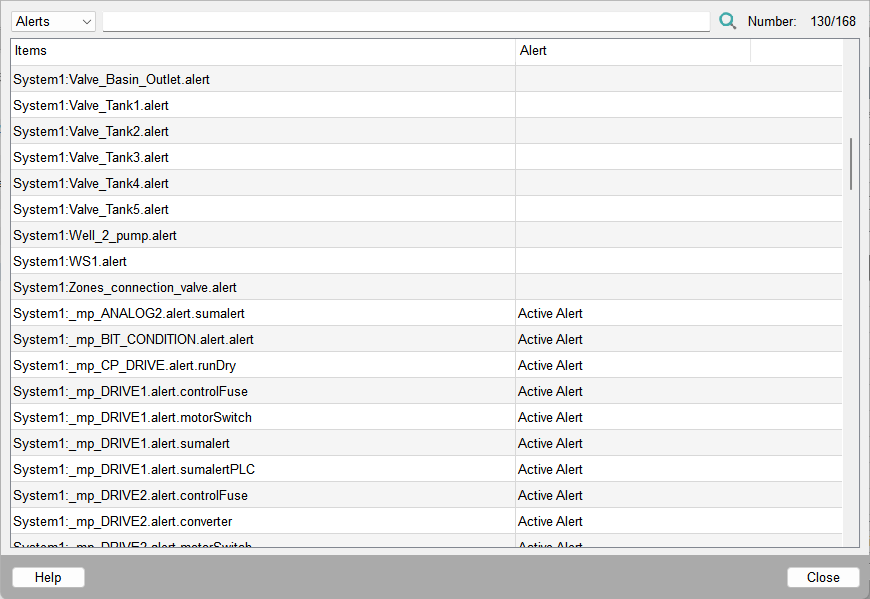
- Archive
Displays the archive associated with the datapoint element. The following buttons can be found along the bottom of the panel:
- Close
Closes the panel
- Help
Opens the description in the Online Help
| Example | Description |
| Working with DP groups | How to check your group settings. |
Use the search bar to find a specific datapoint element.