
Define DP(T) filter
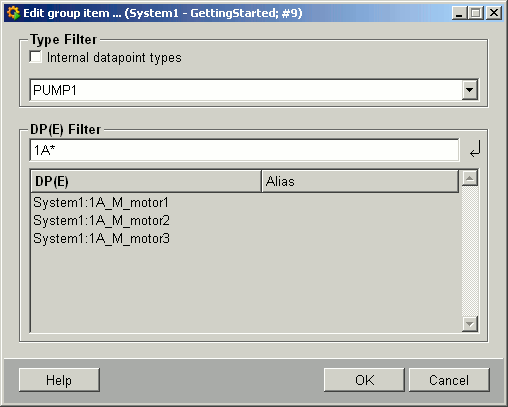
The +DP(T)-filter button opens a panel for defining filters for datapoints or datapoint elements. You can select a datapoint type or datapoint (and a filter) using wildcards. Associated datapoints are displayed. Data type and the appropriate filter settings (for example, PUMP1, 1A*) are added to the group administration panel.
-
Internal datapoint types
Selecting this option also displays the internal datapoint types in the combo box.
Combo box with selectable datapoint types.
-
DP(E)-Filter
Specify datapoints or identifiers using wildcards. After pressing ENTER to confirm, the existing datapoints matching the filter settings are displayed in the list.
Note:When defining an dp(e) filter, the following characters are not allowed: semi-colon ";", comma ",", right or left square brackets "[ ]", right or left curly brackets "{ }", blank space, question mark "?", backslash "\", percent sign "%", right or left brackets "( )" dollar symbol "$". Otherwise an error message is displayed.
-
OK
Applies filter settings in the input box to the group definition panel and adds them to the list of filters.
-
Cancel
Exits the panel.
-
Help
Opens the description in the online help.
| Example | Description |
| Working with DP groups | How to define a datapoint element filter. |