
STD_INDICATORS
The STD_INDICATORS contain a number of indicator instruments but also offer you the possibility to display datapoints in trend displays.
| Symbol | Symbol name | Description |
|---|---|---|

|
3D_pie_chart | Display a float/int value as a pie chart (in %) globally colored |

|
3D_pie_chart_simple | Display a float/int value as a pie chart (in %). |

|
bar_2 | Displays a float/int value as a horizontal bar |

|
bar_8 | Displays a float or integer value in the form of a bar. If the data point has an alert handling procedure, the top range of the bar is displayed red. |

|
pie_chart | 2 dimensional pie chart |

|
pillar_transparent | Displays a float/int value as a pillar (transparent) |

|
pillar_solid | Displays a float/int value as a pillar, with a height according to the value |

|
pillar_square_transparent | Displays a float/int value as a squared pillar (transparent) |

|
pillar_square_solid | Displays a float/int value as a pillar, with a height according to the value |

|
pointer_instrument | This symbol is used to display a value in the form of a pointer instrument. If the datapoint has an alert handling procedure, the top range of the bar is displayed red. Possible data types : integer, float |

|
pointer_instrument_2 | This (smaller) symbol is used to display a value in the form of a pointer instrument. If the datapoint has an alert handling procedure, the top range of the bar is displayed red. Possible data types : integer, float |

|
progress_bar |
This symbol can be used, for example, to signal a computing process. $dpe_value = 1 bar moves $dpe_value = 0 bar doesn't move. Possible data types : bool, float, integer (see showProgressBar(), openProgressBar(), closeProgressBar()) |

|
spinner |
The spinner is used to symbolize a rotation. $dpe_value = 1 spinner rotates, $dpe_value = 0 spinner stationary Possible data types : bool, float, integer |

|
tendency | Symbolizes,whether a float/int value (dpConnect()) increase or decrease. |

|
trend | This symbol is used to display a value in the form of an online trend display. |

|
wind_rose | Displays the angle of a float/int value (dpConnect); north = 0 °, south 180 °. |
trend
The trend symbol contains specific settings for trend display in its configuration panel.
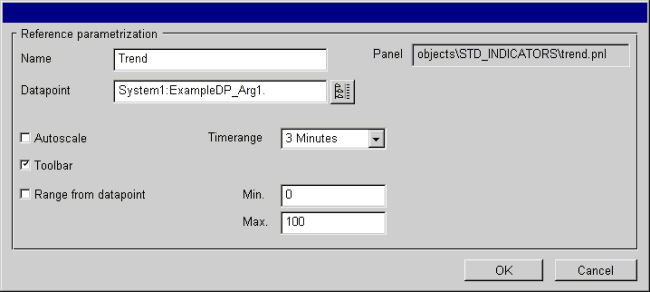
The configuration panel contains the following information:
Panel: Displays the directory path to the reference.
Name: Enter a specific name with which to address the object in scripts.
Datapoint: Specify a datapoint element or use the DP selector to select one.
Autoscale: Optionally, you can have the trend display scaled automatically, use the datapoint range or define any other range.
Toolbar: Option to display tools with which you can scale the trend display at runtime (see Vision/Trend).
Range from datapoint: Uses the scale defined according to the datapoint element range.
Min-Max: Here you can define a range.
Timerange: You can select pre-defined time ranges from this combo box.
OK:Saves any changes and closes the panel.
Cancel:Discards any changes and closes the panel.