
_auth (Authorization)
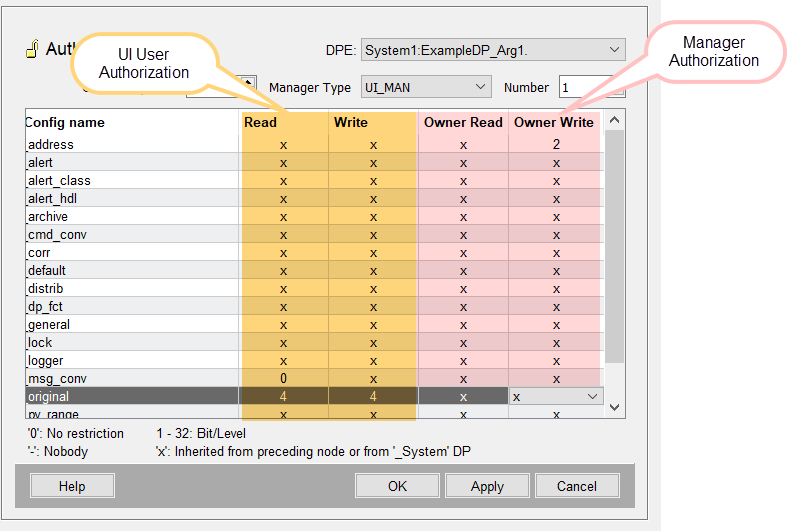
The authorizations for changing datapoint attributes are managed in the "_auth" config. Authorizations can be specified for each config of a datapoint element, e.g. for the datapoint functions of a node, etc. - see figure below.
A manager runs under a user. The user has general user permissions (see Authorization levels and Groups). The user permissions specify the "general" required permission level such as write or read access or right to acknowledge alerts for a specific group and the users of this group. See also chapter WinCC OA Authorization Concept for an overview of the different authorization types in WinCC OA.
Read and write permission for a specific datapoint config can, however, be specified by using the _auth config. This means that if a user does not have a permission to write datapoint values in a WinCC OA system, the user could, however, write the value of a specific datapoint by using the _auth config and setting an authorization for the _original config (see figure below). Therefore, the _auth config specifies an additional authorization level for datapoint configs.
_auth Config - Two Authorization Types: User and Manager Authorization
The _auth config contains two authorization types: user and manager authorization. The authorizations are "OR"-linked. This means that when a user has neither write nor read permission but a manager possess write rights, the user still possesses write rights. The same also applies to read permission. You can find a list of the WinCC OA managers for which an _auth config can be specified further below.
By specifying an auth config for a datapoint and by using the "Owner Write" authorization, you specify that a manager running under a specific user may, e.g., write and change the value of a datapoint. By using "Owner Read" you specify that a manager running under a specific user may only read the value of a datapoint. You can find the authorization table describing the user and manager authorization further below.
Examples for how to use an auth config for a manager are, e.g., a UI Manager that sets a value via a script or a driver that queries or sets a value. For an example of the _auth config, see further below.
DPE
The data point element or the alias to which the authorization is assigned.
Owner
The manager identifier in the upper part of the panel consists of "Owner" (System number), manager type and manager number.
The manager type contains all manager types available in the system.
Config Name
The column "Config name" contains the datapoint configs. Configs comprise properties that datapoints can possess in WinCC OA. For more information see chapter Datapoint configs, basics.
Read, Write, Owner Read, Owner Write
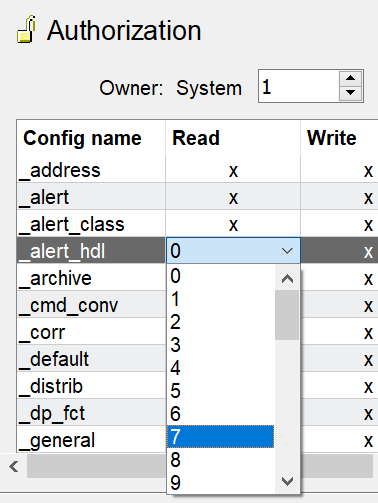
A table lists the configs and their authorization levels. Click on a line in the table to assign an authorization level to a config.
The _auth config contains two authorization types: user and manager and four authorizations: Read, Write, Owner Read and Owner Write. The authorizations are "OR"-linked. This means that when a user has neither write nor read permission but a manager possesses write rights, the user still possesses write rights. The same also applies to read permission.
| Authorization | Description |
| Read | Read permission for a user. |
| Write | Write permission for a user. |
| Owner Read | Read permission for a manager. |
| Owner Write | Write permission for a manager. |
If a user has no write rights, a value of a datapoint cannot be set via the dpSet* functions or via the function alertSet. An error message is output in the log viewer. In order to acknowledge an alert, the acknowledgement authorization of the alert class is checked (not the _auth config) - see the description further below.
The _auth config is not evaluated for historical queries.
Watch out when adding authorizations to managers or users. If a manager or user does not have read permission, a manager cannot be started and read values of data points. Similarly, a user cannot read values of a datapoint!
The following bits (authorization levels) can be set for the different configs:
| Bit (Authorization level) | Description |
| Bits 1-32 | The user need this bit in order to edit or read the config. You can set one of the bits 1-32. |
| 0 | No limitation. The config can be edited or read irrespective of the bits. |
| - | Nobody can edit or read the config. |
| x |
The authorization level (bit) is inherited from the higher-level node or if an authorization level was not defined for the higher-level node, the authorization is inherited from the _System datapoint. x (inheritance) is the default setting. |
Note, that the _auth config specifies read and write rights for a datapoint config. The user rights (see chapters Authorization levels and Groups) again "general" read/write/acknowledgement rights for a user.
If an _auth config is not available for a datapoint, the authorization is inherited from the _System datapoint.
The set authorization does not have an effect on the user root.
The internal user management datapoints (Datapoint type: _Users) possess the auth config with the authorization bits set by default for the configs _address, _default, dp_fct and _original. For the user management you need the bit 3.
The config attributes can be found in the Appendix.
_Auth Config Example: UI User Authorization
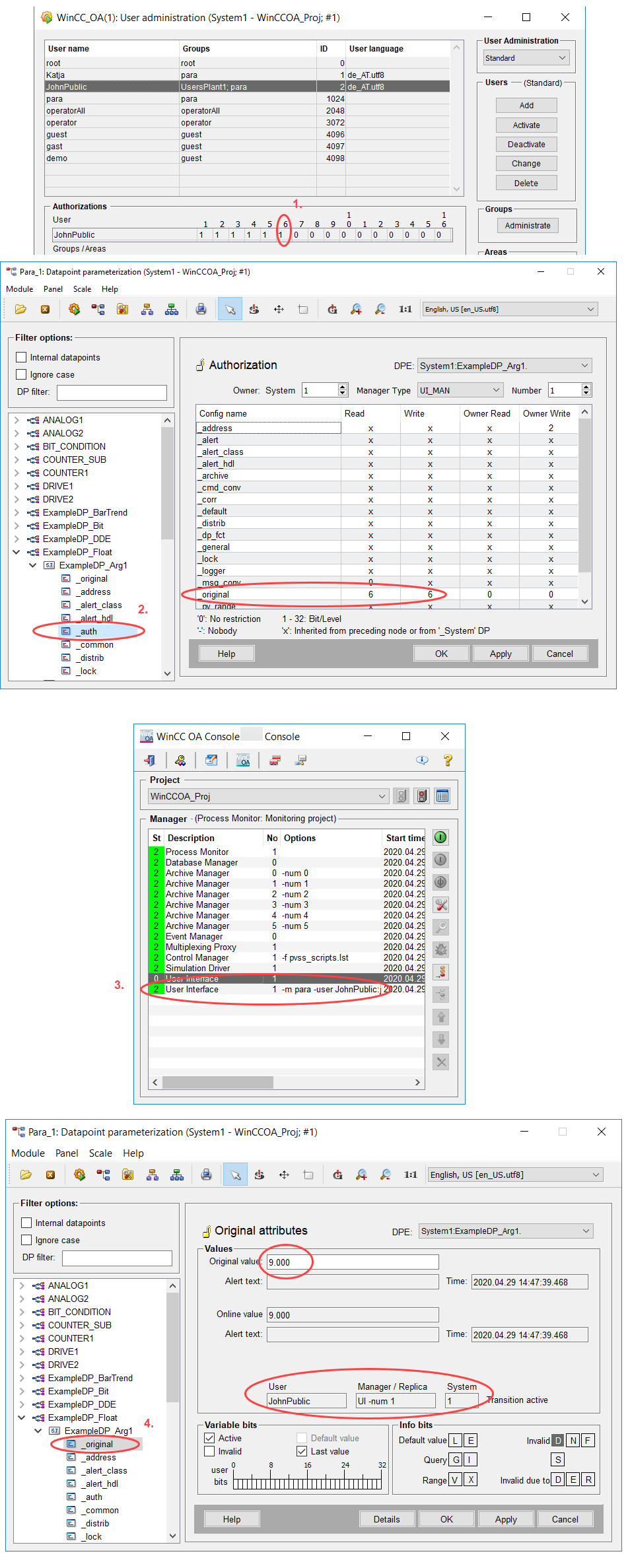
In this example, the bit 6 for "Write" was set for the UI Manager with the number 1. This means that a UI Manager with the number 1 running under a user who possesses the bit 6, may change the original value of the datapoint ExampleDP_Arg1.
- The user JohnPublic possesses the bit 6 that was set for the _auth config. The bit 6 is needed to set the original value of the datapoint ExampleDP_Arg1.
- A UI with the number 1 that was specified in the _auth config for the datapoint ExampleDP_Arg1. is opened with the user JohnPublic.
- JohnPublic can set the original value of the datapoint ExampleDP_Arg1.
_auth Config Example: Manager Authorization
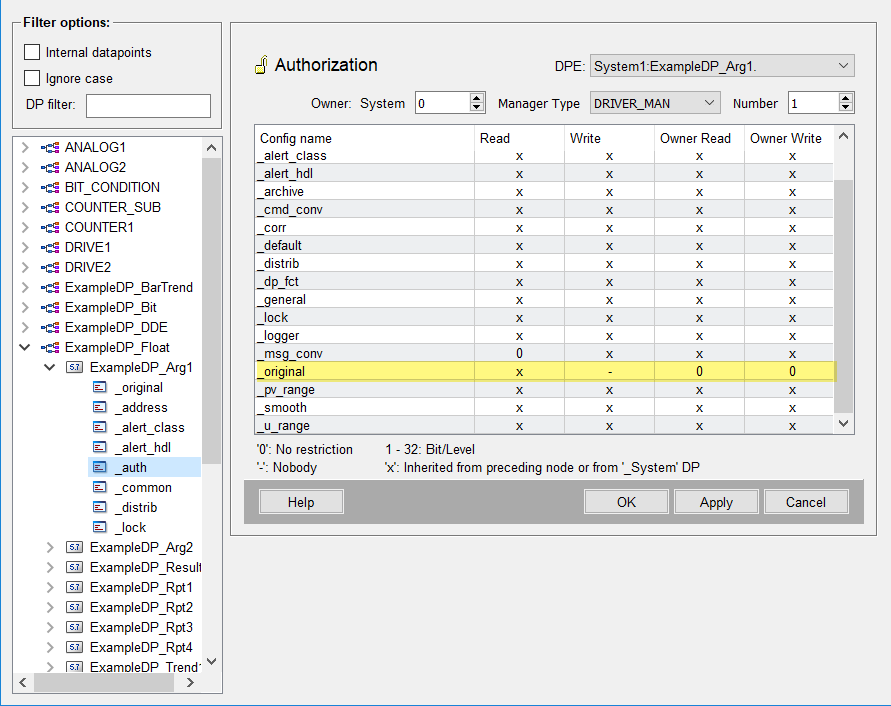
In this example only the driver manager can set the value of a datapoint. In other words only values from the PLC are accepted since the manager type is driver manager ("DRIVER_MAN").
- The _auth config was set for the datapoint ExampleDP_Arg1. for the manager type "DRIVER_MAN" with the number 1. The Write and read permissions for the manager were set to 0 (no restriction) and the write permission for the UI user to "Nobody" (-). Via these settings only values from the PLC are accepted.
_alert
The attribute _alert is an exception and not a "real" config. _alert contains the alert_hdl attributes of an alert instance that can be set or queried at runtime via the functions alertSet/alertGet e.g. _add_values
For all alert_hdl attributes, see chapter alert_hdl.
The configuration of an alert is saved in the config _alert_hdl (Alert handling). The attribute _alert only contains the runtime attributes of an alert and not the configuration.
CTRL Script Examples
This section contains examples of how to add an _auth config to a datapoint by using the CTRL language.
Examples
Only users with authorization level 3 may change an attribute of the "_default" config:
main(mapping event)
{
  dpSet("System1:ExampleDP_Result.:_auth._default._write", 3);
}
All users may configure peripheral addresses.
main(mapping event)
{
  dpSet("System1:ExampleDP_Result.:_auth._address._write", 0);
}
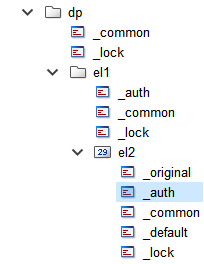
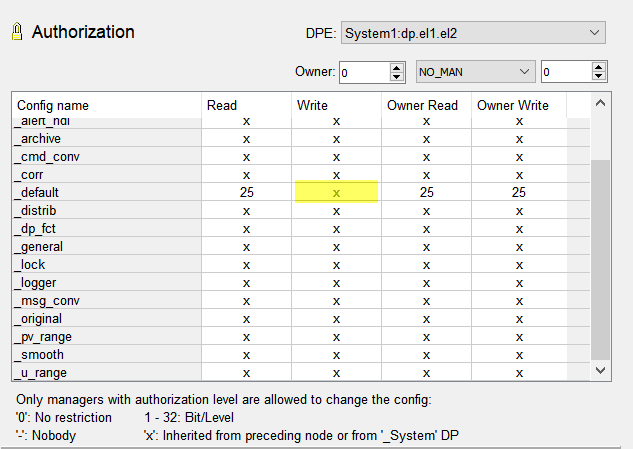
Authorizations for changing attributes of the "default" config of the element "dp.el1.el2" are inherited from the parent node "dp.el1". "x" is set for the "default" config in the "Write" column of the authorization config.
main(mapping event)
{
  dpSet("dp.el1.el2:_auth._default._write", 255);
}
Authorization for alerts
Writing authorization (edit):
In order to write alert attributes for example, at runtime via alertSet() function with _add_values to set additional values or let an alert "come" and "go" by setting the alert_hdl attribute _event ( ":_alert_hdl.2._event", DPATTR_ALERTEVENT_CAME), the authorization set via the _alert attribute of the _auth config is checked.
To enable the authorization, set the _auth config for a datapoint as well as an authorization level for the config "_alert_hdl" of the _auth config (see figure below).
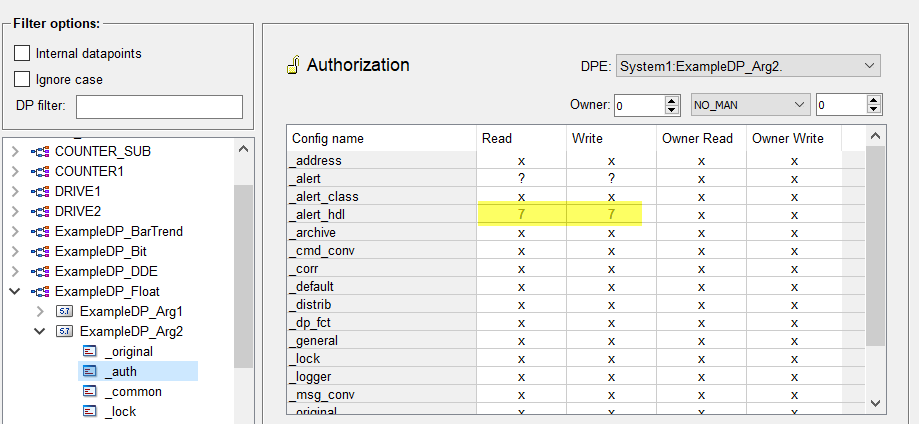
Note also that the set _auth authorization is checked for all alert_hdl attributes that can be set via the function alertSet(). This means that the _auth config is not only checked for the attributes "_add_values" and "_event" mentioned above but for all alertSet() attributes if the _auth config was set for a datapoint.
Acknowledgement rights:
In order to acknowledge an alert, the acknowledgement authorization of the alert class is checked. The authorization is set:
- In the alert handling configuration (_alert_hdl config) of the datapoint
-
The alert class set in the alert handling might request a certain authorization level to allow alert acknowledgement, see the alert class "040_warning" below as well as the second figure "Acknowledgement authorization in the internal alert class "warning" (alert priority 40)" below:
Figure 9. Datapoint "ExampleDP_arg2" and the config _alert_hdl - alert handling 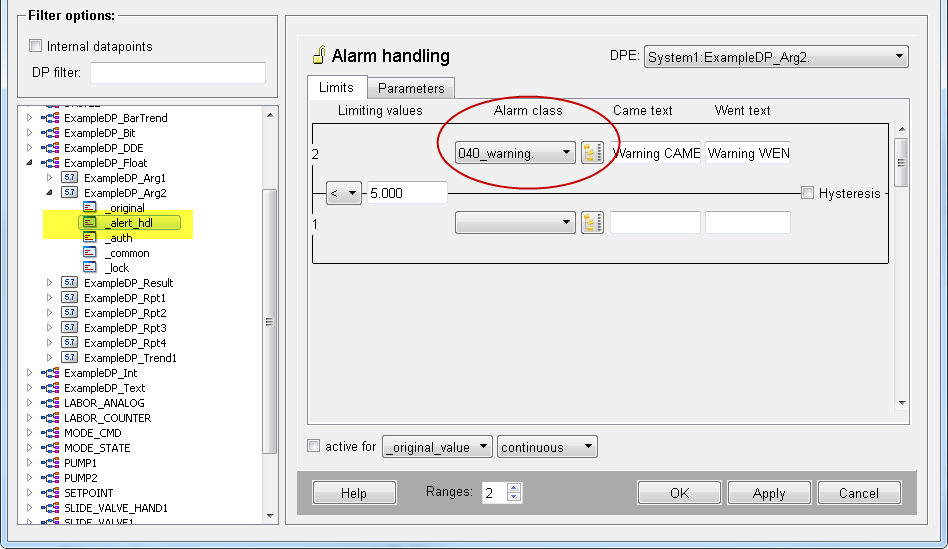
- In the internal alert class _AlertClass where the acknowledgement authorization for the alert class is specified.
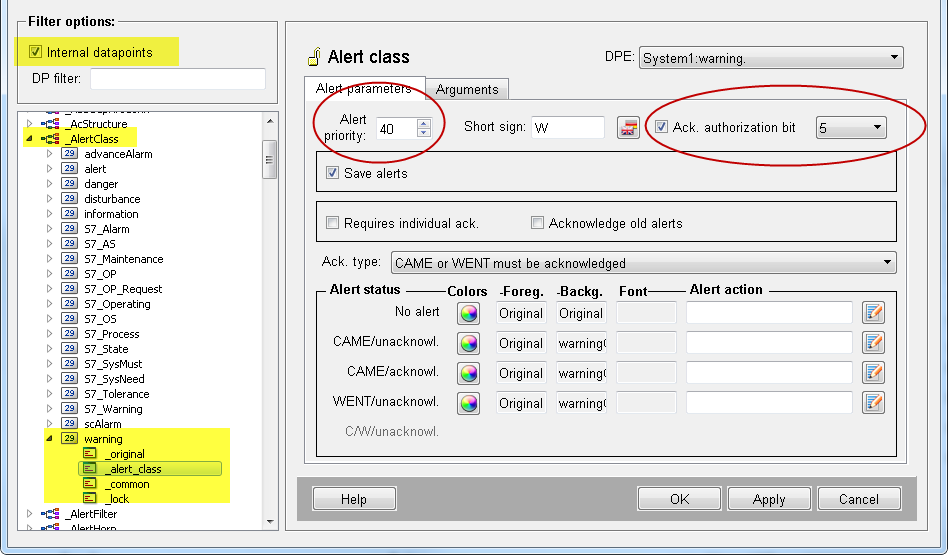
The alert class "warning" with the alert priority 40 was used for the alert handling of the datapoint "ExampleDP_arg2" when the alert class 040_warning was selected. Therefore, the acknowledgement authorization of the internal alert class is valid for the datapoint "ExampleDP_arg2".
3 different authorization scenarios are available:
- You can set the _auth config. The _auth config is checked when alert attributes are written.
- You can set the acknowledgement authorization for an alert class and thus for the alert handling when the same alert class is used for an alert handling of a datapoint.
- You can set both the _auth config as well as the acknowledgement authorization.