
Delayed Alerts
An alert delay can be configured with delayed alerts. This allows short range changes to be filtered out.
A delay time can be set per alert range (with the exception of the good range). The delay time means that an alert area in the "CAME" direction only becomes the current alert if the value is in this range longer than the delay time.
"WENT" alerts are always generated immediately, regardless of the message delay settings. The "delay time" is at most the manager-dispatch-loop time. By default, the time is 100 microseconds.

Functionality
If an alert transitions to a higher-priority area, a (“CAME” message) and a delay time is set for the target area, the initial area initially remains the current area. At the same time, time monitoring is started. Then there are three options:
- The value remains in the target range:
After the delay time has elapsed, the target area becomes the current area and a corresponding "CAME" message is generated.
- The value returns to the initial range:
The time monitoring is stopped and the initial state is reached again without generating a message.
- The value transitions to an area of even higher priority:
A "CAME" message is generated for the original target area. The time monitoring is then no longer active.
Whether a "CAME" message is then generated for the new area depends on its configuration of the delay time. If a delay time is configured, the cycle described above begins again. Therefore, if there is a delay time, the original target area becomes the current area, otherwise the new area becomes the current area.The delay time is only taken into account when a value change happens. If the system shuts down during the delayTime, after a restart the alerts will be immediately triggered.
Configuration
- To configure a delayed alert, open the PARA module and add an alert_hdl config to a datapoint. The delayed alert can be specified as a time interval in seconds via the text field
"Delay [s]" :
Figure 1. An Alert Delay for a Datapoint 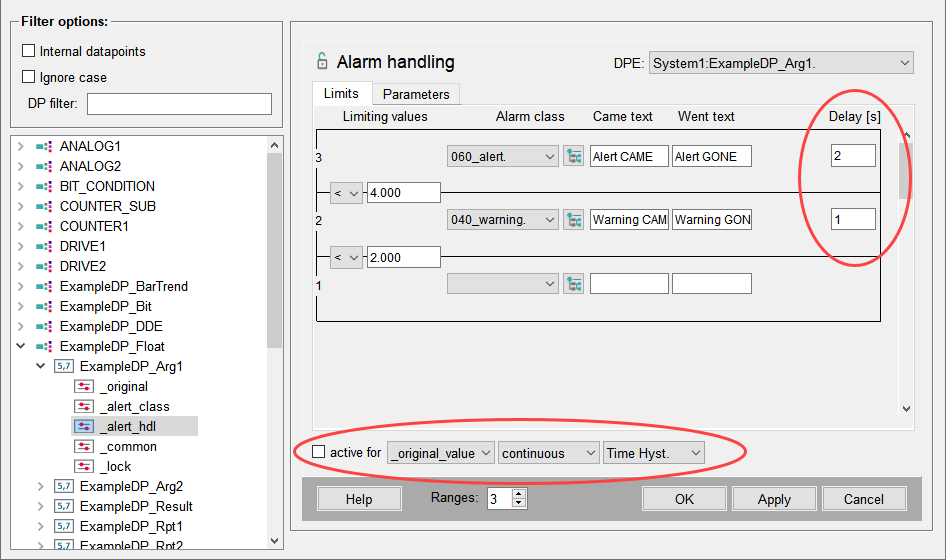
Alert Delay
- When the delay is higher than 0, the delayed alert functionality is activated for the alert range and the alert will be triggered when the specified delay condition is met.
- When delay interval is 0 (empty), there is no delay condition and an alert will be triggered immediately.
- The delay time is only taken into account when a value changes. This means that when the system shuts down during the delay time, the alerts will be triggered immediately after a restart.
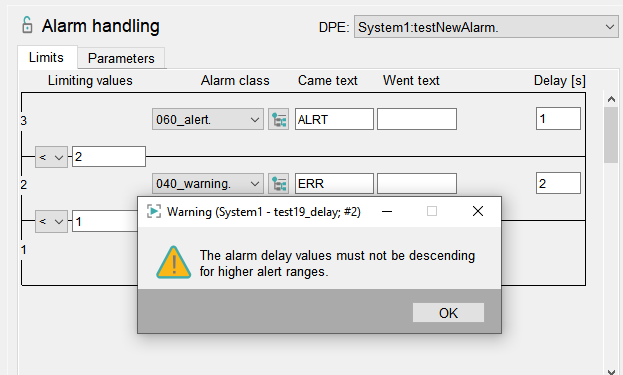
The delayed alert functionality is supported for the following datapoint types:
- DPEL_BOOL for the following alert config types:
- continuous
- discrete
- DPEL_UINT, DPEL_INT, DPEL_ULONG, DPEL_LONG, DPEL_FLOAT for the following alert config types:
- continuous
- discrete
- extended (For the "extended alert handling, set the config entry
useExtendedAlarmHandling = 1in the [ui] section of the config file.
_hyst_time (Delay) attribute
The _hyst_time attribute (called Delay in the alert_hdl configuration) specifies the minimum time in seconds that an alert must be in a bad range for it to be triggered. When the alert is back in a good range, it is immediately cleared. For an alert instance, the _alert_hdl.<detail>._hyst_time can be used to get the values used for an alert instance. The configuration applies per alert range.
Intermediate state
If a value came into a bad range while the _hyst_time (Delay) was set to a specific time e.g. 20 seconds and the system was restarted after 15 seconds - the alert will be in the intermediate state for another 20 seconds after the restart.
If an _alert_hdl is deactivated during the intermediate state, the alerts that have not yet been triggered will be discarded and will not be triggered after the came alert _delay_came expires.
Changing the hyst_time (Delay) attribute is not allowed while an _alert_hdl is active. This attribute is also read-only for an alert instance.
Debug Flags - Delayed Alerts
- Event-Man -report ALERTCOUNT (or -report ALL) will show the number of delayed alerts and the minimum and maximum remaining time of the alert delay.
- -dbg EV_WORK will print a line when an alert delay expires and the alert will be activated.
Restrictions
- Delayed Alerts can be used for CAME delay, but not for GONE delay.
- The delayed alert functionality cannot be used and is not shown for the following
alert config types:
- Multi-instance alert
- Summary alert
- The alert delay cannot be used in combination with a value-hysteresis by design.
Values of all alert config types for which a hysteresis can be used have a drop-down menu that allows selecting a hysteresis for all alert ranges:
Figure 3. Value Hysteresis 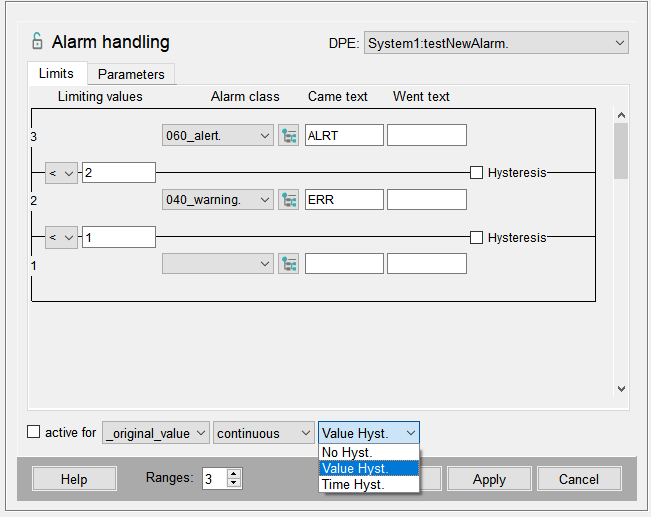
- If an alert has multiple ranges and an alert delay, and a value falls within a
higher range, the delay applies only to the highest range; all lower ranges trigger
immediately.
Note:The additional configuration of a time-dependent smoothing (_smooth config) can be used to delay a GONE message.
By using a time-dependent smoothing (_smooth Config), the timing of a GONE message can be indirectly influenced. The time-dependent smoothing discards all value changes within the smoothing period. A GONE message is therefore triggered only when, after the smoothing period has elapsed, a value change is accepted that moves the value into the good range.