Accessibility of Licenses - An Overview
Bare Metal Architecture
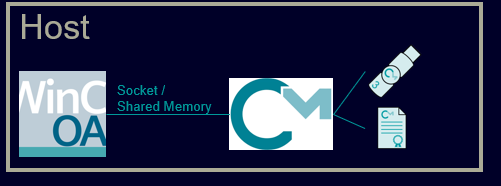
WinCC OA talks to the locally installed CodeMeter Runtime on a native PC. CodeMeter Runtime provides licenses. CmAct License or Dongle can be connected locally or via a license server. See WinCC OA Bare Metal
WinCC OA in a Docker Container
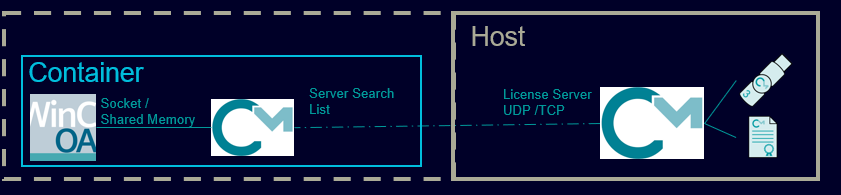
Run WinCC OA in a Docker container. CodeMeter Runtime is installed natively and provides a licence. Licences are stored outside the Docker container. Connection to the inside of the container via licence server. See WinCC OA in a Docker Container.
WinCC OA and CodeMeter Runtime in Docker Container
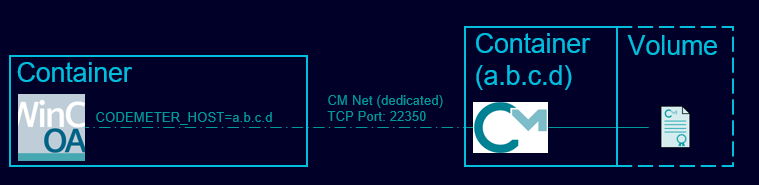
WinCC OA and CodeMeter are executed in dedicated Docker Containers. The CodeMeter Runtime installed in WinCC OA Containers is not executed. Licenses are stored in the context of the CodeMeter Container. The CodeMeter container can be accessed from the WinCC OA container via sockets. See WinCC OA and CodeMeter Runtime in Docker Container.
WinCC OA and CodeMeter Runtime in Docker Container with license server
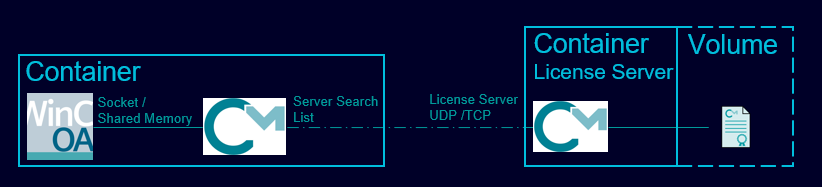
WinCC OA and CodeMeter are hosted in their dedicated containers. WinCC OA container executes additionally a CodeMeter Runtime. Licensing in WinCC OA is carried out via the license server feature. See Docker Container with License server.