
Docker Support
An introduction on how to use WinCC OA within a Docker container, what specifics must be considered and where to find further information on the topic.
What is Docker?
Docker serves as an innovative platform designed to streamline the entire lifecycle of software applications, from development to deployment and execution. It achieves this by utilizing 'containers'—self-contained, isolated units that neatly package an application along with all its essential components, such as code, libraries, and configurations. This elegant solution offers a distinct advantage over traditional methods or resource-intensive virtual machines, as containers are remarkably lightweight and guarantee consistent application performance across diverse computing environments, thereby significantly enhancing reliability and efficiency.
Docker Image
docker build -t winccoa321. #Executed in the local directory.
#You must download the Debian packages before executing this command
Future support for patch-based images is planned to enhance deployment efficiency.
Example: To load a PostgreSQL® image from GIT hub:
docker pull postgres:16Container Management and Licensing
Docker container management allows applications like WinCC OA to be run in isolated, configurable environments. Containers can be started, stopped, inspected, and accessed via graphical tools like Portainer or through command-line commands. Key functions include viewing logs, opening terminal sessions, and forwarding network ports for web access. Licensing is handled dynamically: the container connects to a license server defined by an environment variable. If multiple license containers exist, the correct one must be specified in the project configuration using a serial number. This ensures the application runs with a valid license and without warnings. Persistent data can be maintained by mounting external volumes.
The CodeMeter license server can either be running on a separate server or as service on the host machine which provides the Docker environment.
A CodeMeter license server requires the installation and corresponding server configuration of the CodeMeter runtime. The runtime is provided as part of the setup or can be downloaded, for Linux only, from www.winccoa.com or directly from the vendor website http://www.wibu.com.
http://www.wibu.com also provides extensive descriptions for the configuration of a CodeMeter license server.
Depending on how the DNS configuration can be passed through in Docker, specify the license server either as a hostname or as an IP address.
Use one of the following options to start the container with the created Docker image.
By default, the path home/winccoa/oaproj/ is used. To specify a
different path, use the optional argument -e OAPROJ= of the docker run
command and mount a volume with -v parameter.
Use the optional -p argument of the docker run command
to map all necessary ports for your project to the Docker container.
Option 1: Run it manually:
docker run --rm --name Demo -p 8443:8443 -e OAPROJ=/opt/WinCC_OA/3.20/DemoApplication_3.20_mount -e LICENSESERVER=<IP from License server e.g. 172.28.224.1> -v /mnt/c/WinCC_OA_Proj/DemoApplication_3.20:/opt/WinCC_OA/3.20/DemoApplication_3.20_mount winccoa320_4Replace the license server placeholder in the command with your server’s IP address (for example, 172.28.224.1).
Option 2: Use Docker Compose with a YAML file:
docker compose -f docker-compose_0.yml up#YAML FILE:
#docker run -d --rm --name winccoa -p 8443:8443 -e OAPROJ=/opt/WinCC_OA/3.20/DemoApplication_3.20_mount -e LICENSESERVER=172.28.224.1 -v /mnt/c/WinCC_OA_Proj/DemoApplication_3.20:/opt/WinCC_OA/3.20/DemoApplication_3.20_mount winccoa320
services:
Demo: #name
image: winccoa320_4 #image name
container_name: Demo
volumes:
- /mnt/c/WinCC_OA_Proj/DemoApplication_3.20:/opt/WinCC_OA/3.20/DemoApplication_3.20_mount
environment:
- OAPROJ=/opt/WinCC_OA/3.20/DemoApplication_3.20_mount
- LICENSESERVER=172.28.224.1
ports:
- 8443:8443Running multiple Containers
//Starting Docker Compose
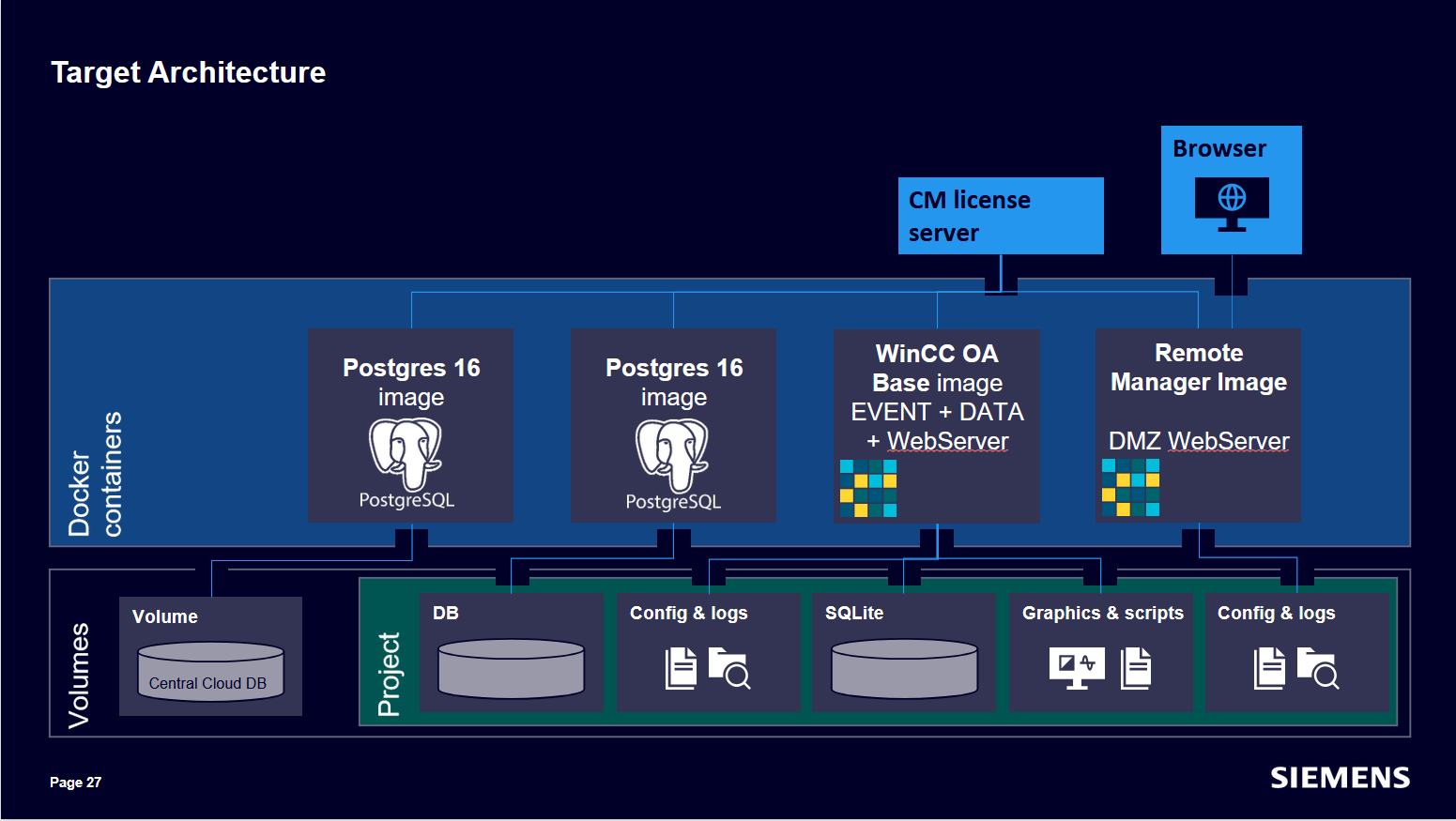
docker compose -f docker-compose.yml upManaging multiple Docker containers is best done using Docker Compose, which allows
defining services, volumes, networks, and environment variables in a single YAML file. This
approach ensures consistent configuration and simplifies deployment. In a typical setup,
containers for WinCC OA, PostgreSQL® (local and cloud), and a remote web
server are orchestrated together. Each service is configured with its own image, ports, and
volumes (To have the whole project source in a single directory, the project mounts
different config and log folders into the Docker containers), enabling modular and
scalable architecture. Data persistence is ensured through mounted volumes, and environment
variables are used to configure licensing and connectivity. The architecture supports
distributed archiving by connecting multiple PostgreSQL® instances and defining archive
groups. A remote manager container in the DMZ acts as a secure interface for external
access, using a minimal project structure and dedicated config and log folders. Docker
Compose commands like up and down as well as
--force-recreate manage the lifecycle of containers, while port mapping
and service separation ensure secure and efficient communication between components.
The following example shows a progressive configuration:
services:
  winccoa: #name
    build: ../../WinCCOA_320_4
    image: winccoa320_4 #image name
    container_name: winccoa
    volumes:
      - ./dockerExample_ED:/opt/WinCC_OA_proj/dockerExample_ED
    environment:
      - OAPROJ=/opt/WinCC_OA_proj/dockerExample_ED
      - LICENSESERVER=172.28.224.1
    ports:
      - 127.0.0.1:4897:4897 #dataPort for remote GEDI/PARA
      - 127.0.0.1:4998:4998 #eventPort for remote GEDI/PARA
      - 8449:8449 #webSocket (dashboard server)
- 8843:8843 #webServer https://localhost:8843/#/login?dbrwservices:
winccoa: #name
build: ../../WinCCOA_320_4
image: winccoa320_4 #image name
container_name: winccoa
volumes:
- ./dockerExample_ED:/opt/WinCC_OA_proj/dockerExample_ED
environment:
- OAPROJ=/opt/WinCC_OA_proj/dockerExample_ED
- LICENSESERVER=172.28.224.1
ports:
- 127.0.0.1:4897:4897 #dataPort for remote GEDI/PARA
- 127.0.0.1:4998:4998 #eventPort for remote GEDI/PARA
- 8449:8449 #webSocket (dashboard server)
- 8843:8843 #webServer https://localhost:8843/#/login?dbrw
postgres: #name
image: postgres:16
container_name: postgres
volumes:
- ./dockerExample_ED/db/wincc_oa/localdb/postgresql/16:/var/lib/postgresql/data
environment:
- PGDATA=/var/lib/postgresql/data/pgdata services:
winccoa: #name
build: ../../WinCCOA_320_4
image: winccoa320_4 #image name
container_name: winccoa
volumes:
- ./dockerExample_ED:/opt/WinCC_OA_proj/dockerExample_ED
environment:
- OAPROJ=/opt/WinCC_OA_proj/dockerExample_ED
- LICENSESERVER=172.28.224.1
ports:
- 127.0.0.1:4897:4897 #dataPort for remote GEDI/PARA
- 127.0.0.1:4998:4998 #eventPort for remote GEDI/PARA
- 8449:8449 #webSocket (dashboard server)
- 8843:8843 #webServer https://localhost:8843/#/login?dbrw
postgres: #name
image: postgres:16
container_name: postgres
volumes:
- ./dockerExample_ED/db/wincc_oa/localdb/postgresql/16:/var/lib/postgresql/data
environment:
- PGDATA=/var/lib/postgresql/data/pgdata
postgresCloud: #name
image: postgres:16
container_name: postgresCloud
volumes:
- postgresCloudDBFolder:/var/lib/postgresql/data
environment:
- POSTGRES_PASSWORD=etm#123
- PGDATA=/var/lib/postgresql/data/pgdata
volumes:
postgresCloudDBFolder:services:
winccoa: #name
build: ../../WinCCOA_320_4
image: winccoa320_4 #image name
container_name: winccoa
volumes:
- ./dockerExample_ED:/opt/WinCC_OA_proj/dockerExample_ED
environment:
- OAPROJ=/opt/WinCC_OA_proj/dockerExample_ED
- LICENSESERVER=172.28.224.1
ports:
- 127.0.0.1:4897:4897 #dataPort for remote GEDI/PARA
- 127.0.0.1:4998:4998 #eventPort for remote GEDI/PARA
# - 8449:8449 #webSocket (dashboard server)
# - 8843:8843 #webServer https://localhost:8843/#/login?dbrw
webserver: #name
build: ../../remoteManager_320_4
image: winccoa_remote320_4 #image name
container_name: webserver
volumes:
- ./dockerExample_ED/web_config:/opt/WinCC_OA_proj/remote/config
- ./dockerExample_ED/web_log:/opt/WinCC_OA_proj/remote/log
- ./dockerExample_ED/data:/opt/WinCC_OA_proj/remote/data #webserver files
environment:
- EMPTYPROJ=/opt/WinCC_OA_proj/remote
- OAPROJ=/opt/WinCC_OA_proj/remote
ports:
- 9449:8449 #webSocket (dashboard server)
- 9843:8843 #webServer https://localhost:8879/#/login?dbrw https://localhost:8843/#/login?dbrw
postgres: #name
image: postgres:16
container_name: postgres
volumes:
- ./dockerExample_ED/db/wincc_oa/localdb/postgresql/16:/var/lib/postgresql/data
environment:
- PGDATA=/var/lib/postgresql/data/pgdata
postgresCloud: #name
image: postgres:16
container_name: postgresCloud
volumes:
- postgresCloudDBFolder:/var/lib/postgresql/data
environment:
- POSTGRES_PASSWORD=etm#123
- PGDATA=/var/lib/postgresql/data/pgdata
volumes:
postgresCloudDBFolder:# - 8449:8449 #webSocket (dashboard server)
# - 8843:8843 #webServer https://localhost:8843/#/login?dbrw
webserver: #name
build: ../../remoteManager_320_4
image: winccoa_remote320_4 #image name
container_name: webserver
volumes:
- ./dockerExample_ED/web_config:/opt/WinCC_OA_proj/remote/config
- ./dockerExample_ED/web_log:/opt/WinCC_OA_proj/remote/log
- ./dockerExample_ED/data:/opt/WinCC_OA_proj/remote/data #webserver files
environment:
- EMPTYPROJ=/opt/WinCC_OA_proj/remote
- OAPROJ=/opt/WinCC_OA_proj/remote
ports:
- 9449:8449 #webSocket (dashboard server)
- 9843:8843 #webServer https://localhost:8879/#/login?dbrw https://localhost:8843/#/login?dbrw
services:
  winccoa: #name
    build: ../../WinCCOA_320_4
    image: winccoa320_4 #image name
    container_name: winccoa
    volumes:
      - ./dockerExample_ED:/opt/WinCC_OA_proj/dockerExample_ED
    environment:
      - OAPROJ=/opt/WinCC_OA_proj/dockerExample_ED
      - LICENSESERVER=172.28.224.1
    ports:
      - 127.0.0.1:4897:4897 #dataPort for remote GEDI/PARA
      - 127.0.0.1:4998:4998 #eventPort for remote GEDI/PARA
#      - 8449:8449 #webSocket (dashboard server)
#      - 8843:8843 #webServer https://localhost:8843/#/login?dbrw
  webserver: #name
    build: ../../remoteManager_320_4
    image: winccoa_remote320_4 #image name
    container_name: webserver
    volumes:
      - ./dockerExample_ED/web_config:/opt/WinCC_OA_proj/remote/config
      - ./dockerExample_ED/web_log:/opt/WinCC_OA_proj/remote/log
      - ./dockerExample_ED/data:/opt/WinCC_OA_proj/remote/data #webserver files
    environment:
      - EMPTYPROJ=/opt/WinCC_OA_proj/remote
      - OAPROJ=/opt/WinCC_OA_proj/remote
    ports:
      - 9449:8449 #webSocket (dashboard server)
      - 9843:8843 #webServer https://localhost:8879/#/login?dbrw  https://localhost:8843/#/login?dbrw
  postgres: #name
    image: postgres:16
    container_name: postgres
    volumes:
      - ./dockerExample_ED/db/wincc_oa/localdb/postgresql/16:/var/lib/postgresql/data
    environment:
      - PGDATA=/var/lib/postgresql/data/pgdata
  postgresCloud: #name
    image: postgres:16
    container_name: postgresCloud
    volumes:
      - postgresCloudDBFolder:/var/lib/postgresql/data
    environment:
      - POSTGRES_PASSWORD=etm#123
      - PGDATA=/var/lib/postgresql/data/pgdata
volumes:
postgresCloudDBFolder:Health Check
//dockerHealthCheck.ctl allows you to use the command:
system health state
depends_on:
winccoa:
condition: service_healthy
stop_grace_period: 2m
services:
winccoa: #name
build: ../../WinCCOA_320_4
image: winccoa320_4 #image name
container_name: winccoa
volumes:
- ./dockerExample_ED:/opt/WinCC_OA_proj/dockerExample_ED
environment:
- OAPROJ=/opt/WinCC_OA_proj/dockerExample_ED
- LICENSESERVER=172.28.224.1
ports:
- 127.0.0.1:4897:4897 #dataPort for remote GEDI/PARA
- 127.0.0.1:4998:4998 #eventPort for remote GEDI/PARA
#      - 8449:8449 #webSocket (dashboard server)
#      - 8843:8843 #webServer https://localhost:8843/#/login?dbrw
webserver: #name
build: ../../remoteManager_320_4
image: winccoa_remote320_4 #image name
container_name: webserver
volumes:
  - ./dockerExample_ED/web_config:/opt/WinCC_OA_proj/remote/config
  - ./dockerExample_ED/web_log:/opt/WinCC_OA_proj/remote/log
  - ./dockerExample_ED/data:/opt/WinCC_OA_proj/remote/data #webserver files
environment:
  - EMPTYPROJ=/opt/WinCC_OA_proj/remote
  - OAPROJ=/opt/WinCC_OA_proj/remote
ports:
  - 9449:8449 #webSocket (dashboard server)
  - 9843:8843 #webServer https://localhost:8879/#/login?dbrw  https://localhost:8843/#/login?dbrw
depends_on:
winccoa:
condition: service_healthy
stop_grace_period: 2m
postgres: #name
image: postgres:16
container_name: postgres
volumes:
- ./dockerExample_ED/db/wincc_oa/localdb/postgresql/16:/var/lib/postgresql/data
environment:
- PGDATA=/var/lib/postgresql/data/pgdata
postgresCloud: #name
image: postgres:16
container_name: postgresCloud
volumes:
- postgresCloudDBFolder:/var/lib/postgresql/data
environment:
- POSTGRES_PASSWORD=etm#123
- PGDATA=/var/lib/postgresql/data/pgdata
volumes:
postgresCloudDBFolder:
Updating
Docker simplifies software updates by allowing seamless deployment of new images. For instance, updating WinCC OA involves building a new image via Docker Compose and restarting the setup. This approach ensures efficient patch application with minimal disruption, if the provided application is properly prepared for containerized deployment.
// start a build
docker compose -f docker-compose.yml build
Run with a new patch
docker compose -f docker-compose.yml up
build: ../../WinCCOA_320_6
image: winccoa320_6 #image name
build: ../../remoteManager_320_6
image: winccoa_remote320_6 #image name
services:
  winccoa: #name
    build: ../../WinCCOA_320_6
    image: winccoa320_6 #image name
    container_name: winccoa
    volumes:
      - ./dockerExample_ED:/opt/WinCC_OA_proj/dockerExample_ED
    environment:
      - OAPROJ=/opt/WinCC_OA_proj/dockerExample_ED
      - LICENSESERVER=172.28.224.1
    ports:
      - 127.0.0.1:4897:4897 #dataPort for remote GEDI/PARA
      - 127.0.0.1:4998:4998 #eventPort for remote GEDI/PARA
#      - 8449:8449 #webSocket (dashboard server)
#      - 8843:8843 #webServer https://localhost:8843/#/login?dbrw
  webserver: #name
    build: ../../remoteManager_320_6
    image: winccoa_remote320_6 #image name
    container_name: webserver
    volumes:
      - ./dockerExample_ED/web_config:/opt/WinCC_OA_proj/remote/config
      - ./dockerExample_ED/web_log:/opt/WinCC_OA_proj/remote/log
      - ./dockerExample_ED/data:/opt/WinCC_OA_proj/remote/data #webserver files
    environment:
      - EMPTYPROJ=/opt/WinCC_OA_proj/remote
      - OAPROJ=/opt/WinCC_OA_proj/remote
    ports:
      - 9449:8449 #webSocket (dashboard server)
      - 9843:8843 #webServer https://localhost:8879/#/login?dbrw  https://localhost:8843/#/login?dbrw
    depends_on:
      winccoa:
        condition: service_healthy
    stop_grace_period: 2m
  postgres: #name
    image: postgres:16
    container_name: postgres
    volumes:
      - ./dockerExample_ED/db/wincc_oa/localdb/postgresql/16:/var/lib/postgresql/data
    environment:
      - PGDATA=/var/lib/postgresql/data/pgdata
  postgresCloud: #name
    image: postgres:16
    container_name: postgresCloud
    volumes:
      - postgresCloudDBFolder:/var/lib/postgresql/data
    environment:
      - POSTGRES_PASSWORD=etm#123
      - PGDATA=/var/lib/postgresql/data/pgdata
volumes:
  postgresCloudDBFolder: