
DirectWrite for PLC's (OPC UA Driver)
This chapter provides an overview of the DirectWrite feature for PLC's (OPC UA Driver)
In directWrite, the Event Manager does not handle the value directly. Instead, it passes the value to the relevant driver, which then transmits it to the PLC.
Before forwarding, the Event Manager performs essential checks, such as verifying locks, checking value ranges, and confirming user permissions. If any of these checks fail, the Event Manager immediately returns an error to the client.
After the driver confirms that the value has been successfully sent to the PLC and either accepted or rejected, the Event Manager sends feedback to the client (the original requester) with the corresponding response.
The DirectWrite process ensures that the user receives the actual result of the write request for the command value in the PLC.
- The user can easily check if their value has been received by the PLC or, if there is an error, if it has been rejected (atomic confirmation). The device (PLC) sends an error code directly back if a problem occurs.
- DirectWrite improves reliability, which is especially important for safety or security operations, or when network quality is uncertain.
- Two new functions are now available: dpDirectRead() and dpDirectWrite(). With these functions, you can read values directly from the PLC or write them directly to the PLC without using a datapoint. Simply use the address config, which defines the connection to the PLC.
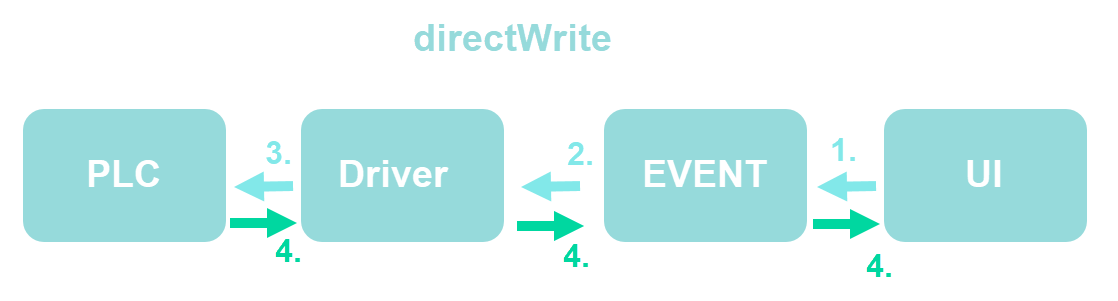
directWrite
- The user sets a value in the UI, which is then sent to the EVENT.
- The EVENT forwards this message to the driver.
- The driver processes the value, applies any necessary transformations, and sends it to the PLC.
- When the driver receives an acknowledgment message from the PLC, it sends a response back to the EVENT. The EVENT then forwards this response to the UI.
DirectWrite - Restrictions
This chapter outlines the restrictions for directWrite.
The current solution approach focuses only on process value commands and does not include alarm integration, such as alarm acknowledgment in the PLC. Alarm integration is not part of the first release but may be considered for future updates.
dpDirectWrite will not work for Input-only addresses.