
STD_LEDS
These symbols can be used to display bit messages as LEDs (for status displays such as On, Off, etc.).
| Symbol | Symbol name | Description |

|
Led_1 | This symbol is used to display bit messages such as On/Off, etc. |

|
Led_2 | This symbol is used to display bit messages such as On/Off, etc. |

|
Led_3 | This symbol is used to display bit messages such as On/Off, etc. |

|
Led_32Bits | This symbol is used to display bit messages for bit 32 pattern. |

|
Led_4 | This symbol is used to display bit messages such as On/Off, etc. |

|
Led_5 | This symbol is used to display bit messages such as On/Off, etc. |

|
Led_6 | This symbol is used to display bit messages such as On/Off, etc. |

|
LED_invalid_default | This symbol displays the invalid bit and the default value bit of the configured datapoint. |

|
Led_OnOff_1 | This symbol combines two LEDs. |

|
Led_OnOff_2 | This symbol combines two LEDs. |

|
Led_OnOff_3 | This symbol combines two LEDs. |

|
Led_userBits | This symbol displays a DPE's user bits. |
Led_1
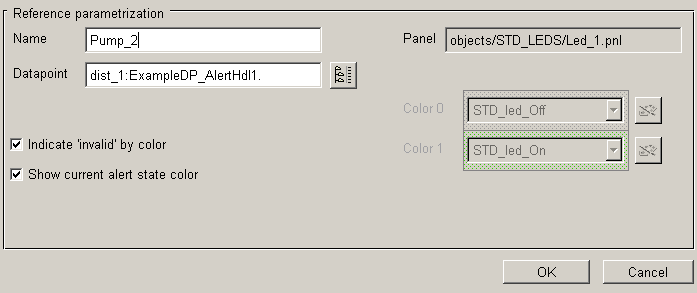
This symbol, like most of the others, has options to display the alert color ("Show current alert state color") and the invalid color ("indicate "invalid" by color") in the reference editor. By default, the on/off status is displayed by STD_led_Off/STD_led_On, but you can define other colors using the Color Editor. When the alert color is selected ("Show current alert state color") the status color is grayed out.
Led_32Bits
This symbol is used to display bit32 status displays. Again, the set bits are displayed by STD_led_On.

Led_On_Off
Same principle as Led_1 (and the others); the only difference is that you have to specify two datapoint elements (On/Off) in this case!