STD_INPUTS
You can use the symbols in this group to change values of configured datapoints.
| Symbol | Symbol name | Description |

|
Date | This symbol writes a date to datapoints of the time type. |

|
Date_Time | This symbol writes a date and time to datapoints of the time type. |

|
decrement | This symbol reduces (decrements) the configured datapoint. Possible data types : integer, float |

|
decrementFast | This symbol reduces (decrements) the configured datapoint. Possible data types : integer, float |
| EnterValue64 | This symbol can be used to display a hexadecimal value or decimal value | |
| EnterValue32 | This symbol can be used to display a hexadecimal value or decimal value | |

|
From_To | This symbol describes two datapoints of the time type. Possible data types : time |

|
hornAckClient | For acknowledging a horns signal; the client uses the configuration of the panel alertHornProps.pnl (see WinCC OA DemoApplication, Alert horn) |

|
hornAckServer | For acknowledging a horns signal from a UI; have to be acknowledged separately from the client. |

|
inc_dec |
This symbol increases (increments) and reduces (decrements) the configured datapoint. Possible data types : integer, float |

|
inc_decFast |
This symbol increases (increments) and reduces (decrements) the configured datapoint. Possible data types : integer, float |

|
increment |
This symbol increases (increments) the configured datapoint. Possible data types : integer, float |

|
incrementFast | This symbol increases (increments) the configured datapoint. Possible data types : integer, float |

|
int |
This symbol writes integer values to datapoints (1 spin button per digit). Press this button to transfer the set value to the data point. Possible data types : integer, float (no decimal places are displayed) |

|
int2 |
This symbol writes integer values to datapoints (1 spin button per digit). Press this button to transfer the set value to the data point. Possible data types : integer, float (no decimal places are displayed) |

|
NumBlock |
This symbol writes integer values and float values to datapoints. The value is written to the datapoint by confirming it in the Value Editor. Possible data types : integer, float |

|
Time | This symbol writes a time to datapoints of the time type. |

|
Value |
This symbol writes integer values and float values to datapoints. The value is written to the datapoint by pressing Return. Possible data types : integer, float |
Because these symbols only require you to select one datapoint element (two datapoint elements in the case of FromTo) of the appropriate type, we will not describe the reference panels in this group.
Date_Time
When you press Accept the symbol copies a set date and time to the specified datapoint element of the time type.

From_To
The symbol shows the time of the two specified datapoint elements (type: time).
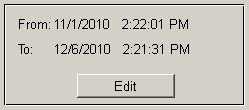
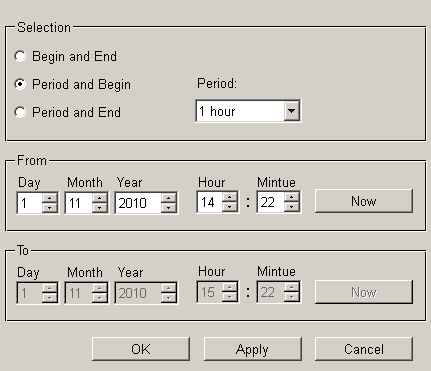
Press Edit to open a panel used to set ranges and times copied to the data point elements by pressing Accept.