
SNMP Driver Configuration
Before you can use the SNMP feature you have to configure the SNMP Agents (and thereby create a Manager DP and an Agent DP that belongs to the Manager DP) via the SNMP configuration panels.
This chapter describes the SNMP configuration panels for Agent configuration.
Open the SNMP configuration panel via
SNMP Configuration Panel
The panel gives you an overview of the available SNMP Agents. Furthermore, you can create new SNMP Agents from here.
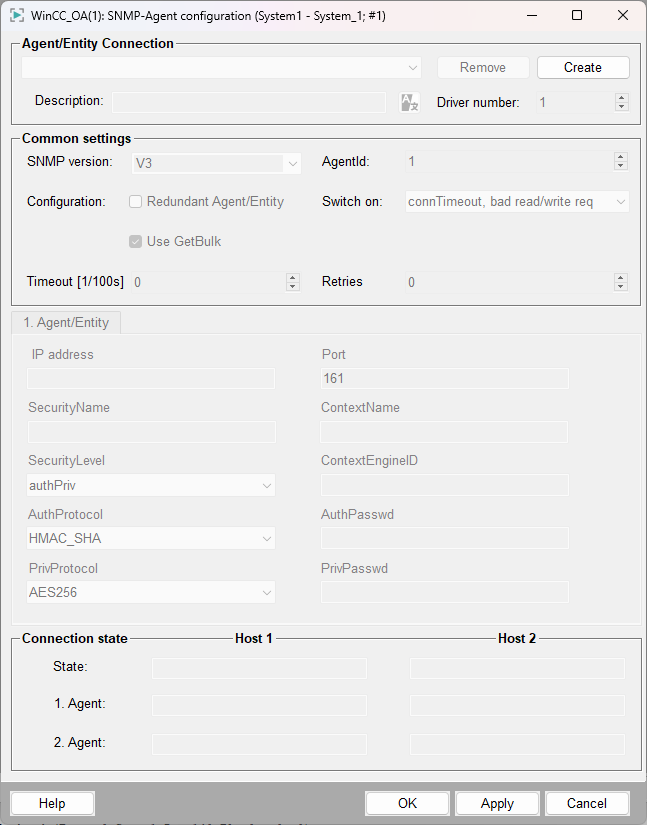
If no Agents have been created yet, the configuration panel appears mostly greyed out. The combo box Agent/Entity Connection lets you switch between the available Agents.
To create a new Agent, click the Create button.
SNMP Agents
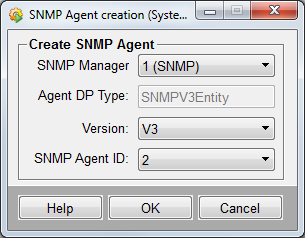
The SNMP Agents are queried by the SNMP managers. After clicking the Create button, the following panel can be used to create new Agents.
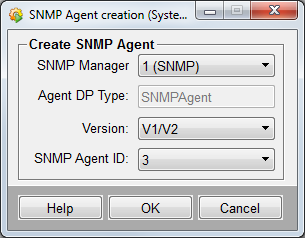
- SNMP Manager
-
Shows the manager for which the Agent is created. Managers numbering from 1 until 255 can be selected. The manager number 1 is the default.
- Agent DP Type
-
Specifies the name for the SNMP Agent DP. The entry is read from the config file. To change the default, you have to set the config entry "agentDPName" or in case of SNMPv3, the entry "v3entityDPName". See [snmpdrv]
- Version
-
Defines the SNMP version for the Agent. Possible versions are V1/V2 or V3. When V1/V2 is selected, the default is V2.
- SNMP Agent ID
-
ID of the SNMP Agent.
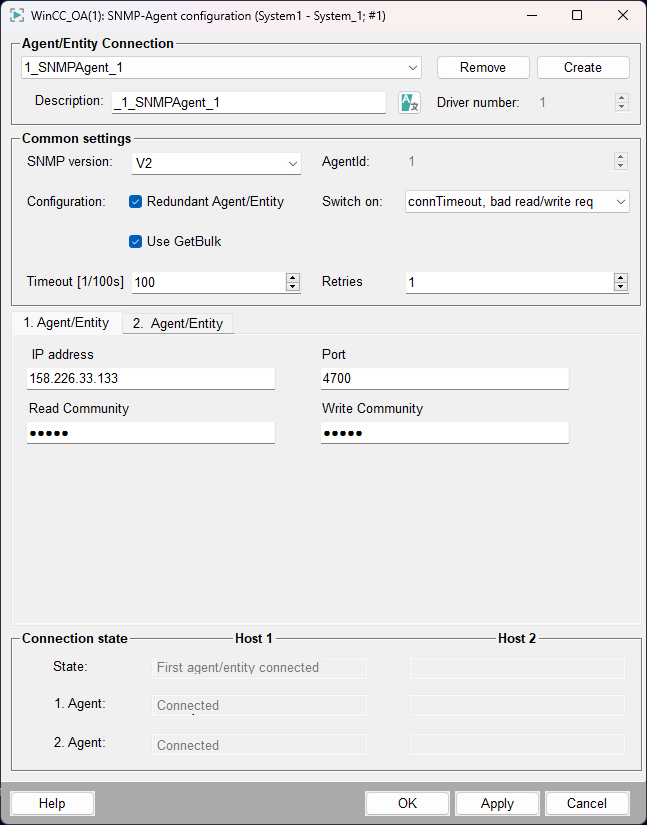
Agent/Entity
Name of the Agent which is shown in the table on the SNMP Agents tab.
- Create
- Creates a new SNMP Agent.
- Delete
- Deletes the selected SNMP Agent.
Common Settings
- SNMP Version
- Shows the selected SNMP protocol.
- Driver number
- The driver /manager number to which the Agent is assigned.
- AgentId
- The ID of the Agent.
- Configuration:
-
The checkbox activates a redundant Agent (refer to redundant SNMP agent and SNMP in redundant WinCC OA System for further information).
If a redundant Agent is enabled, a second tab "2. Agent/Entity" is displayed. Switch on defines the condition for the redundancy switch:
- connection timeout (keep alive check fails)
- bad read/write request (TIMEOUT status is returned on a read or write request)
- conn Timeout, bad read/write request (timeout or keep alive failure)
- Use GetBulk
- Ticked by default. The "Use GetBulk" checkbox sets the Access.Flags bit 2 on the internal DP.Using GetBulk has performance benefits for browsing and reading bulk addresses.
- Timeout
- Specifies the time in 1/100s until which the manager has to receive a reply to a SNMP message. The default value is 100. It might ,however, be necessary to increase the timeout in case of longer distances or low networks/Agents. Valid values are 100 - 1000 (= 1 - 10sec).
- Retries
- Specifies the number of retries that are executed before an error is shown. If a timeout is reached the message is sent newly. You can configure 10 sending retries at most. (default = 1)
1. Agent/Entity / 2. Agent/Entity
- IP Address
-
The IP address of the Agent, e.g. 192.168.1.13, or a computer name, e.g. eiwrk068. If no IP address was set here or it has been deleted (empty string), the Agent is disabled and the internal DPE Status.Timeout (see internal datapoints) is set to FALSE independent of the state it was before.
- Port number
-
Defines the port number via which the SNMP manager tries to connect to the Agent, which is configured here. The default WinCC OA Pmon SNMP Agent port is 4700. The port numbers for the SNMP pmon Agent and for the Live Agent can be specified via config entries.
- Read / Write community
-
Allows the read and write access to the Agent. The read and write community strings are like a password. The community strings are sent with the SNMP request. If the string is correct, the SNMP Agent sends an answer (the requested information) to the manager. This entries are only used for the Agents to which the WinCC OA system is connecting.
To encrypt or decrypt the access parameter of the SNMP driver the function snmpcrypt_setAccessPassPhrase() can be used. If the access parameters are encrypted, the values displayed in the panel are also encrypted.
SNMP Live Agents
The Live Agent provides datapoint-specific data from the DP table of the ETM MIB. The SNMP Pmon Agent serves as a proxy for the SNMP Live Agent. Thus, the data can be provided for external SNMP managers.
Further information about the OIDs of the WinCC OA MIB can be found under: MIB - WinCC OA MIB
Open the SNMP Live Agent panel via
Clicking on the push button Create opens the following panel in which SNMP Live Agents can be created.
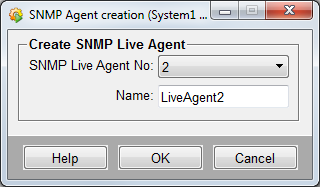
You can create Live Agents with numbers from 1 to 10. The number can be chosen from the combo box.
The SNMP Live Agent configuration panel can be used for configuring the DP
elements that are queried via SNMP (the DPEs are provided by the SNMP Live Agent).
To open the SNMP Live Agent configuration panel, double-click the Agent in the table, or right-click the table to open the context menu.
Click on the push button "Select Datapoint Element" in the SNMP Live Agent configuration panel
to select a DPE which is available to the Live_Agent SNMP manager.
in the SNMP Live Agent configuration panel
to select a DPE which is available to the Live_Agent SNMP manager.
Although it's technically possible to write to these DPEs (write access), this method has been disabled because WinCC OA user permissions cannot be verified this way.
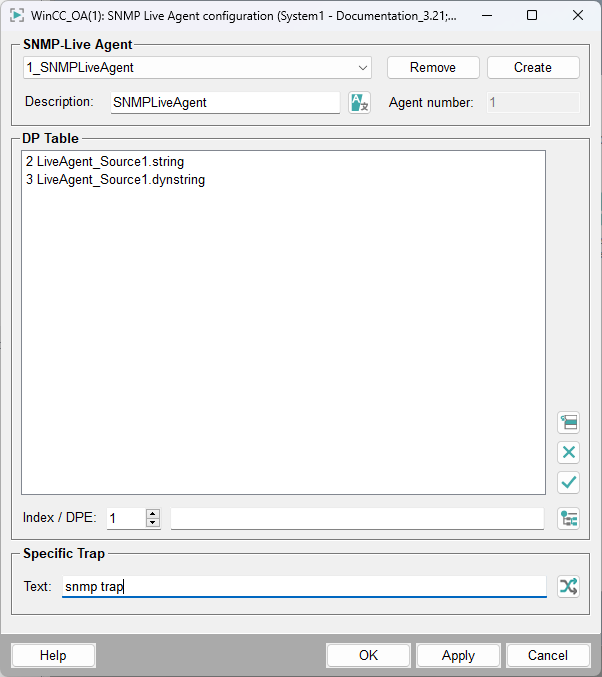
The unique number of the Live Agent (Agent number) as well as the Description are shown at the top of the panel.
The DP Table shows the datapoints that are queried via SNMP. The datapoints are chosen via the familiar WinCC OA buttons and are added to the table via the Apply button. The datapoints contain an index, which is used to communicate with the datapoints via MIB (e.g. (1.3.6.1.4.1.13828.2.1.20.1.2.idx). The queried datapoint information is displayed on other datapoints that have a peripheral address assigned..
A trap Text can be specified in the lower part of the panel. The trap text is
represented on the _LiveAgentNr_SNMPLiveAgent.specificTrap datapoint element. The
trap is sent to all configured managers when  is clicked. The config entry
 enableUserTraps
= "Yes" has to be set so that the traps are sent.
The traps are sent via the Pmon Agent since the Pmon Agent serves as a proxy for the Live Agent. The default SNMP Live Agent port is 4701.
SNMPv3
WinCC OA supports SNMPv3. This means that the manager (WCCOAsnmp) can be used to access a unit that supports SNMPv3 using GET and SET services. SNMPv3 traps can also be received. In SNMPv3, there is no longer any distinction between manager and agent. There are now only SNMP entities.
SNMPv3 now offers important security features:
- Message integrity to ensure that a packet has not been tampered with during transmission.
- Authentication to verify that the message comes from a secure source.
- Encryption of packets to prevent eavesdropping by unauthorized persons.
In order to use SNMPv3 there are some additional optional config entries. Furthermore, the SNMP configuration panel as well as the address config for the SNMP driver were modified. You can now also configure SNMPv3 entities and set the entity type in the address panel. The config entries and the configuration and address panels are described in the following section.
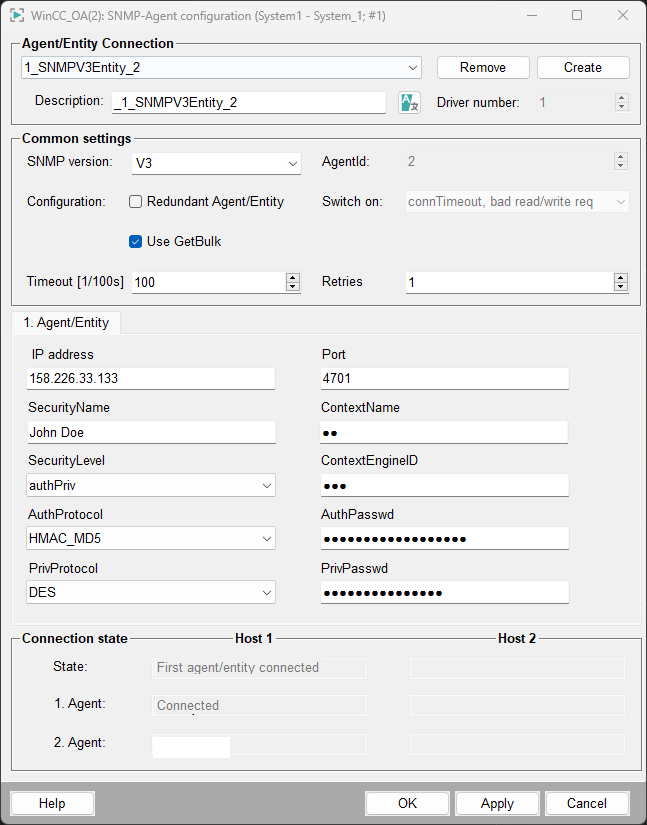
An Entity is configured in the panel shown above.
1. Agent/Entity / 2. Agent/Entity
- IP address
-
Enter the entity's IP address (e.g., 192.168.1.13) or computer name (e.g., eiwrk068). If no IP address is set or if it's deleted (resulting in an empty string), the entity will be disabled. In this scenario, the internal DPE Status.Timeout (see internal data points) will be set to FALSE, regardless of its previous state.
- Port
-
Defines the port number the SNMP manager uses to connect to the entity configured here.
- SecurityName
-
The SecurityName describes the user/the program that requires access to the data. The SecurityName has to be unique per SNMP manager.
- ContextName
-
The context name on the target computer. The context includes specific MIB objects.
You can specify a context name per Entity. If several context areas should be queried on one entity, several datapoints should be created.
The Management Information Base is the tree which leaves contain the actual data. You can restrict the user access in the SNMP V3 to an area of MIB e.g. everything under the node 1.3.6.2.1.1. Thus, the user can not access anything else.
- SecurityLevel
-
The security level describes which security measures should be used for the data exchange.
-
noAuthNoPriv (1) No authentication and no encryption
-
authNoPriv (2) Authentication but no encryption
-
authPriv (3) Authentication and data encoding
Default value is (1).
-
- ContextEngineID
-
The EngineID of the target computer. If this is not specified, it is defined during the query of data.
- AuthProtocol
-
The following protocols are available for the authentication of the SNMP users:
-
none (1) no authentication protocol
-
HMAC_MD5 (2) MD5 authentication
-
HMAC_SHA (3) SHA authentication
-
HMAC_SHA2_224 (4) SHA2 authentication
-
HMAC_SHA2_256 (5) SHA2 authentication
-
HMAC_SHA2_384 (6) SHA2 authentication
-
HMAC_SHA2_512 (7) SHA2 authentication
Default value is (1).
An authentication protocol can only be selected if the setting in the security level is "authNoPriv" or "authPriv".
-
- AuthPasswd
-
The password used for the authentication. This password can only be set if the setting in the security level is "authNoPriv" or "authPriv".
- PrivProtocol
-
The sent data can also be encrypted in order to increase the security. For the encryption a protocol has to be selected.
-
none (1) no encryption
-
DES (2) Data Encryption Standard encryption (not recommended, use AES encryption instead)
- IDEA (9): IDEA encryption (International Data Encryption Algorithm)
-
AES128 (4) Advanced Encryption Standard encryption with 128 bit key
-
AES192 (20) Advanced Encryption Standard encryption with 192 bit key
-
AES256 (21) Advanced Encryption Standard encryption with 256 bit key.
Default is (1).
An encryption protocol can only be selected if the setting in the security level is "authPriv".
-
- PrivPasswd
-
The password used for the encryption. This password can only be set if the setting in the security level is "authPriv".
Note:The snmpcrypt_setAccessPassPhrase() function can be used to encrypt or decrypt the access parameters of the SNMP driver. This also encrypts the display of the values within the configuration panel.