
Mass configuration of multiple datapoint elements
Mass configuration within the RDB compression means that compression calculations that have been added to a datapoint element at master datapoint can be taken over to these datapoint elements of all datapoints of the same datapoint type with only one click. Thereby the following has to apply:
-
The datapoint type must have a master datapoint.
-
Only datapoint elements, which are of the data type int, uint or float can be added to the RDB compression.
-
Only datapoint elements that have an archive PowerConfig at the master data point can be added to the RDB compression.
The mass configuration of multiple datapoint elements is described with the help of the following example.
 Mass configuration of multiple datapoints
-
Create a new datapoint type named Valve with for example the following structure:
-
Add a master datapoint to the datapoint type.
-
Add to every datapoint element at the master datapoint an _archive PowerConfig.
-
Create for example the following three datapoints at the datapoint type:
-
Open the RDB compression (see Configuration - Introduction).
-
At the datapoint element _mp_Valve.Valve_1 to the tree view of the RDB compression (for the instruction how to add a new datapoint element to the tree view see Adding a datapoint element).
-
The tree view of the RDB compression has now the following the structure:
-
Add the two left datapoint elements to the tree view (_mp_Valve.Valve_2.Valve_2_1 and _mp_Valve.Valve_3.Valve_3_1.Valve_3_1_1).
-
The tree view of the RDB compression has now the following the structure:
-
Select the option "Display <number> compressed DPEs".
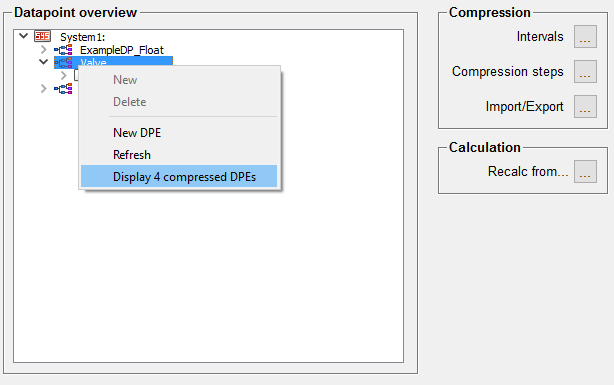
-
Right-click the master datapoint in the tree view to open the context menu:
-
Click the Take over for all option to take over all compression calculations at the datapoint elements for all datapoints of this datapoint type.
-
The 3 datapoints have been added to the tree view and have the same compression calculations at their datapoint elements created at the master datapoint before.
-
In the case that for specific datapoints at a master datapoint a compression calculation should not be carried out, its compression calculations have to be deactivated (see Activating/Deactivating compression calculations) and/or deleted afterwards (see Deleting compression calculations). Note that the tree view has to be refreshed (Refresh option from the context menu) in order that the changes are shown correctly.
Adding new compression calculations to the datapoint elements of the datapoints with a master datapoint is still possible. Attention should be paid to the fact that the option "Take over for all" overwrites all compression calculations of the datapoints' elements of the specific type. That means that compression calculations that are only available at the datapoint but not at the master datapoint will deleted or overwritten when using this option.