
Extended Settings
Extended Settings
The NGA Extended Settings are intended for changing and fine-tuning low-level parameters of NGA backends. Modification requires a deeper understanding of NGA and is only recommended for persons with appropriate skills.
The extended settings comprise the following settings:
Database Control

Select the execution type of the backend.
Each backend can be started In-Proc (as shared library within the NGA Frontend Manager) or Out-Of-Proc (as separate process).
- In-Proc (Backend as plugin) . The frontend is always connected to the backend. There is only one "external" connection between the backend and the database. Only this connection to the database is monitored.
- In-Proc (Backend as plugin) only for NGA manager. As above but only for the NGA manager and not for the "Direct Read" option.
- In-Proc (Backend as plugin) only for "direct read". As above but is only used for the "direct read" option.
- Out-Of-Proc (Separate process) / In-Proc for the "direct read". The advantage of a separate independent process is that NGA manager will not be affected when a backend process stops unexpectedly. There is a connection between the frontend and the backend and between the backend and the database. For the Out-Off-Proc option the default settings for communication or user-defined settings can be used. When using multiple backends out-of-proc, the “Custom configuration” option must use different port numbers for communication. Out-Off-Proc is converted to In-Proc for the direct read" option and in this case the backend runs as a plugin.
- Out-Off-Proc (Separate process) only for NGA manager. As above but only for the NGA manager and not for the "direct read" option.
Buffering Parameters
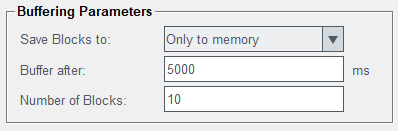
The buffering parameters section is used to specify backend buffering parameters.
Save Blocks to: You can select where to save the data blocks and after how many milliseconds the blocks are buffered.
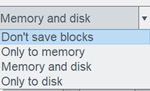
You can select to save the blocks:
- Don't save blocks: the blocks are not saved.
- Only to memory: fast but data is lost when the process is stopped. Memory Buffering: Configures how many blocks are held in memory. If this number is reached, the oldest block is deleted (when Save blocks to is set to Memory only) or saved on disk (when Save blocks to is set to Memory and disk).
- Memory and disk: the safest option, the newer buffered data is kept in memory and the older data is saved on disk.
- Only to disk: a safer but slower option.
Buffer after [msec] If a block cannot be written into the database within the specified time, it is buffered OR
Number of Blocks: blocks are buffered after the specified number of data blocks were created.
Memory Buffering
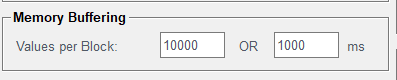
Values per Block OR ms: Defines parameters when a block is sent to the backend. In order to increase performance, data (alarms and events) is sent in “chunks”. The decision when a chunk is sent to the backend can depend on its size (Values per block). Meaning when the here specified number of events or alerts are stored in a block, it is sent to the backend. In addition also a timeout ("ms") can be defined. The "ms" sets the maximum time a buffer is not sent. After that time interval (starting with the creation of a new buffer) the buffer is sent to the backend independent of the number of events or alarms stored in it.
Disk Buffering
proj_dir/db/wincc_oa/nga or a directory outside of
proj_dir/db/wincc_oa. Otherwise inconsistencies during the redundancy synchronization could occur.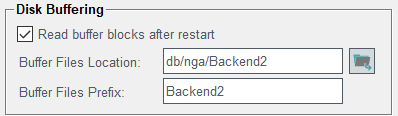
- Read Buffer Blocks after restart: This setting indicates if at startup of the NGA existing buffer files (from the last session) should be processed or not.
- Buffer files location: Directory for saving disk buffers. Default location (when empty) is
<projdir>/db/wincc_oa/nga. Absolute and relative (to<projdir>/db/wincc_oa) paths can be specified. - Buffer Files Prefix: As buffer file names are just numbers which increase over time, each backend has to have a specific prefix when storing all buffers in the same directory to avoid identical filenames across backends.
Communication
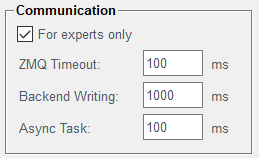
On the Communication tab "timing" parameters for the communication between NGA frontend and backend are specified. These parameters influence the write and read performance and must not be changed if the consequences are not fully understood.
- For experts only: Check this check box to specify the values below. These settings are only for experts and a wrong configuration may lead to shortage of data to the backend.
- ZMQ timeout [ms]: Polling interval for ZMQ, a high value will decrease performance (but increase the response time i.e. to stop the NGA), a low value will use more CPU performance. NOTE: ZMQ communication is not encrypted.
- Backend writing [ms]: Maximum wait time for backend response of a write operation; if an operation takes longer, an error message is shown and this value should be increased.
- Async task [ms]: Time to wait for finishing DB write operation; if this period elapses, NGA will write the current data buffer to disk (if disk buffering is active).
Database Parameters
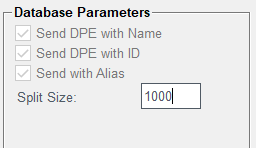
Specify here, depending on the possibilities of the backend, how datapoints are sent to the database, by using the datapoint name, the datapoint ID. Also the data point alias can be used. This setting is normally specified via the profile (by the creator of the backend) and must not be changed for currently existing backends.
Split size: this setting specifies the number of records. The number is used to group read requests in order to speed up the data transfer. When using split functions in WinCC OA (e.g. dpGetPeriodSplit()) this is the size of a "chunk". Split size = Number of record lines (in the figure above 1000 lines). The recommended range is 200-10.000 lines. 1 means that the backend is not queried in "chunks" and the result is received as one result instead of "chunks". Avoid values outside the recommended range as this can have a big impact on performance.