
Configuration of the PowerConfig Settings for Datapoints
As already described in the chapter master datapoints, each PowerConfig defines attributes that were set similar for all instances through the master datapoint. On the other hand properties that should be different for each datapoint (device) may exist. You can set these in the PARA module.
The purpose of the following step is to only set the differences that are as minor as possible for particular instance datapoints and not the sum of all possible configurations. The settings that are same for all datapoints are only set once for the master datapoint.
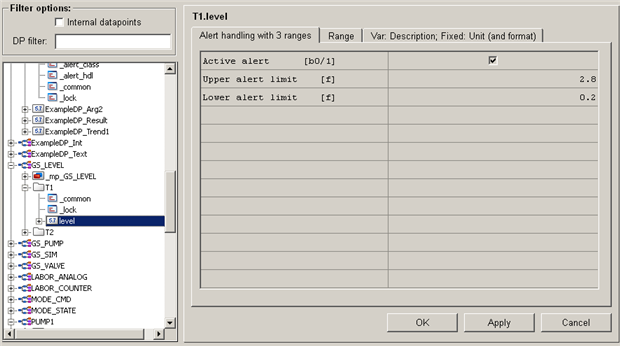
To configure the settings that are different for each instance, use the context menu of the particular datapoint [rightMouseClick] > "PowerConfig Configuration" (see figure above).
-
The alarm handling as well as value range settings may remain as they are for T1 - the settings were already made for the master datapoint.
-
On the tab "Var.Description;Fixed:Unit (and Format), enter the text "Tank 1 level".
For the level measurement T2 proceed according to the following figures.
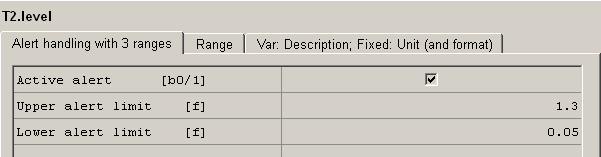
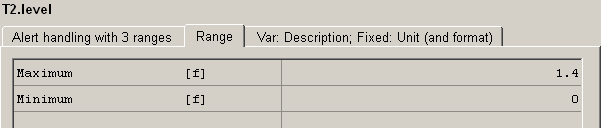

Apart from the descriptions for the .state.position and .cmd.position elements, no other configuration is necessary for the datapoints V1 to V3 of the type GS_VALVE. All settings were already set for the master datapoint. You can enter the descriptions for the sake of completeness, however, they are not compulsory for the further project.
The tree view of the PARA module will be shown as in the figure below. For the 3 device-oriented datapoint types, 6 datapoints P1, V1, V2, V3, T1 and T2 exist. If you are in a hurry, proceed with the chapter Creating Process Images - The Graphic Editor.
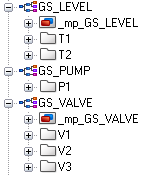
If you work with individual datapoints without a master datapoint, you have to configure every config by [MouseClick] on the particular config. When working with master data points, you configure the settings via the context menu of the element, meaning one level higher! The level of the configs is still visible in the PARA, however, you can't apply the settings that were entered there!