
Import From ASCII File (Mass Engineering)
WinCC OA makes it possible to export datapoint types, master datapoints and datapoints together with their configuration into ASCII files. You can also import this kind of files from the internal database again. For all these tasks, the ASCII manager will be used (at least in the background).
The ASCII manager is primary a command line tool that can be easily integrated in superior engineering systems. In addition you can use the "ASCII manager panel" that was already used in the earlier chapters (see chapter Import Current Project State). You can open the panel via System Management > Databasetab.
Datapoint types, configured master datapoints and instance datapoint P1 were already imported in the chapter Import Current Project State.
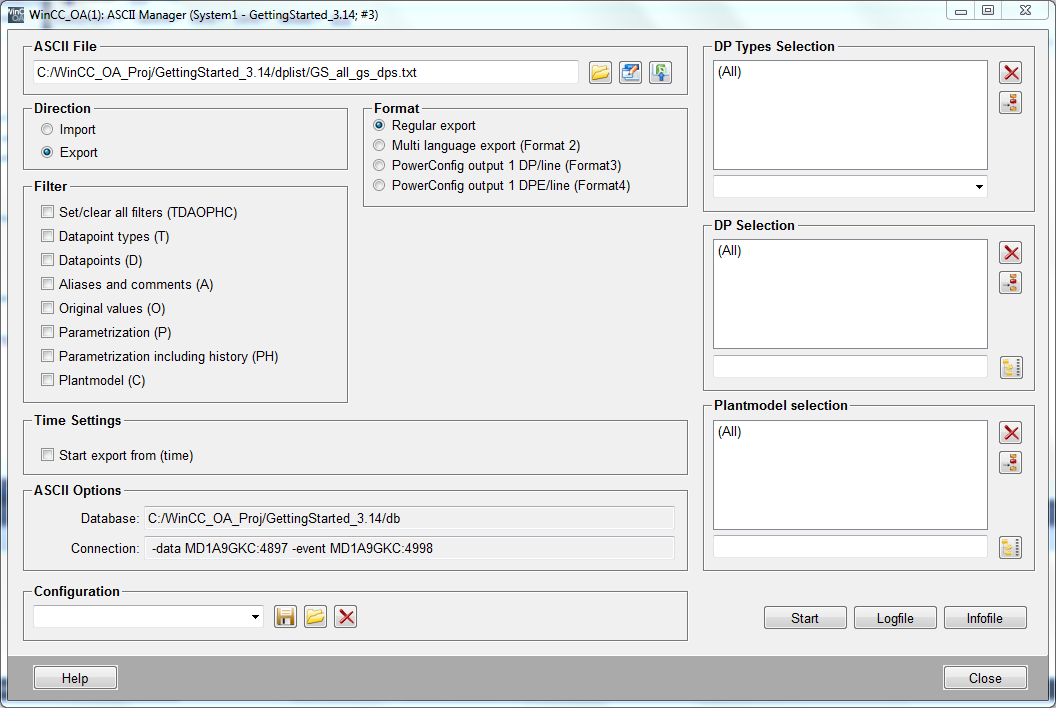
In WinCC OA, there are several formats available in order to import and export structured datapoint types and datapoints. These are basically ASCII / CSV formats and use the tabulator as separator. The information in these files is not coded but can be directly read.
You can limit the amount you want to import or export. For example, you can only import or export single datapoint types or datapoints, specific configs or only changes which were made after a defined date.
The ASCII manager can be used for creating datapoint types and datapoints in WinCC OA. At least the Data and Event manager as well as one simulation driver have to run for the import (the online engineering enables to extend or change the configuration during running plant operation. The presented methods of the chapters Import From ASCII File (Mass Engineering) to Scripting make the fast processing of high amount of data possible. You have to consider the increased processor load as well as the increased memory requirements in this kind of systems).You can export data also when the system is stopped.
ASCII Manager Formats
-
FormatV1("Regular export") - enables to export or import the data of the whole project. You can select datapoint types, individual data points and configs. The structure is internally arranged according to data point types and configs. The information for a datapoint element is distributed to different parts of a file. The format V1 can regard multilingual texts (description, alarm texts).
-
FormatV2 ("Multilingual export") - is not required in the normal project environment
-
FormatV3("PowerConfig Output (1DP/Line, Format 3)") - this format will only be used for datapoint types that have a configured master datapoint. Typically there will be one file for each datapoint type (device class) created. For each datapoint (meaning each device) a single line is intended. All information belonging together is saved in one place. Format V3 merely considers the attributes that can be changed for a data point instance. The format is suited for object-oriented mass engineering.
-
Format V4("PowerConfig Output (1 DPE/Line, Format 4)") - V4 is suited especially for the engineering of existing installations but also when the number of attributes per datapoint is very high. It corresponds basically to format V3, however, there will be one line provided for each datapoint element. This enables an easy input of connected periphery address series, description texts etc. in an external table program (auto fill in).
For further information see also Templates/DP lists, basics.