
Creating Instances
Datapoint types alone cannot record any process information - they are just a form of template for the data points that belong to the real devices. In order to create a device datapoint of the created datapoint type GS_PUMP2, you can use the context menu in the tree view of the module PARA.
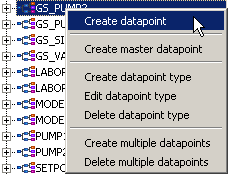
- [rightMouseClick] --> Create datapoint opens a dialog for entering a name
- Enter "P2" for the first pump and confirm through OK.
When the tree below GS_PUMP2 is opened, you can see the complete datapoint P2 of type GS_PUMP2.
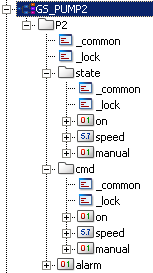
The elements of the datapoint P2 should be considered as pure internal information units of the control system since noPeripheral addresses were configured. However,values changesthat are detected and processed by all managers can already be done. The easiest way is to change the value of an internal datapoint element in the original value dialog of the module PARA. This can be opened by a [leftMouseClick] on the element itself or on the "_original" sub element (config) in the tree view (see also figure on the page Datapoints as bearer of the information). After entering the new value into the "original value" field and clicking on the Apply button, the new value is visible in the "Online value" field and the time stamp is updated according to the time the value was applied.
There is nearly no limit to the number of datapoints that can be created on the basis of the GS_PUMP2 datapoint type. The names of the datapoints must be unique system-wide. In addition, names must only contain standard alphabetic characters (letters), the digits 0-9 as well as the underline character "_". Every name of a datapoint has to start with either a letter or an underscore.
The datapoint elements are dynamic variables that represent the process or internal states of the control station. They are part of the memory area of the Event manager and are managed by it. Nevertheless, the datapoint elements can accessed by all managers.