
Notifications
WinCC OA now includes a smart and proactive notification system to keep you fully informed about your license status. This system provides:
- Timely Alerts: Get notified about key license states that require your attention.
- Intelligent Reminders: Receive one-time alerts for immediate issues and recurring daily notifications for critical upcoming events.
- Clear, Dynamic Information: Messages are flexible, providing essential details like critical dates or days remaining, ensuring you always have the full picture.
This ensures you can always act proactively, preventing any surprises related to your WinCC OA licenses!
Subscription licenses are checked at the start of the project, 30 days before the end of the contract, every 7 days, and 30 days before the end of the contract, every 24 hours until the license is renewed (the alarm is triggered daily).
Notification Messages
For a comprehensive overview of these notifications, including specific triggers and message examples, please refer to the table below.
| State | Alarm text | Frequency | Contract remaining time |
| Extension pending | License update will be attempted automatically in 3 weeks; internet access or manual action is required. | 1 time | |
| Valid | License update successfully | <no alarm text> | |
| Expiring | License will expire in <x> days and will lead to a stopped System. | 7 times | 7 -> 1 days |
| Grace period | License expired! Grace period running. Systems stops in <x> days! | 30 times | 0 -> -29 days |
| 7-day license mode | License in 7-day mode, running components will stop in <x> days. | 7 times | -30 -> -36 days |
| License central not available | License central not available, automatic license extension via internet is not possible, manual action will be required on <7 days before contract end date>! | When LC is not reachable, the alarm is set to GONE, as soon as LC is reachable again. |
Visibility of the Notifications
We've designed WinCC OA to keep you fully informed about your license status, ensuring smooth, uninterrupted operations. Our comprehensive notification system makes sure you're always aware and have plenty of time to act:
- Within your WinCC OA project, you'll start receiving prominent, unmissable notifications a full 7 days before your license contract is due to end. These alarms are designed to be as clear and urgent as our emergency mode notifications, so you always have ample time to renew.
- From your alert screen, a simple click will take you directly to the detailed
license information within Project Administration. This makes it
incredibly easy to investigate and manage your license status without any extra steps:
Figure 1. Alert Screen 
- A dedicated License Panel within Project Administration offers a clear, comprehensive overview of all your license details. We've ensured that even if you have multiple license containers, the information is presented in a straightforward and easy-to-understand manner.
- Multiple Points of Visibility:
- Persistent Visual Cues: Within the WinCC OA
user interface, a clear and persistent visual indicator (like a colored
border at the top of the module) will immediately signal a license
alarm, ensuring it's always visible no matter what you're working on:
Figure 2. Login 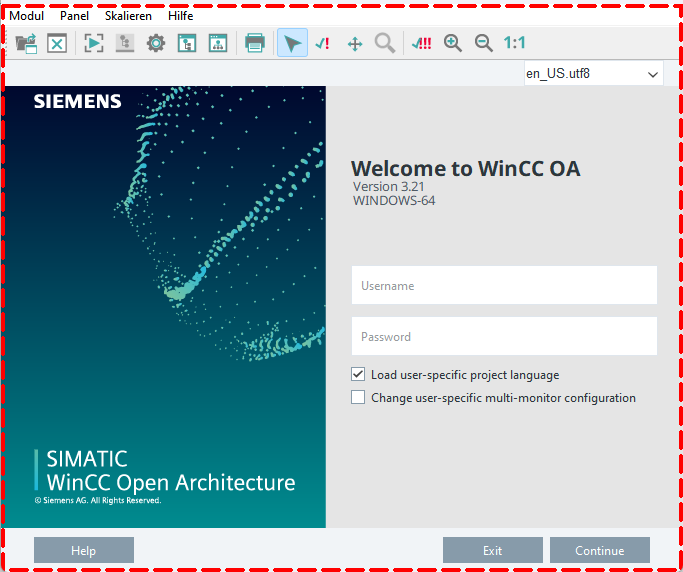
- System Overview: Critical license status information is
integrated into your system overview panel, providing a holistic view of
your system's health:
Figure 3. System Overview 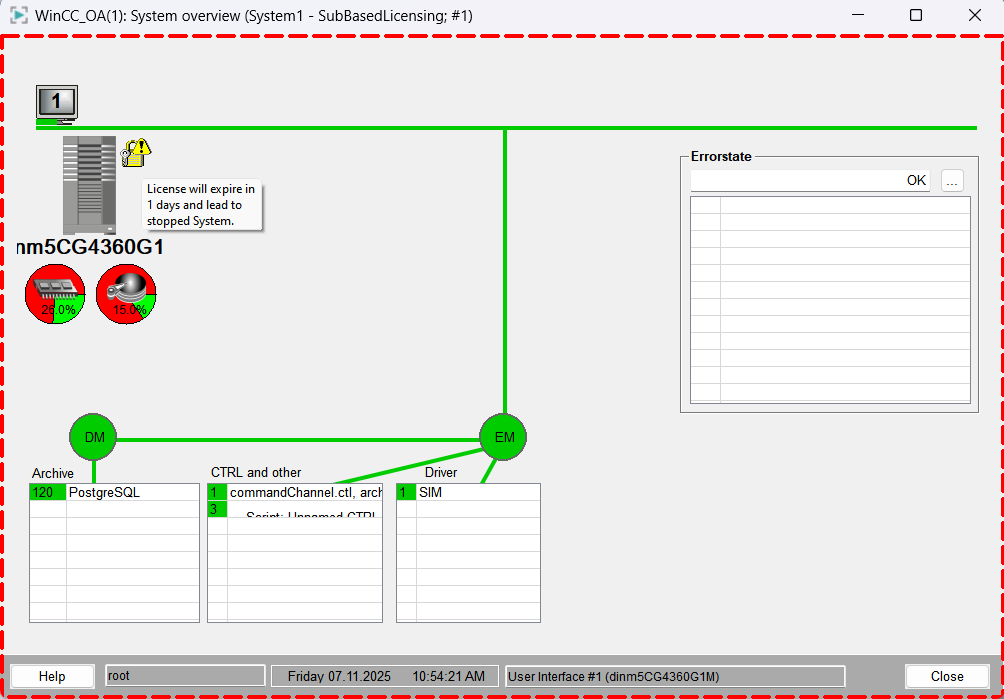
- Login Messages: You'll even see important license messages right
on the login panel, ensuring you're aware of any critical status before
you fully access your project:
Figure 4. System Use Notification 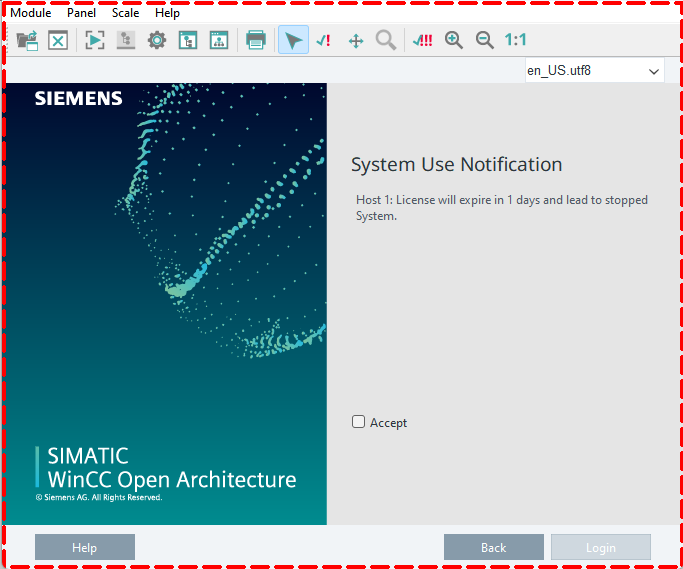
- WC Dashboard Integration: Your WinCC OA Dashboard will prominently display license alarm states, giving you a quick, at-a-glance overview of your license health.
- Persistent Visual Cues: Within the WinCC OA
user interface, a clear and persistent visual indicator (like a colored
border at the top of the module) will immediately signal a license
alarm, ensuring it's always visible no matter what you're working on:
- Guidance When You Need It: Beyond just notifying you, a helpful dialog box will pop up to clearly explain the specific license issue and guide you through the steps to resolve it, ensuring you know exactly what to do.
- Detailed Logging for Administrators: For technical users and system administrators,
standard log messages will be recorded in the log viewer, providing a detailed
audit trail for all license-related events.
Important:Critical alarm notifications are displayed in red and will blink until they are acknowledged. Warning notifications appear in yellow, while information notifications are shown in green.
Redundancy
We've designed license management for redundant WinCC OA systems to be both robust and easy to understand, ensuring your operations remain seamless:
- Independent Host Licensing: Each host independently manages its own license information, ensuring resilience and smooth operation within your redundant WinCC OA setup.
- Active Host Notifications: All license alarms and important notifications are triggered by the active host, providing clear, unified alerts from a single source.
- Dual License Renewal: Since each host has its own dedicated license, renewals and prolongations must be applied to both hosts for continuous, uninterrupted operation across your entire environment.