Compressor, Fan, Mazerator, Pump - Pump2
These four symbols are assigned either to the datapoint type Pump1 or Pump2. Pump1 does not allow operation, while Pump 2 can be operated, for example manually. The screenshot shows the symbols in simulated manual operation with maintenance:

Equipment operational panel Pump2
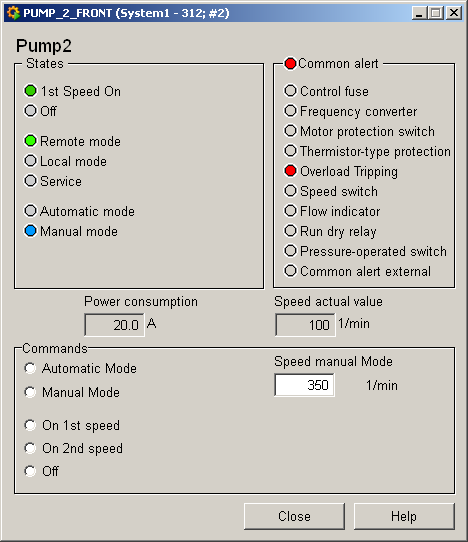
The equipment operational panel for datapoint type Pump2 is more complex. In addition to the operational states there are a number of PLC alerts that display a fault of the respective pump component. Please see the Pump1 equipment operational panel for a description of the equipment operational panel.
Commands can be sent to the periphery in the bottom part of the panel:
-
Automatic mode, manual mode allow you to switch between modes.
-
In manual mode you can select between two speeds or Off
-
Input of a target speed
Information panel Pump2
The information panel contains details on the associated datapoint elements. Please see the chapter datapoint types for the symbol catalog (see PUMP2) in the PARA module for a description of the datapoint types and their elements.
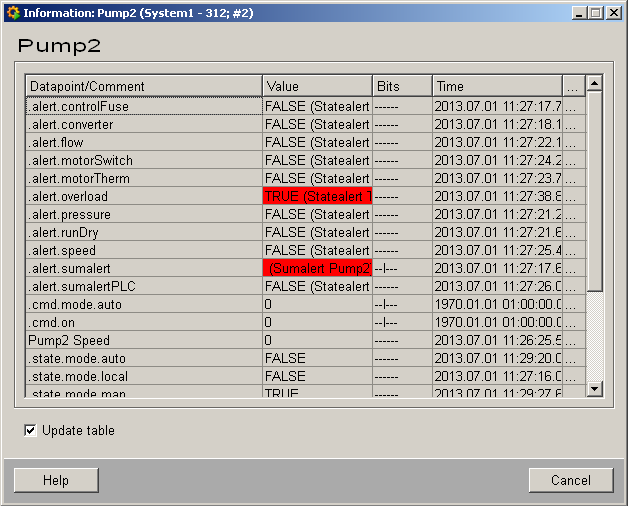
The table contains all datapoint elements either with their name or description, their values (contents), status (bits) and source time. The "..." buttons open detailed information on the event or alert (see alert table)
Simulation panel Pump2
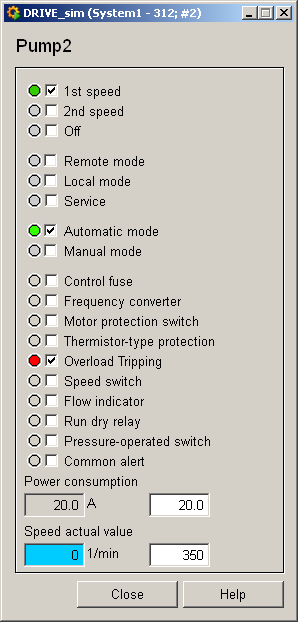
Right-click on the symbol or select the Information menu to open the following panel for simulating a peripheral device. This panel can be used to set datapoint elements by hand. The above equipment operational panel can be displayed with the following inputs in the simulation panel (see Simulating operational states):