
seLoadCoverageReport()
The function loads a coverage report (an xml file).
Synopsis
int seLoadCoverageReport(string coverageReportPath);
Parameters
| Parameter | Description |
|---|---|
| coverageReportPath | Path to the coverage report, e.g. seLoadCoverageReport(makeNativePath(PROJ_PATH + LOG_REL_PATH + "coverageExample.xml")); |
Return value
The function returns 0 when it was successfully executed and otherwise -1.
Description
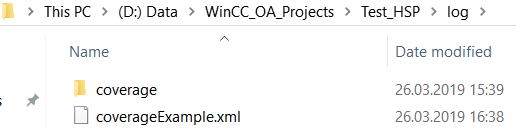
The function loads a coverage report (an xml file). The file must be located in the WinCC_OA_Proj/log directory. In order to open a coverage report, you can use, for example, the function moduleAddAction() - see example below.
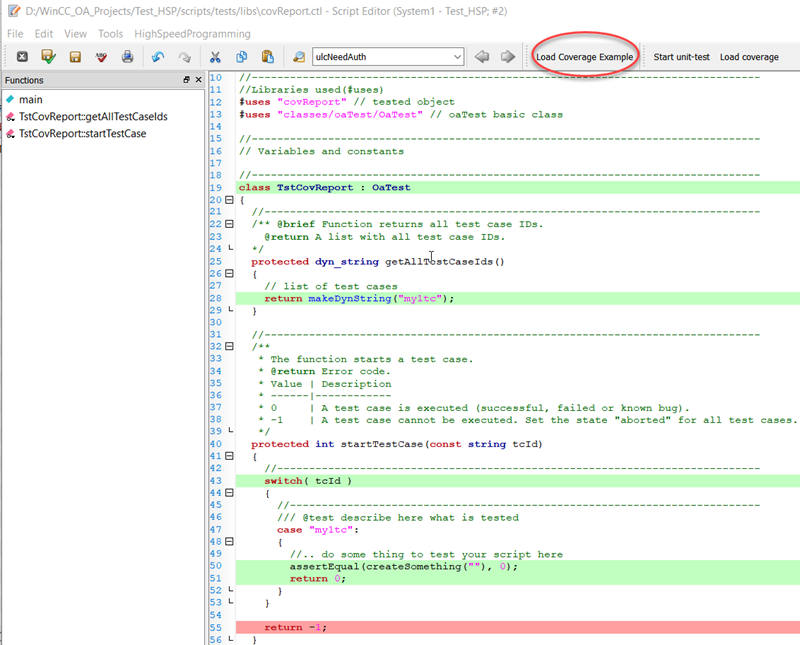
In the following example, the coverage report for the script covReport.ctl is opened by using a new button "Load Coverage Example".
Figure: A report in the WinCC_OA_Proj/log directory
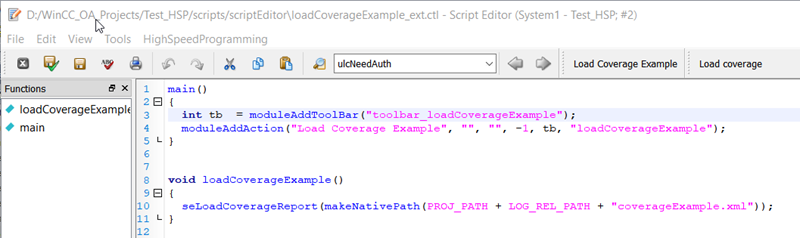
The report is opened via the "Load Coverage Example" button. In the following script the report is loaded via the function seLoadCoverageReport() and the button "Load Coverage Report" is created for the script editor.
main()
{
  int tb  = moduleAddToolBar("toolbar_loadCoverageExample");
  moduleAddAction("Load Coverage Example", "", "", -1, tb, "loadCoverageExample");
}
void loadCoverageExample()
{
  seLoadCoverageReport(makeNativePath(PROJ_PATH + LOG_REL_PATH + "coverageExample.xml"));
}
The file with the suffix _ext.ctl, e.g. loadCoverageExample_ext.ctl. must be located in the WinCC_OA_Proj/scripts/scriptEditor directory.
Figure: WinCC_OA_Proj/scriptEditor/loadCoverageExample_ext.ctl.
You can open the report by using the button - see figure below:
Assignment
Script Editor Extensions
Availability
UI