
The File Menu
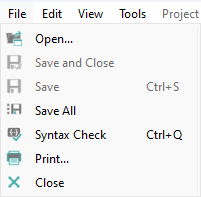
- Open: Lets you open previously saved scripts directly.
Restriction:Only scripts that are saved in a scripts directory can be opened in this way.
- Save and Close: Saves the script and closes the editor.
- Save: Saves the script.
- Save All: Saves all the currently open scripts
- Syntax Check: Checks the code's syntax. If the code contains errors, these will be highlighted.
- Print: Opens the print window for the script. If the printer name is empty, the default printer will be used.
- Close: Closes the script editor. If the script has been changed without saving, you will be asked in a pop-up message whether you wish to save the changes.