
Information Areas of a Symbol
An information area (infoArea) is an area around a symbol. Relevant changes on the data point are visualized via image/color changes (e.g. mode state, alert) in the information area. These help the user to recognize quickly whether a plant/device requires treatment/attention.
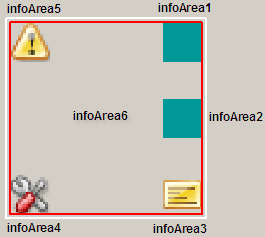
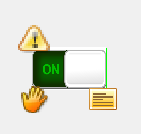
By default, several images that react to certain changes of state are already predefined for four information areas. An image is inserted as soon as the corresponding datapoint element adopts a certain value/state.
By default, there are several predefined images for the information areas infoArea3, infoArea4 and infoArea5 (see table below). Information areas infoArea1 and infoArea2 (here shown in green) are empty and can be implemented by the library author in the HOOK function hook_<LibName>_alterInfoAreaDisplay(). The function hook_<LibName>_getInfoAreaDPEs() returns the datapoint that should be shown for the information area icon. Use these functions in order to implement the information areas.
If you want to change the information areas infoArea3, infoArea4 and infoArea5, change the implementation of the function hook_getOperationModeElement(sDp) in the script /scripts/libs/ <LibName>_hook.ctl or you can change the datapoint node that saves the operating modes via the function hook_<LibName>_getOperationModeElement().
InfoArea6 forms the alert frame around the other five information areas. If an alert of a datapoints is triggered, this frame is used to display the sum alert (flashing/shining).
The function hook_<LibName>_alterInfoAreaDisplay() determines the icons for the information area on the basis of the datapoint _STDLIB_Modes.
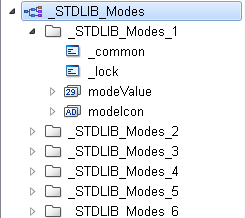
Datapoint Type _STDLIB_Modes
When a value/state of a datapoint element connected to an information area is changed, the function hook_displayInfoAreaIcon() is searched for a match between datapoint element value and Icon ID-number, in order to possibly display the corresponding image in this information area.
Which icon ID-number represents which image in the information area is determined by means of the internal datapoint type _STDLIB_Modes. It contains an individual datapoint (_STDLIB_Modes_x) for every information area. Each datapoint contains two datapoint elements - modeValue and modeIcon.
Every information area datapoint lists the possible icon ID-numbers in modeValue and the possible images in modeIcon. If an icon ID-number is determined by means of the function hook_displayInfoAreaIcon(), it is searched in the datapoint element modeValue. If a icon ID-number could be found, a predefined icon is searched for in the same row in the datapoint element modeIcon. If an image was specified for the modeIcon element it is then displayed in the corresponding information area of the symbol.
| Information Area | Icon | Meaning | ID-Number |
Directory path Stdlib_<Version>\pictures\modes... |
|
inforArea3 Note |
- | Empty. No information is predefined. | 1 | - |

|
Is displayed when a note is left for this datapoint. | 2 | ...\note.png | |
|
infoArea4 Mode state (auto, manual, local, remote) |
- | Empty. No information is predefined. | 0 | - |

|
Local (1, 0, 1, 0) | 1 | ...\mode_loov.png | |

|
Manual (0, 1, 0, 0) | 2 | ...\mode_eman.png | |

|
Remote (1, 0, 0, 1) | 3 | ...\mode_rout.png | |

|
Local (0, 1, 1, 0) | 4 | ...\mode_iman.png | |
|
infoArea5 Validity |
- | Empty. No information is predefined. | 1 | - |

|
Datapoint invalid (invalid) | 2 | ...\invalid.png |