
Properties laboratory values panel
When you open theLaboratory Valuespanel, the child panel for the laboratory values settings opens automatically.
In this panel, you can only select either the datapoint types for which the manual input function has been enabled in compression level 1 or those datapoint types that reference such a type (see Archiving and Compression).
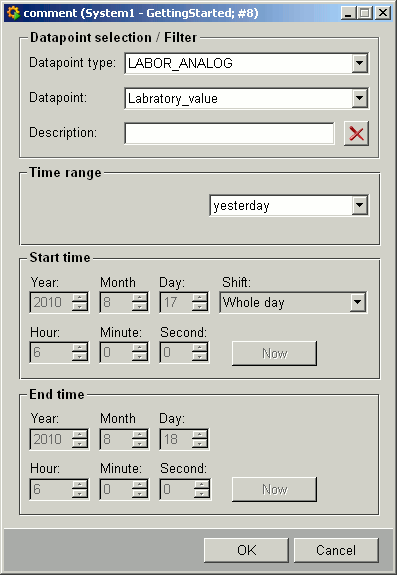
Explanation of the different panel elements:
Datapoint type: S elect a datapoint type having the manual input function in compression level 1.
If there are no datapoints of the chosen datapoint type, an error message is shown.
Datapoints: Select one datapoint or all the datapoints for the chosen type. The combo box does not display the datapoint names but the datapoint descriptions.
Description: If a description has been entered here, then only the values of those datapoints whose description precisely matches or contains this text are retrieved.
 Delete a
description.
Delete a
description.
Time range: Select the required time interval from the combo box.
If you select a day or an hour, a second is subtracted. This means that when a day is selected, from 0:00:00 to 23:59:59.999 is displayed and when an hour is selected, from 00:00 to 59.999. Otherwise values would be calculated, for example, for 25 hours instead of for a day as intended.
Start/End: You can set here the fixed start and end times depending on the chosen time range.
Cancel:Closes the panel.
OK: Accepts the settings and starts retrieving data from the database.