
Properties correction values panel
Clicking on the Correction value button or opening the panel with the selector automatically opens the child panel for the correction values settings.
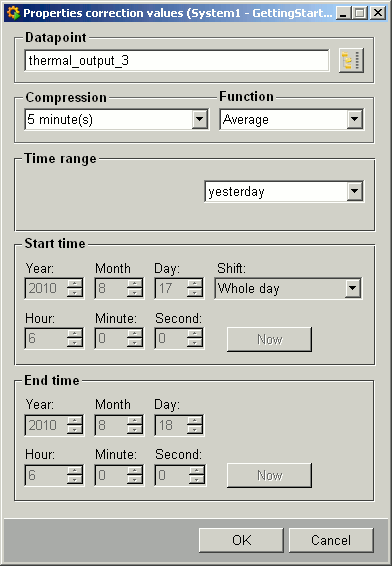
Explanation of the different panel elements:
 Through this button,
you select a datapoint (element) or enter a datapoint in the associated text field.
Confirm any datapoint entered by hand with the RETURN key.
Through this button,
you select a datapoint (element) or enter a datapoint in the associated text field.
Confirm any datapoint entered by hand with the RETURN key.
Compression and Function : If the selected datapoint is of the type AC (with preset archiving and compression), select the associated interval from the Compression combo box and the functions linked to this interval from the Function combo box.
Datapoints that are not of the type AC (that is, without preset archiving and compression) are simply displayed in the Datapoint text field at the top.
Time range : Select the time range you require for the data readout from this combo box.
Start/End : Set the fixed start and end times for the time range chosen.
Now:Sets the time to the current system time.
Cancel: Closes the panel.
OK: Accepts the settings and starts retrieving data from the database.