
Trouble-shooting Control-ADO
Control-ADO under Windows Server
Oracle:
Microsoft does not support a 64 bit OLEDB provider for oracle. Use the "Oracle Provider for OLE-DB" instead "Microsoft OLE-DB Provider für Oracle" . For ADO access use „Provider=OraOLEDB.Oracle;Data Source=….“ instead of „Provider=msdaora;Data source=…“,.
Alternatively:
with ODBC instead of
Driver={Microsoft ODBC for Oracle};Server=myServerAddress;Uid=myUsername;Pwd=myPassword;
use DSN=mySourceName;UID=;PWD=; (here add a system DSN to the ODBC data source first).
In order to use the ADO interface on a Windows 64 bit machine, note in addition the following:
-
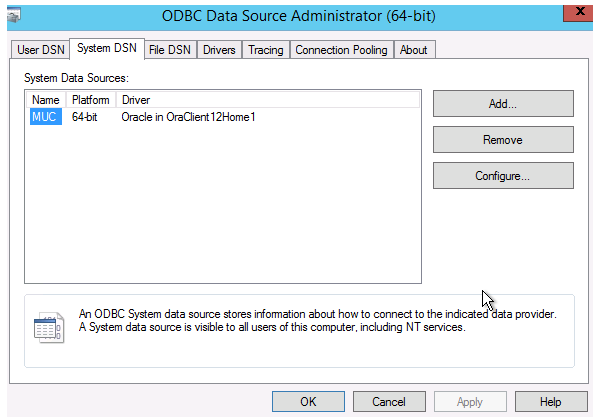
Install the 64 bit client and configure the client (through Oracle Net, SQLPLUS, Oracle Odbc) also when the Oracle Server runs on the computer. An Installation is necessary (OK Test for the Odbc administrator is not sufficient!).
-
Note that the Oracle Inventory directory may not be located on a path that contains ";" (Comma). Search for "Oracle\Inventory" in the registry and change the path. Change the path also in the file system.
-
You have to execute the administration of the 64 bit client using c:\Windows\SysWOW64\odbcad64.exe. The ODBC administrator in the control panel only knows the 64 bit drivers.
-
Error Messages
This topic contains each error message, which may occur during ADO processes under Windows.
Depending upon the development environment, and the mechanism used to trap error conditions, you may see return codes in one of two forms:
-
0x80004005 (hex)
-
-2147467259 (long)
They are the same value, just cast differently. In this case they are the error values, which may indicate that neither OLE DB nor its underlying provider was able to positively identify the source of the error.
Frequently encountered return codes from OLEThis list was compiled from the Winerror.h file, which ships with the Win32 SDK:
Debugging return codes from OLE DBUnsigned
return codes
Signed Hex return codes Description 0x80000001 -2147483647 Not implemented 0x80000002 -2147483646 Ran out of memory 0x80000003 -2147483645 One or more arguments are invalid 0x80000004 -2147483644 No such interface supported 0x80000005 -2147483643 Invalid pointer 0x80000006 -2147483642 Invalid handle 0x80000007 -2147483641 Operation aborted 0x80000008 -2147483640 Unspecified error 0x80000009 -2147483639 General access denied error 0x8000000A -2147483638 The data necessary to complete this operation;is not yet available. 0x80004001 -2147467263 Not implemented 0x80004002 -2147467262 No such interface supported 0x80004003 -2147467261 Invalid pointer 0x80004004 -2147467260 Operation aborted 0x80004005 -2147467259 Unspecified error 0x80004006 -2147467258 Thread local storage failure 0x80004007 -2147467257 Get shared memory allocator failure 0x80004008 -2147467256 Get memory allocator failure 0x80004009 -2147467255 Unable to initialize class cache 0x8000400A -2147467254 Unable to initialize RPC services 0x8000400B -2147467253 Cannot set thread local storage channel control 0x8000400C -2147467252 Could not allocate thread local storage channel control 0x8000400D -2147467251 The user supplied memory allocator is unacceptable 0x8000400E -2147467250 The OLE service mutex already exists 0x8000400F -2147467249 The OLE service file mapping already exists 0x80004010 -2147467248 Unable to map view of file for OLE service 0x80004011 -2147467247 Failure attempting to launch OLE service 0x80004012 -2147467246 There was an attempt to call CoInitialize a second time while single threaded 0x80004013 -2147467245 A Remote activation was necessary but was not allowed 0x80004014 -2147467244 A Remote activation was necessary but the server name provided was invalid 0x80004015 -2147467243 The class is configured to run as a security id different from the caller 0x80004017 -2147467241 A RunAs specification must be <domain name>/<user name> or simply <user name> 0x80004018 -2147467240 The server process could not be started. The path name may be incorrect. 0x80004019 -2147467239 The server process could not be started as the configured identity. The pathname may be incorrect or unavailable. 0x8000401A -2147467238 The server process could not be started because the configured identity is incorrect. Check the user name and password. 0x8000401B -2147467237 The client is not allowed to launch this server. 0x8000401C -2147467236 The service providing this server could not be started. 0x8000401D -2147467235 This computer was unable to communicate with the computer providing the server. 0x8000401E -2147467234 The server did not respond after being launched. 0x8000401F -2147467233 The registration information for this server is inconsistent or incomplete. 0x80004020 -2147467232 The registration information for this interface is inconsistent or incomplete. 0x80004021 -2147467231 The operation attempted is not supported. 0x8000FFFF -2147418113 Catastrophic failure 0x80070005 -2147024891 General access denied error 0x80070006 -2147024890 Invalid handle 0x8007000E -2147024882 Ran out of memory 0x80070057 -2147024809 One or more arguments are invalid This list was compiled from the Oledberr.h file, which ships with the OLE-DB SDK:
Unsigned
return codes
Signed Hex return codes Description 0x80040E00 -2147217920 Invalid accessor 0x80040E01 -2147217919 Creating another row would have exceeded the total number of active rows supported by the rowset 0x80040E02 -2147217918 Unable to write with a read-only accessor 0x80040E03 -2147217917 Given values violate the database schema 0x80040E04 -2147217916 Invalid row handle 0x80040E05 -2147217915 An object was open 0x80040E06 -2147217914 Invalid chapter 0x80040E07 -2147217913 A literal value in the command could not be converted to the correct type due to a reason other than data overflow 0x80040E08 -2147217912 Invalid binding info 0x80040E09 -2147217911 Permission denied 0x80040E0A -2147217910 Specified column does not contain bookmarks or chapters 0x80040E0B -2147217909 Some cost limits were rejected 0x80040E0C -2147217908 No command has been set for the command object 0x80040E0D -2147217907 Unable to find a query plan within the given cost limit 0x80040E0E -2147217906 Invalid bookmark 0x80040E0F -2147217905 Invalid lock mode 0x80040E10 -2147217904 No value given for one or more required parameters 0x80040E11 -2147217903 Invalid column ID 0x80040E12 -2147217902 Invalid ratio 0x80040E13 -2147217901 Invalid value 0x80040E14 -2147217900 The command contained one or more errors 0x80040E15 -2147217899 The executing command cannot be canceled 0x80040E16 -2147217898 The provider does not support the specified dialect 0x80040E17 -2147217897 A data source with the specified name already exists 0x80040E1z -2147217896 The rowset was built over a live data feed and cannot be restarted 0x80040E19 -2147217895 No key matching the described characteristics could be found within the current range 0x80040E1A -2147217894 Ownership of this tree has been given to the provider 0x80040E1B -2147217893 The provider is unable to determine identity for newly inserted rows 0x80040E1C -2147217892 No nonzero weights specified for any goals supported, so goal was rejected; current goal was not changed 0x80040E1D -2147217891 Requested conversion is not supported 0x80040E1E -2147217890 lRowsOffset would position you past either end of the rowset, regardless of the cRows value specified; cRowsObtained is 0 0x80040E1F -2147217889 Information was requested for a query, and the query was not set 0x80040E20 -2147217888 Provider called a method from IRowsetNotify in the consumer and NT 0x80040E21 -2147217887 Errors occurred 0x80040E22 -2147217886 A non-NULL controlling IUnknown was specified and the object being created does not support aggregation 0x80040E23 -2147217885 A given HROW referred to a hard- or soft- deleted row 0x80040E24 -2147217884 The rowset does not support fetching backwards 0x80040E25 -2147217883 All HROWs must be released before new ones can be obtained 0x80040E26 -2147217882 One of the specified storage flags was not supported 0x80040E28 -2147217880 The specified status flag was neither DBCOLUMNSTATUS_OK nor DBCOLUMNSTATUS_ISNULL 0x80040E29 -2147217879 The rowset cannot scroll backwards 0x80040E2A -2147217878 Invalid region handle 0x80040E2B -2147217877 The specified set of rows was not contiguous to or overlapping the rows in the specified watch region 0x80040E2C -2147217876 A transition from ALL* to MOVE* or EXTEND* was specified 0x80040E2D -2147217875 The specified region is not a proper subregion of the region identified by the given watch region handle 0x80040E2E -2147217874 The provider does not support multi-statement commands 0x80040E2F -2147217873 A specified value violated the integrity constraints for a column or table 0x80040E30 -2147217872 The given type name was unrecognized 0x80040E31 -2147217871 Execution aborted because a resource limit has been reached; no results have been returned 0x80040E32 -2147217870 Cannot clone a command object whose command tree contains a rowset or rowsets 0x80040E33 -2147217869 Cannot represent the current tree as text 0x80040E34 -2147217868 The specified index already exists 0x80040E35 -2147217867 The specified index does not exist 0x80040E36 -2147217866 The specified index was in use 0x80040E37 -2147217865 The specified table does not exist 0x80040E38 -2147217864 The rowset was using optimistic concurrency and the value of a column has been changed since it was last read 0x80040E39 -2147217863 Errors were detected during the copy 0x80040E3A -2147217862 A specified precision was invalid 0x80040E3B -2147217861 A specified scale was invalid 0x80040E3C -2147217860 Invalid table ID 0x80040E3D -2147217859 A specified type was invalid 0x80040E3E -2147217858 A column ID was occurred more than once in the specification 0x80040E3F -2147217857 The specified table already exists 0x80040E40 -2147217856 The specified table was in use 0x80040E41 -2147217855 The specified locale ID was not supported 0x80040E42 -2147217854 The specified record number is invalid 0x80040E43 -2147217853 Although the bookmark was validly formed, no row could be found to match it 0x80040E44 -2147217852 The value of a property was invalid 0x80040E45 -2147217851 The rowset was not chaptered 0x80040E46 -2147217850 Invalid accessor 0x80040E47 -2147217849 Invalid storage flags 0x80040E48 -2147217848 By-ref accessors are not supported by this provider 0x80040E49 -2147217847 Null accessors are not supported by this provider 0x80040E4A -2147217846 The command was not prepared 0x80040E4B -2147217845 The specified accessor was not a parameter accessor 0x80040E4C -2147217844 The given accessor was write-only 0x80040E4D -2147217843 Authentication failed 0x80040E4E -2147217842 The change was canceled during notification; no columns are changed 0x80040E4F -2147217841 The rowset was single-chaptered and the chapter was not released 0x80040E50 -2147217840 Invalid source handle 0x80040E51 -2147217839 The provider cannot derive parameter info and SetParameterInfo has not been called 0x80040E52 -2147217838 The data source object is already initialized 0x80040E53 -2147217837 The provider does not support this method 0x80040E54 -2147217836 The number of rows with pending changes has exceeded the set limit 0x80040E55 -2147217835 The specified column did not exist 0x80040E56 -2147217834 There are pending changes on a row with a reference count of zero 0x80040E57 -2147217833 A literal value in the command overflowed the range of the type of the associated column 0x80040E58 -2147217832 The supplied HRESULT was invalid 0x80040E59 -2147217831 The supplied LookupID was invalid 0x80040E5A -2147217830 The supplied DynamicErrorID was invalid 0x80040E5B -2147217829 Unable to get visible data for a newly-inserted row that has not yet been updated 0x80040E5C -2147217828 Invalid conversion flag 0x80040E5D -2147217827 The given parameter name was unrecognized 0x80040E5E -2147217826 Multiple storage objects can not be open simultaneously 0x00040EC0 265920 Fetching requested number of rows would have exceeded total number of active rows supported by the rowset 0x00040EC1 265921 One or more column types are incompatible; conversion errors will occur during copying 0x00040EC2 265922 Parameter type information has been overridden by caller 0x00040EC3 265923 Skipped bookmark for deleted or non-member row 0x00040EC4 265924 Errors found in validating tree 0x00040EC5 265925 There are no more rowsets 0x00040EC6 265926 Reached start or end of rowset or chapter 0x00040EC7 265927 The provider re-executed the command 0x00040EC8 265928 Variable data buffer full 0x00040EC9 265929 There are no more results 0x00040ECA 265930 Server cannot release or downgrade a lock until the end of the transaction 0x00040ECB 265931 Specified weight was not supported or exceeded the supported limit and was set to 0 or the supported limit 0x00040ECD 265933 Input dialect was ignored and text was returned in different dialect 0x00040ECE 265934 Consumer is uninterested in receiving further notification calls for this phase 0x00040ECF 265935 Consumer is uninterested in receiving further notification calls for this reason 0x00040ED1 265937 In order to reposition to the start of the rowset, the provider had to reexecute the query; either the order of the columns changed or columns were added to or removed from the rowset 0x00040ED2 265938 The method had some errors; errors have been returned in the error array 0x00040ED3 265939 Invalid row handle 0x00040ED4 265940 A given HROW referred to a hard-deleted row 0x00040ED5 265941 The provider was unable to keep track of all the changes; the client must refetch the data associated with the watch region using another method 0x00040ED6 265942 Execution stopped because a resource limit has been reached; results obtained so far have been returned but execution cannot be resumed 0x00040ED8 265944 A lock was upgraded from the value specified 0x00040ED9 265945 One or more properties were changed as allowed by provider 0x00040EDA 265946 Errors occurred 0x00040EDB 265947 A specified parameter was invalid 0x00040EDC 265948 Updating this row caused more than one row to be updated in the data source -