
 "timeFormat"
Changes the format of the time scale.
Synopsis
setValue(string shape, "timeFormat", int TrendNumber, bool NumLines, string
                    Format1, string Format2);
shape.timeFormat(int TrendNumber, bool NumLines, string Format1, string
                    Format2);
Parameters
| Parameter | Description |
|---|---|
| shape | Name of the object |
| TrendNumber | Number of the pertinent trend display range |
| NumLines | TRUE=single spacing, FALSE=double spacing |
| Format1 | Format string for the first line |
| Format2 | Format string for the second line |
Description
Changes the format of the time scale. The two lines can be formatted separately. The format of the lines is defined by two strings (a second string must also be passed for single spaced display). These strings can contain several parameters. The format for the string is:
[<string>][%Label][<string>]
Any number of parameters and strings can be mixed.
The following table lists the permissible labels and their meaning:
| Parameter | Description |
|---|---|
| %a | Abbreviated name of the weekday |
| %A | full name of the weekday |
| %b | Abbreviated name of the month |
| %B | Full name of the month |
| %c | Local representation of date and time |
| %d | Day in the month (01 - 31) |
| %H | Hour (00 - 23) |
| %I | Hour (00 -12) |
| %j | Day in the year (001 - 366) |
| %m | Month (01 - 12) |
| %M | Minute (00 - 59) |
| %p | Local equivalent of AM (morning) or PM (afternoon) |
| %S | Second (00 - 59) |
| %U | Week in the year (Sunday is the first day of the week) (00 - 53) |
| %w | Weekday (0-6, Sunday is 0!) |
| %W | Week in the year (Monday is the first day of the week) (00-53) |
| %x | Local representation of the date |
| %X | Local representation of the time |
| %y | Year without the century (00 - 99) |
| %Y | Year with the century |
| %Z | Name of the time zone if it exists |
| %% | % |
A format string "Today is the %d. %B" would return as follows: "Today is the 2nd of April" (for this date). Note that the format string is not displayed if it is too long to fit onto the screen
main()
{
  TREND1.timeFormat(0, TRUE, "%a %d. %m.", "");
}
Image: Date is shown for the Time Scale
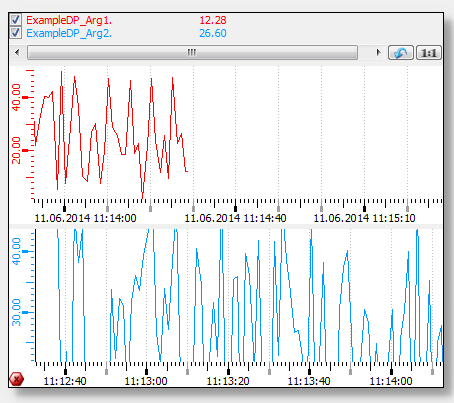
Assignment
Trend