
 "timeFormat"
Defines the time format for the X-axis.
Synopsis
setValue(string shape, "timeFormat", string format);
getValue(string shape, "timeFormat", string &format);
shape.timeFormat(string format);
Parameters
| Parameter | Description |
|---|---|
| shape | Name of the object |
| format | Time format string |
Description
This attribute can be used to specify how the times displayed on the x-axis are shown. The format is specified by a string that can contain more than one parameter. The format of the string is:
[<string>][%Specifier][<string>]
Any number of parameters and strings can be mixed.
The valid specifiers and their meanings are shown in the following table:
| Parameter | Description |
|---|---|
| a | Weekday abbreviation |
| A | Weekday in full |
| b | Month abbreviation |
| B | Month in full |
| c | Day/Month/Year Hour/Minute/Second |
| d | Day as a number (01-31) |
| H | Hour in 24 hour format (00-23) |
| I | Hour in 12 hour format (01-12) |
| j | Day as a number (001 - 366) |
| m | Month as a number (1-12) |
| M | Minute as a number (00-59) |
| p | Gives the A.M./P.M. label for the 12-hour clock |
| S | Second as a number (00-59) |
| U | Week number with Sunday as the first day of the week (00-51) |
| w | Weekday as a number (0-6, Sunday=0) |
| W | Week number with Monday as the first day of the week (00-51) |
| x | Day/Month/Year |
| X | Hour/Minute/Second |
| y | Year without century (00-99) |
| Y | Year with century as a number |
| Z | Time zone abbreviation |
| z | Full time zone label, returns an empty string for an unknown time zone |
| % | Percentage sign |
A format string of the form "Today is the %d. %B" would thus return, for example, "Today is the 02 April" (for that particular date). The format string is not displayed if it is too long to fit onto the screen.
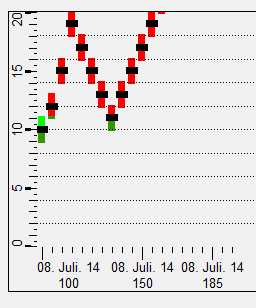
The following example sets the format to "Day as a number. Month in full. Year without Century" representation.
main()
{
  BAR_TREND1.timeFormat("%d. %B. %y");
}
Assignment
Bar trend