
Graphics objects
The properties of graphics objects are accessed by functions (attributes).
In principle there are two methods of editing these attributes such as color or size.
-
You can use the functions setValue(), setMultiValue(), getValue() and getMultiValue(). You can also access shapes not only in the local panel but also in other modules or panels from the same UI manager.
-
The method with the "dot" operator has syntactic and didactic advantages and simplifies working with attributes. It is, however, unsuitable for reading more than one parameter.
With the dot notation, expressions can be chained at an arbitrary depth. The expression the chaining is used on can be any expression, even a constant
The parameters of graphics attributes and their data types or the format in which they must be passed are explained and defined in the following sections.
The general attributes of objects (this means attributes that can be used for several object types) like color and line type string are described in the first chapters (Attributes of all graphics objects (overview) and in the chapters under "Functions for all graphics objects (detailed)". The object specific attributes are described further on.
Hierarchy of graphics objects
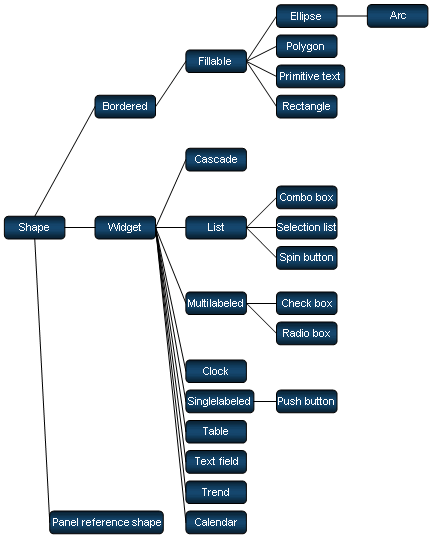
The figure below illustrates the object hierarchy. This tree diagram shows what objects are derived from what objects higher up the tree and thus indicates where their attributes are inherited from.
"Bordered" contains all graphics objects having line type as an attribute. Thus "Bordered" attributes also apply to "Fillable" and hence to "Ellipse", "Arc", "Polygon", "Primitive Text", "Rectangle" as well as "Line".
| Chapter | Content |
|---|---|
| Graphics objects | Hierarchy of the objects and links. |
| Attributes for all graphics objects (overview) | Point notation, the attributes that are available for all graphics objects |
| Graphics objects in references | Addressing graphics objects in references. |
| Access shapes in other panels and modules | How to access not only the local panel but also other panels or modules from the same UI manager |
| Graphic Object Functions | Functions for all graphic objects. |
| Panel functions | Attributes of panels. |
| Reference Functions | Attributes of references. |
| Layoutgroup functions | Attributes of the layoutgroup. |
| Arc functions | Attributes of arc. |
| Bar trend functions | Attributes of the bar trend. |
| Button functions | Attributes of the button. |
| Calendar functions | Attributes of the calendar. |
| Cascade functions | Attributes of the cascade. |
| Check box functions | Attributes of the check box. |
| Clock functions | Attributes of clock. |
| Combo box functions | Attributes of the combo box. |
| DialGauge EWO functions | Attributes of the DialGauge EWO. |
| DpTreeView functions | Attributes of the DpTreeView. |
| DpTypeView functions | Attributes of the DpTypeView. |
| Embedded module functions | Attributes of the embedded module. |
| Frame functions | Attributes of the frame. |
| LCD number functions | Attributes of the LCD number. |
| Pipe functions | Attributes of the pipe. |
| Primitive text functions | Attributes of the primitive text. |
| Polyline functions | Attributes of the polyline. |
| Progress bar functions | Attributes of the progress bar. |
| Radiobox functions | Attributes of the radiobox. |
| Rectangle functions | Attributes of the rectangle. |
| Scheduler ewo functions | Attributes of the scheduler.ewo. |
| Selection list functions | Attributes of the selection list. |
| Slider functions | Attributes of the slider. |
| Spin button functions | Attributes of the spin button. |
| Splitter Functions | Attributes of the splitter. |
| Tab functions | Attributes of the tab. |
| Table functions | Attributes of the table. |
| Text field functions | Attributes of the text field. |
| TextEdit functions | Attributes of the textEdit. |
| Thumb wheel functions | Attributes of the thumb wheel |
| toggleSwitch EWO functions | Attributes of the ToggleSwitch EWO. |
| Tree widget functions | Attributes of the tree widget. |
| Trend functions | Attributes of the trend. |
| Zoom navigator functions | Attributes of the zoom navigator. |