Creating Datapoints with the Database Editor PARA
Since you already created complete types with master datapoints in the previous chapter, you can easily create further datapoints using the database editor PARA.

To create a single datapoint, activate the context menu [rightMouseClick] of the datapoint type and click the entry "Create datapoint". Enter the name of the new datapoint in the dialog box that will be displayed. The data point will be created with OK.
Datapoint identifiers have to start with an alphabetic character or with an underline "_". Numbers are only allowed afterwards. WinCC OA differentiates between upper and lower case - these names are "case sensitive".
-
Create a datapoint called T1 of the datapoint type GS_LEVEL.
-
Create a second datapoint (T2) of the same type.
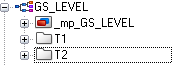
In the tree view of the module PARA you should now see the following datapoints.
In order to create datapoints at least the corresponding datapoint type has to exist. If you create datapoints of a datapoint type for which nomaster datapoint exists, the datapoints only "inherit" the structure, naming of the elements and data types.
If there is also a master datapoint, the datapoints also contain configs. Which attributes of a config can be set individually for a datapoint, will be defined by the selection of the respective PoerConfig.
In WinCC OA, several datapoint elements could be created in a single operation.
For example, you can create the valves V1 to V3 of datapoint type GS_VALVE at once:
-
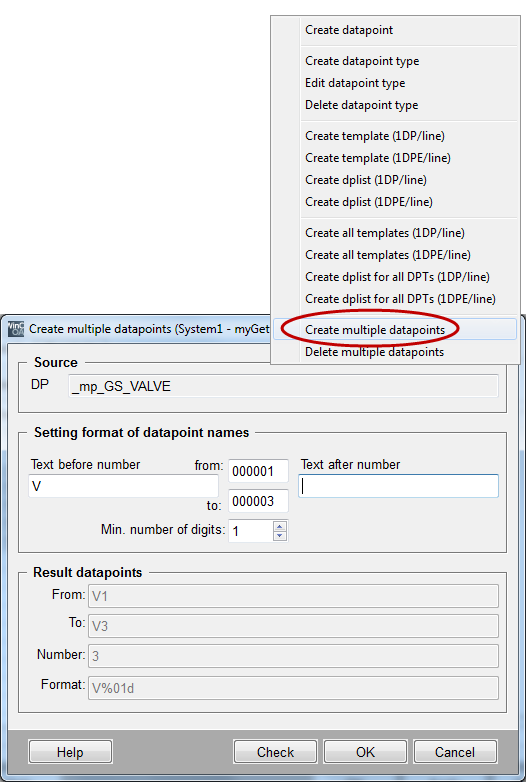
Select the entry "Create multiple datapoints" in the context menu [rightMouseClick] of the datapoint type GS_VALVE.
-
In the following dialog, enter the datapoint identifier "V" as prefix in the "Text before number" field and enter the number range "1" to "3". A single numeric position (Min. number of digits = 1) is sufficient.
-
Leave the possible suffix for the datapoint identifier blank (field "Text after number").
-
Close the dialog with OK and confirm the following dialog:
As soon as the datapoints have been created, the instance names V1, V2 and V3 will be shown in the tree view of the PARA module for the datapoint type GS_VALVE.
The database editor PARA is a great tool within the scope of datapoint design and prototypes. If you would, however, like to create a number of datapoints (devices), you should use external datapoint lists. The datapoints will then be imported to WinCC OA using the ASCII Manager. For more information on the ASCII manager, see chapter Import from ASCII file (Mass Engineering) of this tutorial as well as the chapters ASCII-Manager, Basics and Mass Configuration, Basics of the online help.
In the PARA module you can also delete datapoints individually via the context menu of the datapoint type or datapoint. It is also possible to delete several data points simultaneously.



