Datapoints as bearer of information
In WinCC OA it's possible to individually create device orientated datapoints. The basic concept of such a structured datapoint was introduced in the section Datapoint Concept, Process Image. In the following sections the practical use of datapoints combined with detailed background information will be provided.
In order to work with WinCC OA and to be able to create user interfaces for the use, the carrier of the presented information must be defined. These carriers are variables whose values present the current process information. Such process variables are called datapoint elements in WinCC OA.
In order to display existing datapoints or to create new ones, you usually use the
database editor PARA. It can be opened with the already opened graphic editor
GEDI using the  symbol.

Alternatively, we could also define the database editor as its own manager in the console
and start it from the console. Therefore, open the manager selection dialog (see figure
on the page Configuration of a Project) through the  button, select the entry WCCOAui and enter the parameter
"-m para" in the "Options" field. Consider that the restart option is
set to "manual".
button, select the entry WCCOAui and enter the parameter
"-m para" in the "Options" field. Consider that the restart option is
set to "manual".
Datapoint types
The list in the field on the left side (in the figure above) shows all datapoint types available in the current project. Each of these datapoint types represents a whole class of devices or logical units. If you click on the "+" sign in front of the name of the datapoint type, a list of datapoints (instances/devices) of this type will be shown.
A datapoint type is a form of template for structured datapoints. Structure, naming and partly also configurations are already configured when defining the type.
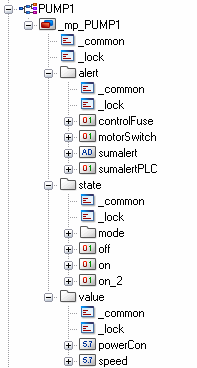
Before it's possible to create a structured datapoint as a representative of a device, a corresponding datapoint type has to be created as a template.
Datapoints
Each datapoint can represent a real device or a logical combination of information. It is built up of one or several, almost arbitrary structured datapoint elements. Each datapoint belongs to its datapoint type and is accordingly shown in the module PARA. A double click on the name of the datapoint type or the "+" symbol in the front of the name opens a list of all data points of one type.
The following image shows two typesavailable by default and their data points (instances). The datapoint type ExampleDP_Float has 4 datapoints (instances) in this case. This datapoint type consists ofonly one datapoint elementand can therefore only represent a single process variable. This corresponds to the common data model of most SCADA systems but is an exception in WinCC OA. This type (and also the other ExampleDP* types) are merely available for test or demonstration purposes.

The datapoint type PUMP1 (displayed at the right) corresponds more to the common structure in WinCC OA. Numerous process variables are part of the device-oriented datapoint. At the start, PUMP1 has just a single datapoint instance. Even this is an exception: it is a master datapoint (MP) that can display certain configuration information for the type. The master data points will be described later. There are no real datapoint instances available for the type PUMP1 since this is a new, initially empty project.

Datapoint types and datapoints only exist within a project. Each of the projects on a computer can have other datapoint types and datapoints even with the same names. In order to transfer existing datapoint types and datapoints from a project to another one, the Import/Export function of the ASCII manager is used. For more information, see ASCII Manager Panel, basics.
Information at the datapoint element
Each datapoint element primarily represents the value of a process variable, however there is some important additional information about this value. It's a complete processimage since it maps all the essential attributes of a recorded value.
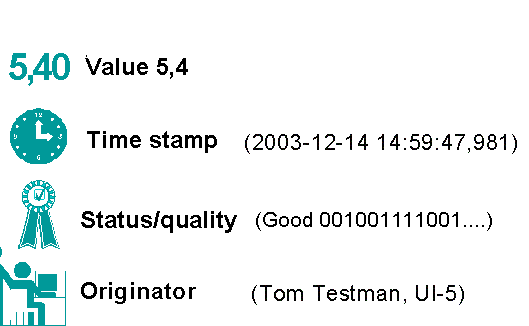
These additional attributes of the value could also be seen in the database editor PARA. Additionally, you can see that there are two different fields for value display.
| Original value | The value that was originally recorded (e.g. received from a controller). This original value always remains and can be queried also after automatic corrections (substitute value enabled). Active write operations are always performed on the original value. |
| Online value | All function modules within WinCC OA work with this value. Normally, it is an identic copy of the original value. Only if a value is noted as invalid, a substitute value might be displayed. When reading a datapoint element (display, processing), the online value is always accessed. |
For more information on the original value, see the chapter _original (Original attributes)
Data types
Datapoint elements can represent quite different information. In addition to the common binary and analog variables also higher and structured data types are available. Therefore, the datapoints can not only be used for the pure representation of process states of a control system but also for administration tasks, configurations, recipes and the like.
| Data type | Data Width | Meaning |
|---|---|---|
| bool | 1 Bit | Binary variable |
| int | 32 Bit | Integer |
| unsigned | 32 Bit | Unsigned integer |
| float | 64 Bit | Float |
| bit32 | 32 Bit | Bit pattern |
| char | 8 Bit | Character |
| string | n x 8 Bit | String (n characters long) |
| langString | m x n x 8 Bit | Multilingual string (n languages) |
| time | 48 Bit | Time / length |
| dpid | - | Datapoint identifier |
| typeref | - | Type reference |
| blob | arbitrary | Binary structure (binary large object) |
|
dyn_… (dyn_string,…) |
Dynamic fields of above mentioned basic types (the used size and required space can be changed for each instance dynamically) | |
|
array… (char array,…) |
Static fields of above mentioned basic types (the number of field elements is already defined when configuring). |
The data type of a datapoint element is already defined when creating the data point type (together with the identification schema). This data type can be changed later which results in the change of all datapoints of this type.
When using floating point numbers, a point "." is used as the decimal separator. This is conform to the worldwide programming standard C/C++.



