
Key Features & Integration
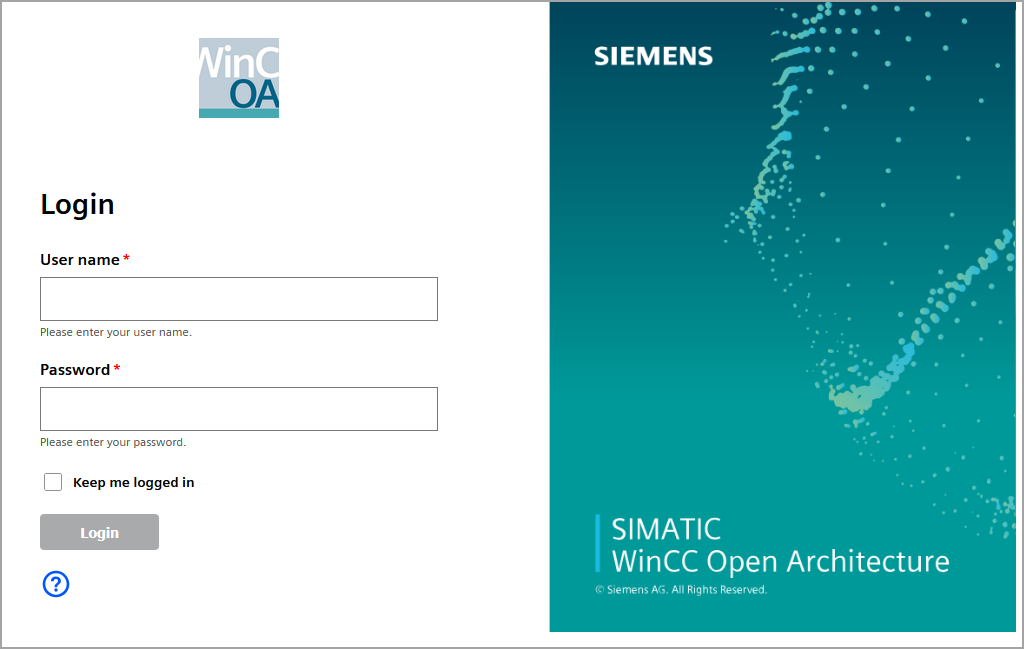
This template offers a strong and responsive visual base for a login page. Its modular design and clean CSS make it easy to customize and integrate into different environments. It serves as a great starting point for developing user interfaces.
Key Features
The main features for the login page are:
| Responsive Design | Description |
|---|---|
| Responsive Design | The page layout adapts to various screen sizes, transitioning from a two-column to a single-column layout on smaller devices (mobile phones). |
| Two-Column Layout (Destop) | The page is divided into a left section (for the login form) and a right section (for a background image). |
| Standard Login Fields | Includes fields for username, password, and language selection. |
| Keep me logged in Checkbox | A simple checkbox for the "remember me" option. |
| Help and Maintenance Icons | Features SVG icons for accessing help or maintenance information. |
| Siemens Font Integration | Uses @import for the 'Siemens Sans' font, indicating an intention to adhere to Siemens IX design principles. |
| Basic Form Styling | Configurable styles for input fields, labels, buttons, and error messages. |
HTML Structure
| HTML Structure | Description |
|---|---|
| <div class="page-container"> | The main container for the entire page layout, using Flexbox to arrange the left and right sides. |
| <div class="left-side"> | Contains the logo and the login form. On desktop devices, it occupies approximately half the page width. |
| <div class="right-side"> | Contains a background image displayed on the right side of the desktop version. It is hidden on mobile devices. |
| <div class="logo-container"> | Container for the company logo. |
| <div class="content-container"> | Wraps the login form, ensuring it is centered and does not exceed the maximum width. |
| <div class="login-form-container"> | A specific container for the form itself. |
| <div class="form-group"> | A standard wrapper for each form element (label, input, small text, error message). |
| <div class="checkbox-group">
and <label class="checkbox-control"> |
A specific structure for the Keep me logged in checkbox, ensuring the text is next to the checkbox. |
| <div class="help-icon-absolute-wrap">,
<span class="help-icon-wrapper">, <span class="icon-button-group"> |
Containers for the help and maintenance icons, which use SVG. |
CSS Styling
Styles are included directly inside the <style> block located in the header section of the HTML file.
| Style | Description |
|---|---|
| Base Styles (body, .page-container) | Sets the base font Siemens Sans, Roboto, zero margins, and flexbox for the main layout. |
| Page Layout (.left-side, .right-side) | Defines widths, padding, and positioning for the left and right sides. The right side uses background-image for a visual effect. |
| Responsive Adjustments (@media (max-width: 768px)) | For smaller screens, the layout changes to a column-based arrangement (lex-direction: column), the left side takes full width, and the right side is hidden (display: none). |
| Form Styles (.login-form-container, .form-group, input, label, select, button) | Defines the appearance of input fields, labels (including the required asterisk), the select box, and the login button. |
| Checkbox Styles (.checkbox-group, .checkbox-control, .checkbox-text) | Uses display: flex on label.checkbox-control to align the checkbox and text side-by-side. |
| Icon Styles (.help-icon, .maintenance-icon) | Defines the size and color of the SVG icons. |
Use and Deployment
- Save the File: Copy all of the provided code (see the
code example below) into a text editor and save it with a
.htmlextension (for example,login.html). Ensure that the file encoding is set to UTF-8. - Image File Placement:
logo.png(used for the logo)loginscreen.svg(used for the right-side background)
Place these image files in the same directory as your
login.htmlfile. This is necessary because the image paths in the code are relative (for example,src="logo.png"). - Open in Browser: Double-click the
.htmlfile to open it in your web browser.
Example
<!DOCTYPE html>
<html>

<head>
    <meta charset="UTF-8">
    <meta name="viewport" content="width=device-width, initial-scale=1.0">
    <title>Login</title>
    <style>
        body {
            margin: 0;
            padding: 0;
            font-family: 'Siemens Sans', 'Roboto', sans-serif;
            background-color: white;
        }

        .page-container {
            display: flex;
            min-height: 100vh;
            position: relative;
        }

        .left-side {
            flex: 1;
            display: flex;
            flex-direction: column;
            padding: 40px;
            align-items: center;
            width: 50%;
            margin-right: 50%;
        }

        .right-side {
            position: fixed;
            top: 0;
            right: 0;
            width: 50%;
            height: 100%;
            background-image: url('loginscreen.svg');
            background-repeat: no-repeat;
            background-size: auto calc(100% + 40px);
            background-position: left -50px;
        }

        .logo-container {
            width: 100%;
            max-width: 400px;
            margin-bottom: 40px;
            text-align: center;
        }

        .logo-container img {
            width: 20%;
            height: auto;
        }

        .content-container {
            width: 100%;
            max-width: 400px;
        }

        .grant-debug {
            padding: 20px;
        }

        .grant-debug details {
            margin-top: 20px;
        }

        .login-help {
            display: none;
        }

        @media (max-width: 768px) {
            .page-container {
                flex-direction: column;
            }

            .left-side {
                padding: 20px;
                width: 100%;
                margin-right: 0;
            }

            .right-side {
                display: none;
            }
        }

        /* Login Form */
        .login-form-container {
            width: 100%;
        }

        .login-title {
            color: black;
            font-size: 1.8125rem;
            line-height: 120%;
            font-weight: 700;
            margin-bottom: 30px;
            text-align: left;
        }

        .form-group {
            margin-bottom: 20px;
            text-align: left;
        }

        label {
            display: block;
            color: rgb(0, 0, 0);
            margin-bottom: 8px;
            text-align: left;
            font-weight: bold;
        }

        label.required::after {
            content: "*";
            color: #ff0000;
            margin-left: 2px;
            display: inline;
        }

        input[type="text"],
        input[type="password"],
        .language-select {
            width: 100%;
            height: 44px;
            padding: 0 8px;
            font-size: 16px;
            border: 1px solid #79797a;
            box-sizing: border-box;
            outline: none;
            background: #fff;
            transition: border-color 0.2s, box-shadow 0.2s;
        }

        input[type="text"]:focus,
        input[type="password"]:focus,
        .language-select:focus {
            border-color: #0057fa;
            box-shadow: 0 0 0 1px #0057fa;
        }

        .form-text {
            font-size: 12px;
            color: #535353;
            margin-top: 4px;
            text-align: left;
        }

        .error-message {
            display: none;
            color: #ff0000;
            font-size: 12px;
            margin-top: 4px;
        }

        .checkbox-group {
            margin-bottom: 20px;
            text-align: left;
        }

        .checkbox-control {
            display: flex;
            align-items: center;
            gap: 8px;
            cursor: pointer;
            margin-top: 20px;
        }

        .checkbox-control input[type="checkbox"] {
            width: 18px;
            height: 18px;
            flex-shrink: 0;
        }

        .checkbox-text {
            color: black;
            font-size: 14px;
        }

        .login-submit {
            width: 30%;
            height: 36px;
            background-color: #a8aaac;
            color: white;
            border: none;
            font-size: 14px;
            font-weight: 700;
            margin-top: 8px;
            cursor: pointer;
            border-radius: 4px;
            display: block;
            margin-left: 0;
        }

        .help-icon-absolute-wrap {
            width: 100%;
            margin-top: 18px;
            text-align: left;
        }

        .help-icon-wrapper {
            display: flex;
            align-items: center;
            gap: 10px;
        }

        .icon-button-group {
            position: relative;
            width: 32px;
            height: 32px;
            display: flex;
            justify-content: center;
            align-items: center;
        }

        .help-icon,
        .maintenance-icon {
            position: absolute;
            top: 0;
            left: 0;
            z-index: 1;
            width: 32px;
            height: 32px;
            color: #0057fa;
            display: block;
        }

        .help-icon svg,
        .maintenance-icon svg {
            width: 100%;
            height: 100%;
        }

        .help-icon svg path,
        .maintenance-icon svg path {
            fill: #0057fa;
        }
    </style>
</head>

<body>
    <div class="page-container">
        <div class="left-side">
            <div class="logo-container">
                <img src="logo.png" alt="Logo">
            </div>
            <div class="content-container">
                <div class="login-form-container">
                    <h2 class="login-title" id="loginTitle">Login</h2>
                    <form id="loginForm" action="#" method="post" autocomplete="off" novalidate>
                        <div class="form-group">
                            <label for="userName" class="required" id="lbl-userName">User name</label>
                            <input type="text" name="userName" id="userName" autofocus>
                            <small class="form-text" id="help-userName">Please enter your user name.</small>
                            <div id="err-userName" class="error-message">User name cannot be empty!</div>
                        </div>
                        <div class="form-group">
                            <label for="password" class="required" id="lbl-password">Password</label>
                            <input type="password" name="password" id="password">
                            <small class="form-text" id="help-password">Please enter your password.</small>
                            <div id="err-password" class="error-message">Password cannot be empty!</div>
                        </div>
                        <div class="checkbox-group">
                            <label for="keepLoggedInCheckbox" class="checkbox-control">
                                <input type="checkbox" name="keepLoggedIn" id="keepLoggedInCheckbox">
                                <span class="checkbox-text" id="toggle-label">Keep me logged in</span>
                            </label>
                        </div>

                        <button type="submit" class="login login-submit btn btn-secondary" id="loginBtn">Login</button>
                        <div class="help-icon-absolute-wrap">
                            <span class="help-icon-wrapper">
                                <a href="https://www.winccoa.com/documentation/WinCCOA/latest/en_US/index.html"
                                    target="_blank" class="icon-button-group" <span class="icon-button-group">
                                    <svg class="help-icon" viewBox="0 0 512 512" width="32" height="32"
                                        xmlns="http://www.w3.org/2000/svg">
                                        <g stroke="none" stroke-width="1" fill="none" fill-rule="evenodd">
                                            <g transform="translate(42.666667, 42.666667)">
                                                <path fill="#0057fa"
                                                    d="M291.76704,163.504 C291.76704,177.01952 288.33216,188.82176 281.479253,198.90112 C275.828267,207.371093 266.358187,216.549547 253.042987,226.434987 C245.378987,231.682347 240.331947,236.618667 237.916587,241.257813 C234.87744,246.90624 233.376213,255.371093 233.376213,266.666667 L190.710827,266.666667 C190.710827,249.530027 192.53504,237.027413 196.165333,229.162667 C200.394453,219.679573 209.571627,210.098773 223.686187,200.42048 C230.350293,195.374933 235.188693,190.2368 238.214827,184.994773 C241.839787,179.143253 243.664,172.49216 243.664,165.028693 C243.664,153.13024 240.125013,144.26304 233.070293,138.404907 C227.4336,134.177067 220.56768,132.059947 212.501333,132.059947 C199.39328,132.059947 189.911467,136.398507 184.065067,145.069013 C179.829333,151.518293 177.7056,159.787733 177.7056,169.868587 L177.7056,170.173227 L132.34368,170.173227 C132.34368,143.751253 140.703147,123.790507 157.43488,110.274773 C171.554773,98.9922133 189.007787,93.3346133 209.77344,93.3346133 C227.933653,93.3346133 243.865813,96.86848 257.571627,103.9232 C280.37504,115.62624 291.76704,135.494827 291.76704,163.504 Z M426.666667,213.333333 C426.666667,331.153707 331.153707,426.666667 213.333333,426.666667 C95.51296,426.666667 3.55271368e-14,331.153707 3.55271368e-14,213.333333 C3.55271368e-14,95.51168 95.51296,3.55271368e-14 213.333333,3.55271368e-14 C331.153707,3.55271368e-14 426.666667,95.51168 426.666667,213.333333 Z M384,213.333333 C384,119.226667 307.43872,42.6666667 213.333333,42.6666667 C119.227947,42.6666667 42.6666667,119.226667 42.6666667,213.333333 C42.6666667,307.43872 119.227947,384 213.333333,384 C307.43872,384 384,307.43872 384,213.333333 Z M213.332053,282.666667 C198.60416,282.666667 186.665387,294.60544 186.665387,309.333333 C186.665387,324.061227 198.60416,336 213.332053,336 C228.059947,336 239.99872,324.061227 239.99872,309.333333 C239.99872,294.60544 228.059947,282.666667 213.332053,282.666667 Z" />
                                            </g>
                                        </g>
                                    </svg>
                            </span>
                            </span>
                        </div>
                    </form>
                </div>
            </div>
        </div>
        <div class="right-side">
            <div class="grant-debug">
            </div>
        </div>
    </div>
</body>

</html>
The login page:
Customization and Integration
This template serves as a starting point and can be fully customized:
- Visual Customization: Adjust CSS classes, colors, font sizes, and layout to fit your brand.
- Add or Remove Fields: You can easily add or remove <div class="form-group"> blocks to change the form fields.
- Localization: Update label texts and helper messages to support different languages.
Integration with Siemens IX Design System
The code already imports fonts from Siemens IX using @import
'@siemens/ix/scss/mixins/font';. To fully integrate Siemens IX and take
advantage of its components (such as ix-input,
ix-button, ix-toggle, and others), follow
these steps:
- Replace standard HTML elements with their equivalent IX components
- Follow the Siemens IX design guidelines. For more details on how to use and customize Siemens IX components, as well as information on design principles, refer to the official documentation: Guidelines overview | Siemens Industrial Experience.
Integration with Keycloak (or similar Identity Providers)
This HTML/CSS template is well-suited for creating a custom theme in identity management systems such as Keycloak. Keycloak supports extensive UI customization for login pages through the use of custom themes.
- Keycloak Theme Structure: A standard Keycloak theme
includes FreeMarker Template Language (.ftl) files that generate HTML. You
should embed your HTML/CSS code within these .ftl files (for example,
login.ftl). - Dynamic Content: To ensure your theme works correctly in Keycloak, replace static text and error messages with Keycloak's dynamic variables and logic. This is important for features like internationalization and displaying backend errors.
- Form Actions: The
action="#"attribute in your form should be updated to use the correct URL for Keycloak's login processing. - For more details on customizing the Keycloak UI and working with themes, refer to the official documentation: https://www.keycloak.org/ui-customization/themes.