BACnet Application
The WinCC OA BACnet Application is a package that offers various options for configuring/applying BACnet objects and devices either from the BACnet network or from an EDE file (Engineering Data Exchange file). These options are:
- Browsing for devices in the network and for objects in a device
- Creating devices and objects in WinCC OA
- Creating objects in a device
- Displaying the devices / objects
- Operation and visualization of devices and objects via faceplate in WinCC OA
- Communicating with the BACnet device (or another BACnet-compliant controller) via services
The unique ETM vendor ID in the BACnet community is 314. See also Vendor IDs.
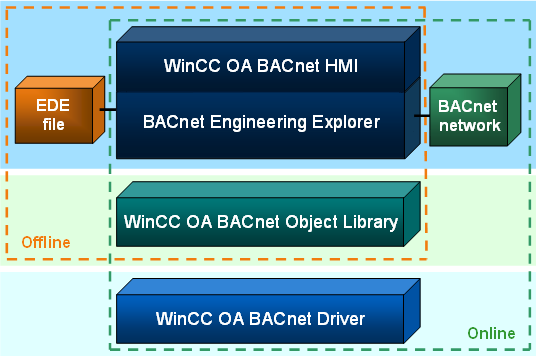
The WinCC OA BACnet Application is composed of the following sub-applications:
WinCC OA BACnet Driver
The WinCC OA BACnet driver establishes the connection to one or multiple BACnet devices. The communication with the BACnet device is only then possible, when the BACnet driver has been configured and the peripheral address to the BACnet device has been defined. For detailed information on the BACnet driver see chapter BACnet Driver, basics.
WinCC OA BACnet Object Library
The WinCC OA BACnet object library is a company-neutral object library, which allows the configuration and visualization of objects from the building automation section (e.g. fan, lamp, etc.) in a WinCC OA project.
This visualization takes place via symbols and faceplates (see Symbols and Faceplates – General). The symbols and faceplates of the BACnet object library have been developed on the basis of the Standard Object Library (Stdlib) and extended according to its requirements.
From a technical point of view, the BACnet object library is a subproject that can be embedded into a WinCC OA project simply and quickly.
WinCC OA BACnet HMI
The WinCC OA BACnet HMI (Human Machine Interface) provides a panel that allows the browsing for devices and objects in the BACnet network or in an EDE file as well as the direct configuration of selected objects:
BACnet Explorer
Enables browsing for BACnet devices and objects in the BACnet network or an EDE file. The devices/objects found can be created in WinCC OA with the according configuration. In addition, new objects can be created or deleted in the device. When creating or deleting objects in devices, there are usually device-specific limitations, i.e. some devices only allow the creation and deletion of certain objects, or even prohibit them completely.
Two types of engineering are possible:
- Online Engineering
-
The BACnet network is browsed for BACnet devices. If devices exist, they can be created quickly and easily in WinCC OA. The devices can be further browsed for objects, which can then also be created in WinCC OA.
A tabular list of found/created devices or objects allows a direct configuration of these devices/objects via faceplates. With the aid of the Explorer, new, not configured objects can be created in or deleted from devices.
- Offline Engineering
-
The device information is read in from EDE files and displayed in the table of the Explorer. Objects that have been imported from an EDE file can be created and/or deleted in WinCC OA. The configuration of devices/objects is also possible via faceplates.