
Create a multilingual project
Selecting the administrator button new project in the project administrator panel allows you to create multilingual projects of different kinds (distributed, redundant or remote) with the support of an installation wizard.
If you want to select several languages for the same project, press simultaneously Ctrl and Shift keys while selecting the languages.
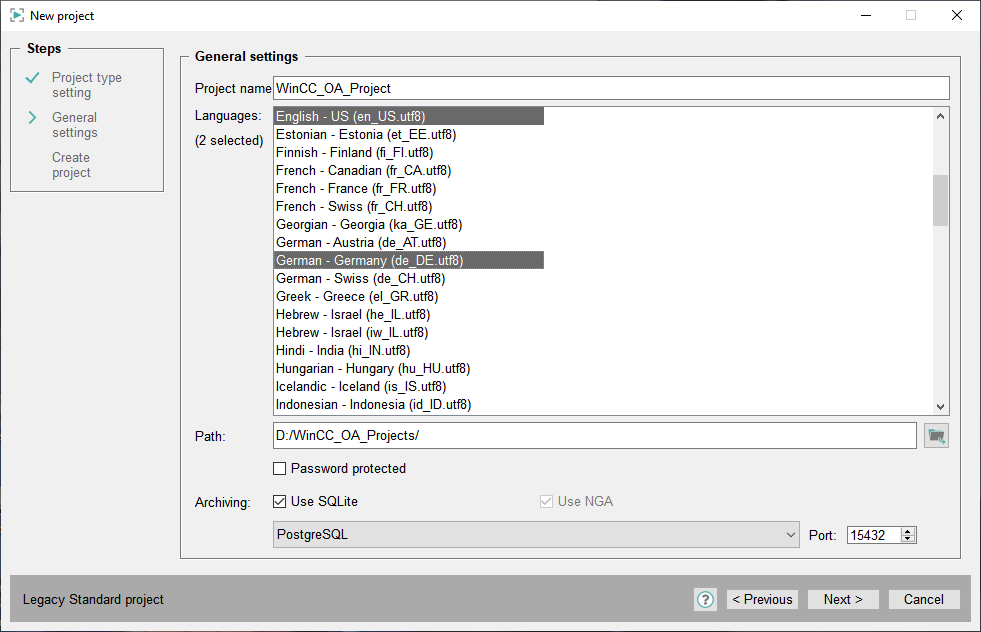
Enter the project name and select the target path, then click on the push button next > You can set a password for the user root. If you do not specify a password, the user interface is started without user credentials. To start the user interface (e.g. GEDI) with a specific user (e.g. root) the manager option -user should be used. Subsequently, the settings of the new project are shown.

Click on the push button OK and the new project is created successfully.
List with all available languages
| UTF-8 coding | Available languages in WinCC OA |
|---|---|
| af_ZA.utf8 | Afrikaans - South Africa |
| sq_AL.utf8 | Albanian - Albania |
| ar_DZ.utf8 | Arabic - Algeria |
| ar_EG.utf8 | Arabic - Egypt |
| ar_SA.utf8 | Arabic - Saudi Arabia |
| hy_AM.utf8 | Armenian - Armenia |
| be_BY.utf8 | Belarusian - Belarus |
| bn_BD.utf8 | Bengali - Bangladesh |
| bs_BA.utf8 | Bosnian - Bosnia And Herzegowina |
| bg_BG.utf8 | Bulgarian - Bulgaria |
| my_MM.utf8 | Burmese - Myanmar |
| ca_ES.utf8 | Catalan - Spain |
| zh_CN.utf8 | Chinese (Simplified) |
| zh_TW.utf8 | Chinese (Traditional) |
| hr_HR.utf8 | Croatian - Croatia |
| cs_CZ.utf8 | Czech - Czech Republic |
| da_DK.utf8 | Danish - Denmark |
| nl_NL.utf8 | Dutch - Netherlands |
| en_GB.utf8 | English - Great Britain |
| en_US.utf8 | English - US |
| et_EE.utf8 | Estonian - Estonia |
| fa_IR.utf8 | Persian - Iran |
| fi_FI.utf8 | Finnish - Finland |
| fr_CA.utf8 | French - Canada |
| fr_FR.utf8 | French - France |
| fr_CH.utf8 | French - Switzerland |
| ka_GE.utf8 | Georgian - Georgia |
| de_AT.utf8 | German - Austria |
| de_DE.utf8 | German - Germany |
| de_CH.utf8 | German - Switzerland |
| el_GR.utf8 | Greek - Greece |
| iw_IL.utf8 | Hebrew - Israel |
| he_IL.utf8 | Hebrew - Israel |
| hi_IN.utf8 | Hindi - India |
| hu_HU.utf8 | Hungarian - Hungary |
| is_IS.utf8 | Icelandic - Iceland |
| id_ID.utf8 | Indonesian - Indonesia |
| it_IT.utf8 | Italian - Italy |
| it_CH.utf8 | Italian - Switzerland |
| ja_JP.utf8 | Japanese - Japan |
| jp_JP.utf8 | Japanese - Japan, Ext. UNIX Code |
| kn_IN.utf8 | Kannada - India |
| kk_KZ.utf8 | Kazakh - Kazakhstan |
| km_KH.utf8 | Khmer - Cambodia |
| ko_KR.utf8 | Korean - Korea |
| lo_LA.utf8 | Lao - Laos |
| lv_LV.utf8 | Latvian - Latvia |
| lt_LT.utf8 | Lithuanian - Lithuania |
| mk_MK.utf8 | Macedonian - Macedonia |
| ms_MY.utf8 | Malay - Malaysia |
| mn_MN.utf8 | Mongolian - Mongolia |
| no_NO.utf8 | Norwegian - Norway |
| nb_NO.utf8 | Norwegian Bokmal - Norway |
| nn_NO.utf8 | Norwegian Nynorsk - Norway |
| pl_PL.utf8 | Polish - Poland |
| pt_BR.utf8 | Portuguese - Brazil |
| pt_PT.utf8 | Portuguese - Portugal |
| ro_RO.utf8 | Romanian - Romania |
| ru_RU.utf8 | Russian - Russia |
| sr_RS.utf8 | Serbian - Serbia |
| si_LK.utf8 | Sinhala - Sri Lanka |
| sk_SK.utf8 | Slovak - Slovakia |
| sl_SI.utf8 | Slovenian - Slovenia |
| es_AR.utf8 | Spanish - Argentina |
| es_BO.utf8 | Spanish - Bolivia |
| es_CL.utf8 | Spanish - Chile |
| es_CO.utf8 | Spanish - Colombia |
| es_CR.utf8 | Spanish - Costa Rica |
| es_CU.utf8 | Spanish - Cuba |
| es_DO.utf8 | Spanish - Dominican Republic |
| es_EC.utf8 | Spanish - Ecuador |
| es_SV.utf8 | Spanish - El Salvador |
| es_GT.utf8 | Spanish - Guatemala |
| es_HN.utf8 | Spanish - Honduras |
| es_MX.utf8 | Spanish - Mexico |
| es_NI.utf8 | Spanish - Nicaragua |
| es_PA.utf8 | Spanish - Panama |
| es_PE.utf8 | Spanish - Peru |
| es_PR.utf8 | Spanish - Puerto Rico |
| es_PY.utf8 | Spanish - Paraguay |
| es_ES.utf8 | Spanish - Spain |
| es_UY.utf8 | Spanish - Uruguay |
| es_VE.utf8 | Spanish - Venezuela |
| sv_SE.utf8 | Swedish - Sweden |
| tg_TJ.utf8 | Tajik - Tajikistan |
| th_TH.utf8 | Thai - Thailand |
| tr_TR.utf8 | Turkish - Turkey |
| tk_TM.utf8 | Turkmen - Turkmenistan |
| uk_UA.utf8 | Ukrainian - Ukraine |
| uz_UZ.utf8 | Uzbek - Uzbekistan |
| vi_VN.uft8 | Vietnamese - Vietnam |